Introduction
In international disaster relief operations, disaster relief organizations set up self-sufficient shelters for their personnel and/or for the care of affected people in the respective areas of operation. A distinction was made between the Bases of Operations (BoO) and Emergency Shelters (ES). Bases of Operation are energy self-sufficient shelters that are used to house emergency personnel and as operation centers during disaster operations. On the other hand, emergency shelters are used as energy self-sufficient shelters for the accommodation and care of people affected by disasters. The necessary equipment for the construction of these energy self-sufficient shelters is provided by the respective aid organization from their country of origin. Diesel generator units are currently used to ensure a continuous energy supply for self-sufficient shelters in emergency relief operations. These are currently the most reliable, easily scalable, mobile, and economical solutions. However, diesel generators are tied to the finite availability of fossil fuels and produce exhaust fumes, which, in turn, damage the global climate. In addition, they generate noise, vibration, and heat, which cause stress to emergency services and the public. Diesel generators are not a long-term solution owing to high greenhouse gas emissions, as they are to be avoided as far as possible by 2050 according to the Paris Climate Agreement. Consequently, the energy supply of self-sufficient shelters needs to be redesigned, and an alternative to diesel generators needs to be developed for disaster relief operations. To this end, the POWERBASE research project, launched in October 2024, aims to create a basis for the future development and public procurement of low-emission energy solutions for international disaster management1–3.
The optimization tool described in this article was developed as part of the POWERBASE project. This study aimed to investigate the reduction in emissions when using energy self-sufficient shelters in international disaster relief operations by implementing photovoltaic modules, wind turbines, and battery storage systems already on the market. The optimization tool is also intended to serve as a planning aid for users to decide which dimensioning of the technologies can be used in the respective disaster operation with regard to the reduction of CO2 emissions. With the developed tool, the energy system of the current state (load coverage by diesel generator units) and the new energy system (additional implementation of PV modules, wind turbines, and battery storage systems for load coverage) are optimized with regard to CO2 emissions during the operation and transport of the technologies, generator outputs, and battery capacities. Thus, the optimal performance of the technologies used for both systems was determined, and the CO2 emissions of both energy systems were calculated and minimized.
The exchanges and presentations by users at the POWERBASE kick-off workshop revealed that disaster relief organizations use different technical equipment when setting up energy self-sufficient shelters. Models of diesel generator units from different manufacturers and power classes have been used by various disaster-relief organizations. To consider this when mapping the energy system of energy self-sufficient shelters in international disaster relief operations, individual considerations are required for different disaster relief organizations. Therefore, the technologies configured in the optimization tool initially represent the construction of BoOs by the German Federal Agency for Technical Relief (THW). However, by configuring the technical parameters in the program code, the tool can be adapted and used individually. The configuration of the program code is described in the Operation section.
The planning tool Micro Grid User Energy Planning Tool Library (MiGUEL) for planning and evaluating PV-diesel hybrid systems has already been developed as part of the Energy Supply for Healthcare Facilities in Ghana (EnerShelF). This planning tool can also be used to simulate and map energy systems with PV systems, wind turbines, diesel generators, and battery storage systems. Based on the levelized cost of electricity and CO2 emissions, the planning tool optimizes the configurable energy system. However, in MiGUEL, the electrical outputs of the implemented technologies are defined by the user input before the simulation, meaning that only energy systems that have already been dimensioned can be mapped and evaluated using the tool4.
Methods
The methods used to develop the optimization tool are described below. To this end, a subsection on Implementation describes the functionality of the tool and the relevant technical details. A subsection on Operation lists the minimum system requirements and explains the workflow for setting up the tool.
Implementation
A schematic of the optimization tool is shown in Figure 1. The program calls up a graphical user interface (GUI) through which the inputs are made, the calculation is started, and the results can be output. The functionality of the optimization tool is described below with technically relevant details.
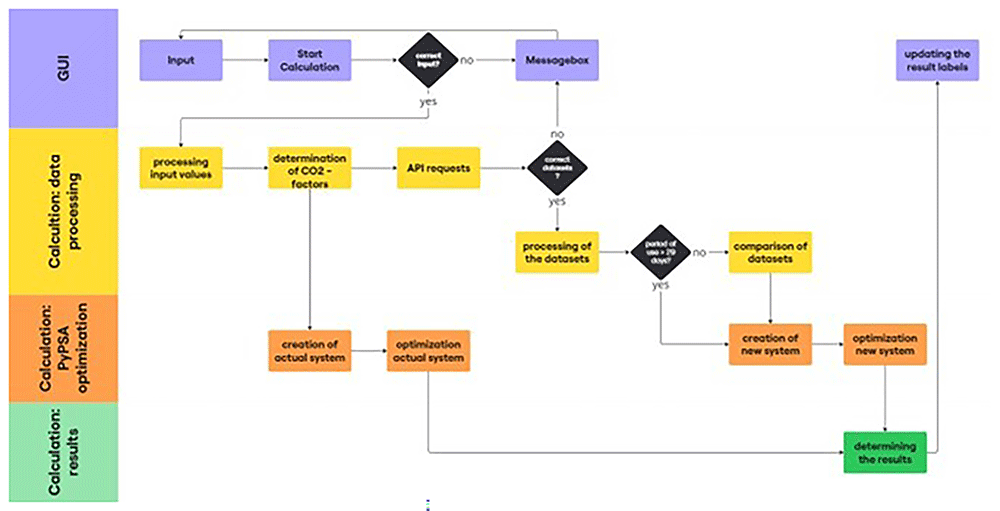
Figure 1. Schematic structure of the optimization tool.
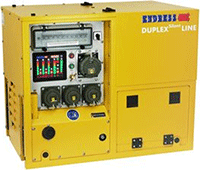
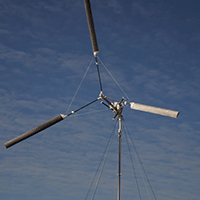
The technologies used in this tool are shown in Table 1. The information shown (e.g., active power, weight, CO2 -emissions) is stored in the program code and can be changed (lines 23–49) if necessary. A detailed description of how the tool is used can be found in the following section Operation.
Table 1. Technologies and parameters used for optimization8–11.
| Diesel generator unit | PV-Module | Wind turbine | Battery storage system |
|---|
| Type | ESE 608 DHG ES Diesel DIN Super Silent Plus
 | SolarSaga 500 X
 | Windcatcher
 | ESS D 30/30
 |
| Active Power | 4.8 kW | 0.5 kWp | 0.2 kW | 30 kW (output)
16.67 kW (input) |
| Weight | 150 kg | 10,5 kg | 12 kg | 900 kg |
| CO2-Emissions | 829,69 g/kWh | 0 g/kWh | 0 g/kWh | 0 g/kWh |
| Others | - | - | Hub height: 4 m | Capacity: 30 kWh |
The optimization tool uses datasets for photovoltaic generation and wind speeds from the Renewables.ninja platform. Renewables.ninja is a publicly accessible platform that provides datasets with hourly resolution for energy generation from solar and wind energy, with worldwide coverage. The tool can be used to retrieve and download the corresponding datasets for 2019 via renewables.ninja5 by entering the coordinates. The photovoltaic generation data provided by the platform are based on solar radiation data from NASA MERRA reanalysis6. These were converted into output data using the Global Solar Energy Estimator (GSEE model) by Stefan Pfenninger7. The global wind speed data for 2019 can be accessed using raw data from the platform. To provide wind speed data, the platform also uses NASA MERRA reanalysis, as mentioned above. Using an application programming interface (API), the required datasets were automatically requested by the optimization tool and read into the program. The data provided by Renewables.ninja are licenced under the Creative Commons Attribution-NonCommercial 4.0 International. This means that the data provided by the platform may only be used for non-commercial purposes, including naming the data source. To use the optimization tool, it is necessary to set up an API on the Renewables.ninja platform. The API setup is described in detail in the operation section5.
Greenhouse gas (GHG) emission intensity values were employed by an optimization tool to ascertain transport emissions. These describe the GHG emissions in CO2 equivalents per ton transported and kilometers travelled for a specific means of transport. The GHG emission intensity values of the various means of transport stored in the optimization tool are taken from the “Global Logistics Emissions Council Framework” of the Smart Freight Centre12 and are listed in Table 2. The values used were those of the well-to-wheel value (WTW). This includes both the emissions from energy and fuel consumption and from its provision. The GHG emission intensity values used can be adjusted, if necessary in lines 52–55 of the program code. Further use of GHG emission intensity values to determine transport emissions is discussed in the implementation subsection12.
| Means of transportation/vehicle | Characteristics | Energy | Unit | Value (WTW) |
|---|
| Aircraft, long haul (>1500 km) | unknown aircraft type | Kerosene | g CO2e/tkm | 817 |
Container vessel
(110m length) | Inland waterway transport | Diesel | g CO2e/tkm | 27 |
European rail
(electric taction) | Average / mixed load | Electricity | g CO2e/tkm | 7 |
Rigid truck
(3,5–7 t) | Average / mixed load | Diesel | g CO2e/tkm | 210 |
Input
Because the framework conditions of energy self-sufficient shelters in international disaster relief operations vary depending on the mission, they are configured by the user using input fields on the GUI. The input mask created for the optimization tool is shown in Figure 2. The graphical user interface was implemented in lines 902–1232 of the program code
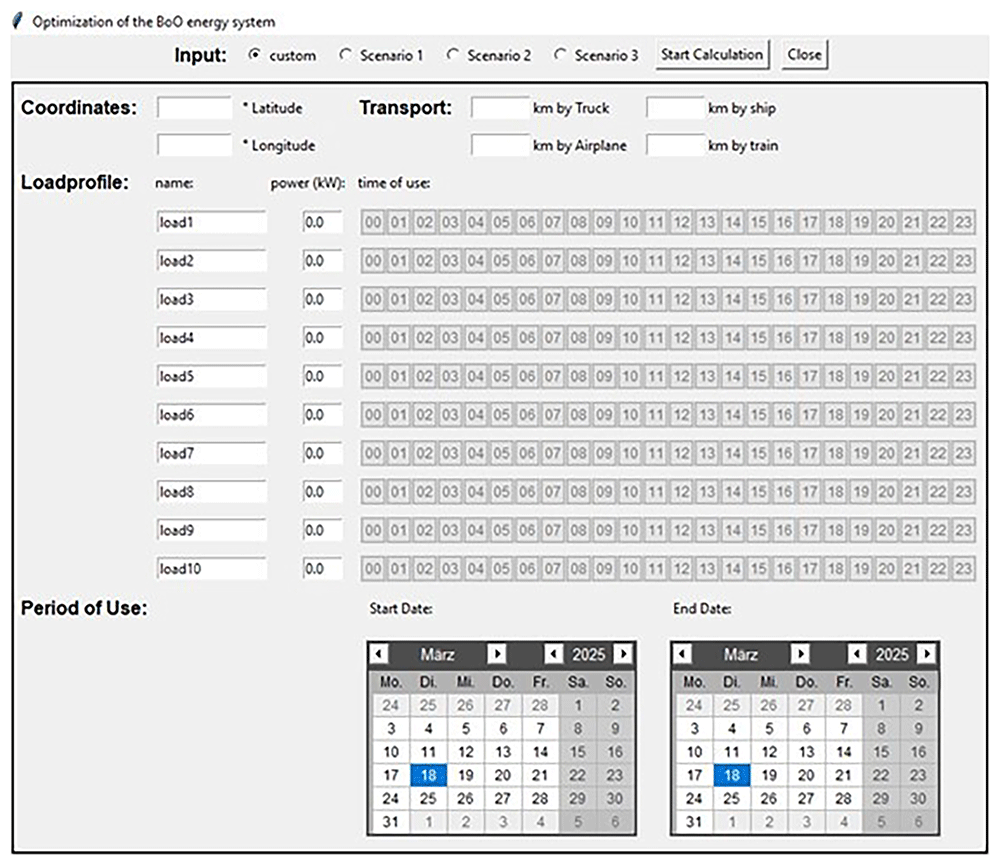
Figure 2. Input mask of the optimization tool.
To optimize a BoO energy system with this tool, the following entries must first be made:
1. Coordinates: Users can enter the coordinates of the operating location using two labeled input fields (Figure 2, top left). The longitude and latitude of the planned location are each entered in a separate input field. The coordinates were then used to query the location-specific weather data.
2. Transport: Users can enter transport kilometers via four labeled input fields (Figure 2, top center). The transport kilometers are specified separately for various means of transport: aircraft, ship, truck and train. As the actual route data are only available after transport, the shortest feasible distances of the respective means of transport can be used for planned operations in accordance with the EN ISO 14083 standard. Transport kilometers for the named means of transport were also used to determine the CO2 emissions for the transport of BoO components. When specifying transport kilometers, return transport should also be considered if possible.
3. Loadprofile: Users can enter the load profile using labeled input fields and buttons that can be activated (Figure 2, center). A total of ten electrical loads can be named via input fields, and electrical power can be entered for each load. In addition, a time-usage profile was defined for each defined load for the hours of a day. This is realized by selecting 24 buttons that can be activated and is carried out by the user on an application-specific basis. It should be noted that each button that can be activated applies to a specified hour of the day. Therefore, it is assumed that by activating a button, the specified electrical power of the corresponding load is available for the entire activated hour of a day.
4. Period of use: The operating period is entered by selecting the start and end dates using two calendar interfaces of the Tkcalender module (Figure 2, below). It should be noted that the selected start and end dates are included in the operating period. Therefore, the operating period started at 12:00 on the selected start date and ended at 23:59 on the selected end date. In addition, the maximum possible operating period was one year. The end date must not be before the start date. The entered operating period is then used for energy simulation and optimization, as well as for filtering imported datasets.
The "Scenario 1”, "Scenario 2" or "Scenario 3" selection boxes (see Figure 2, top center) automatically fill in the input mask with predefined input data sets. The three predefined input datasets are based on the application scenarios for BoO defined in POWERBASE. The scenarios were a forest fire scenario in summer on a Mediterranean island (Scenario 1), a flood disaster in winter in Central Europe (Scenario 2), and an earthquake in a rural Himalayan region (Scenario 3)13. Entries that can be selected for the three scenarios are available to help users and make it easier to understand the input mask. The "custom" option was already selected. If this box is marked, the entries for the application-specific framework conditions described earlier will remain blank. These entries must be filled in by the users themselves. The input data for the three scenarios were predefined in lines 68–272 of the program code.
Calculation
By pressing the “Start Calculation” button (Figure 2, above), the user input was checked by the software. If entries are missing or if an incompatible format is entered, the user is notified of an incorrect entry by a message box. If the input is correct, the main function of the optimization tool is executed. When the main function is initiated, the parameters entered by the user are saved so that they can be used for further calculation. Any data stored from previous calculations are overwritten at the start of a new calculation with the values entered for that calculation. The cached parameters were then processed further, and two energy systems (an actual system and a new system) were created and optimized in hourly resolution using the Python for Power System Analysis (PyPSA) library. Pressing the “Close” button (Figure 2, above) closes the optimization tool and closes the graphical user interface. The methodology used to develop the main function of the optimization tool is described in the following subsection, and can be seen in lines 372–898 of the program code.
PyPSA is a publicly available object-oriented Python library that can be used to model and optimize energy systems by building node-edge models. To model an energy system in PyPSA, a network is created in which various prefabricated components, such as generators, buses, loads, storage, and links, can be connected and configured. By assigning snapshots, load-flow calculations can be performed in several steps. External solvers were used to optimize the energy systems in PyPSA. For this optimization tool, the solver “HiGHS – High-Performance Optimization Tool” (HiGHS) was installed and used as a Python library. HiGHS is publicly available software for solving extensive models of linear programs (LP), mixed-integer programs (MIP), and quadratic programs (QP). The optimization tool first creates and optimizes an energy system using PyPSA to map the actual state (actual system). A second energy system was then created to optimize the new energy system by adding PV modules, wind turbines, and battery storage systems14,15.
To investigate the reduction in emissions through the implementation of PV modules, wind turbines, and battery storage systems, the current state of the energy system of self-sufficient energy shelters in international disaster relief operations is first mapped and simulated. The actual state can be described by using diesel generator units to cover the electrical load. To determine the CO2 emissions for the actual state, the emissions generated during the transport and operation of the diesel generator units were simulated. In the process of optimizing the system in question, the optimum electrical generator output is also determined, while concomitantly minimizing CO2 emissions. The mapping of this process is facilitated by the PyPSA library, which utilizes a network configuration comprising an electrical node connected to an electrical load and a generator. The system of the actual state is illustrated as a system sketch in Figure 1.
To model the energy system for the actual state, the number of snapshots over which the simulation is to be performed is first determined. The number of snapshots depends on the operating period, which is specified by the user by entering the start and end dates (see above). To carry out the simulation at hourly resolution, a snapshot was taken for each hour of the operating period. Next, the electrical load profile configured by the input described above was applied on each day of the entered period of use. To do this, the load profile defined for a day in hourly resolution was multiplied by the number of days defined by the input period of use and saved (lines 416–441 of the program code).
After creating the network for the actual system and specifying the determined snapshots, an electrical bus is added to the network. An electrical load was connected to the bus (Figure 3). The stored electrical load profile over the operating period was used as the electrical load. As shown in Figure 3, a generator is connected to the node of the network for the actual state. Diesel generator units listed in Table 1 were used. The values for active electrical power and CO2 emissions listed in Table 1 were stored for this purpose. The generator output is set as expandable in steps of the generator's active power output, so that the electrical load profile can be covered by the optimized generator output in each time step, and self-sufficient operation is guaranteed. In addition, the CO2 emissions of each kilowatt hour generated by the diesel generator units are considered by specifying the CO2 emissions in accordance with Table 1. The structure of the actual system using PyPSA was implemented in lines 536–546 of the program code.
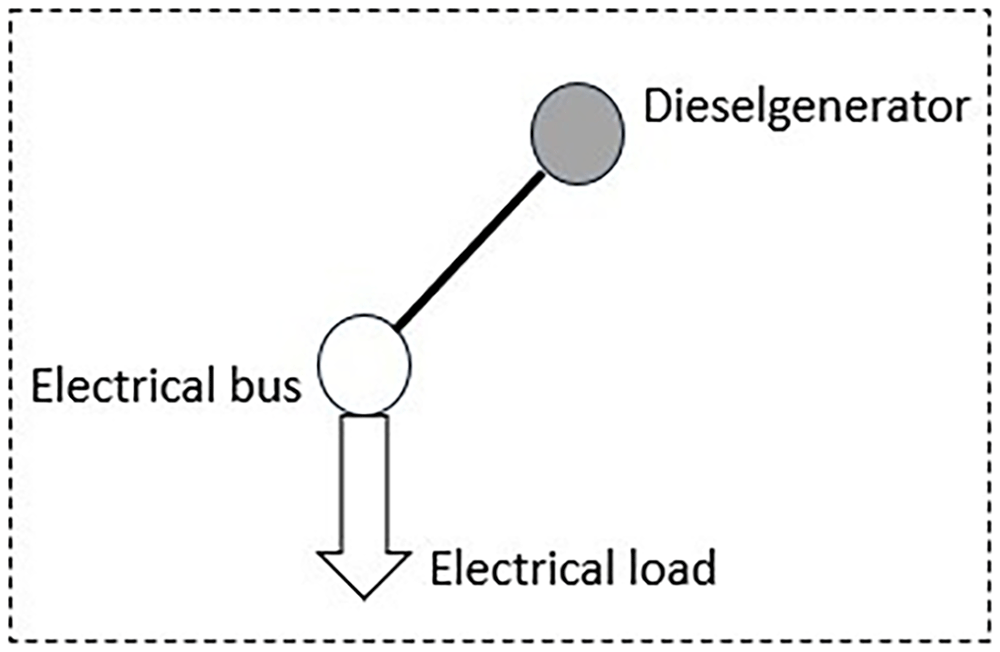
Figure 3. System sketch actual state.
To account for the CO2 emissions associated with the transport of diesel generator units, these are represented in PyPSA as a specific CO2 factor expressed as emissions per unit of installed power (CO2 emissions/installed capacity). This comprises the sum of the specific CO2 factors of the four modes of transport under consideration. For each means of transport, the respective emission intensity values are listed in Table 2 multiplied by the transport kilometers specified by the input (see above) and the specific weight of the generator. The specific transport weight is calculated by Equation 1, using the values for the weight and active power of the generator listed in Table 1. This was implemented in lines 444–533 of the program code.
Equation 1: Specific transport weight
Finally, the energy system shown in the actual state was optimized using the HiGHS solver described above. A load flow calculation was performed for each defined snapshot in which the energy system was optimized with regard to the optimum active power of the diesel generator. The solver specifies the minimization of the total CO2 emissions (transport and operation) of the energy system and coverage of the load over each time step as framework conditions (line 547 of the program code).
The new energy system is mapped by implementing a PV generator, wind generator, and battery storage system in the current energy system (lines 817–849 of the program code). Therefore, a new energy system was created simultaneously with the current system and expanded accordingly. A sketch of the new energy system is shown in Figure 4.
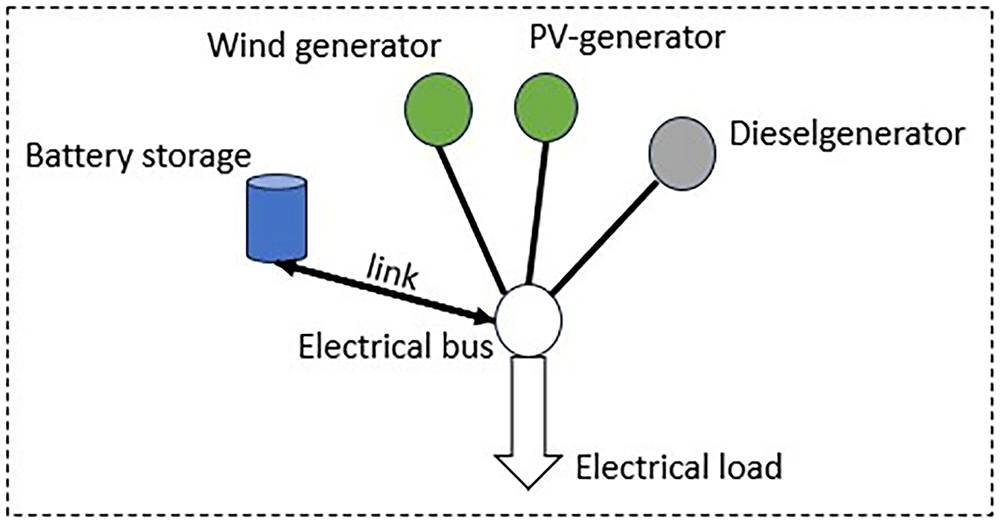
Figure 4. System sketch new system.
To implement the PV modules listed in Table 1 as a PV generator in the new energy system, another generator (PV generator) was created in PyPSA and connected to the electrical node (see Figure 4). The PV generator is specified as expandable so that its optimum output of the PV generator can be determined during optimization. In addition, the power of the PV generator was limited to a maximum of 60 kW, and the expansion of the generator was defined in modular power steps of 6 kW. The power limit and modular expandability can be adjusted in lines 30–31 of the program code, and the implementation of the PV generator can be seen in lines 835–838 of the program code. As the PV generator output depends on location and time, the photovoltaic generation data are requested and downloaded from the platform renewables ninja using an API. The location data entered by the user in terms of longitude and latitude are used for the API query. In addition, the inclination angle of the PV modules is 35 degrees, the azimuth angle is 180 degrees and system losses of 10% are specified for the requested data set (lines 558–568 of the program code). By requesting the photovoltaic generation data for a module output of 1 kW, the values of the received data set can be used as maximum percentage values in relation to the PV generator output to be optimized for each time step of the simulation. For each simulation, the location-dependent data set of PV generation was downloaded for a period of one year and then filtered based on the entered start and end dates to use the data for PV generation corresponding to the period of use (lines 664–697 of the program code).
To consider any deviations in the PV generation data for short operating periods, the PV generation data for the operating period dependent on the input were compared with the PV generation data for comparative periods. For an operating period of less than 30 days, the operating period should be compared with the comparative periods. The number of comparison periods with which the data of the operating period are compared before and after the operating period depends on the length of the operating period, as shown in Figure 5 on the following page. The length of the comparison periods was defined as the length of the operational period. For example, the dataset for an operating period of nine days is compared with two comparison periods (also nine days) before and after the operating period defined by the input (see Figure 5). The period with the lowest overall PV generation data values was then used to optimize the new energy system. The described comparison of the datasets was implemented in lines 700–814 of the program code.
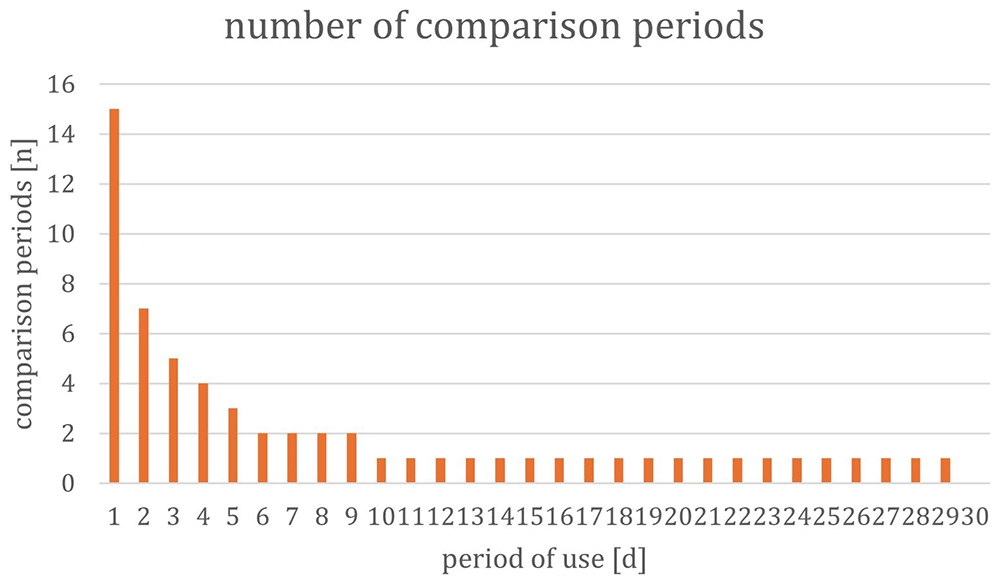
Figure 5. Number of comparison periods depending on the period of use.
To implement the wind generator listed in Table 1, a new generator (wind generator) was added to the new energy system in PyPSA and connected to the electrical node (see Figure 4). To determine the optimum power output of the wind generator, it was specified to be expandable. In addition, the power of the wind generator can be expanded in power increments of 0.2 kW each, corresponding to the nominal power from Table 1. A power limitation of 2 kW is considered. The power limit and modular expandability of the wind generator can be adjusted in lines 37–38 of the program code.
The time- and location-dependent wind speeds for calculating the yield of the implemented wind generator were also retrieved from the renewables.ninja platform using the API (lines 589–618). For the API query, the location information entered by the user for the longitude and latitude was used, and the dataset for the wind speeds at a height of 10 m over the year 2019 was downloaded. The location-dependent wind speed data obtained via the API over a period of one year were then used to calculate the maximum percentage values in relation to the wind generator output to be optimized for each time step in the dataset. As the hub height of the wind turbine used corresponds to 4 m according to the manufacturer's specifications (see Table 1), the wind speeds of the dataset downloaded for a height of 10 m were converted to the corresponding height using the logarithmic boundary layer profile (see Equation 2). This was implemented in lines 621–627 of the program code.
Equation 2: Logarithmic boundary layer profile16, p. 300
The heights are thus defined as h1 = 10 m and h2 = 4 m. The wind speed as a function of h1 is taken from the downloaded data set. d = 0 m is used as the value for the offset of the boundary layer due to obstacles. The roughness length z0 = 0.25 is taken from Table 2. The values for the height (h2), the roughness length (z0) and the offset of the boundary layer (d) can be configured in lines 39–41 of the program code.
The roughness length factor describes the influence of existing terrain on wind speed. These are slowed down, for example, by plants, objects, buildings, and terrain elevations, and must therefore be considered in the calculation. In addition, the offset of the boundary layer owing to obstacles can be set to zero for large distances; otherwise it can be determined by 70% of the obstacle height16, p. 300. The wind speeds converted to the hub height of the wind turbine were then used to determine the generator output of the wind turbine for each snapshot using the characteristic curve shown in Figure 6 (orange curve). For the simulation, this value was stored in PyPSA as a percentage of the nominal power of the wind turbine, as shown in Table 1. If a different wind turbine is used, the program code in lines 625–652 must be adapted based on the characteristic curve of the wind turbine used.
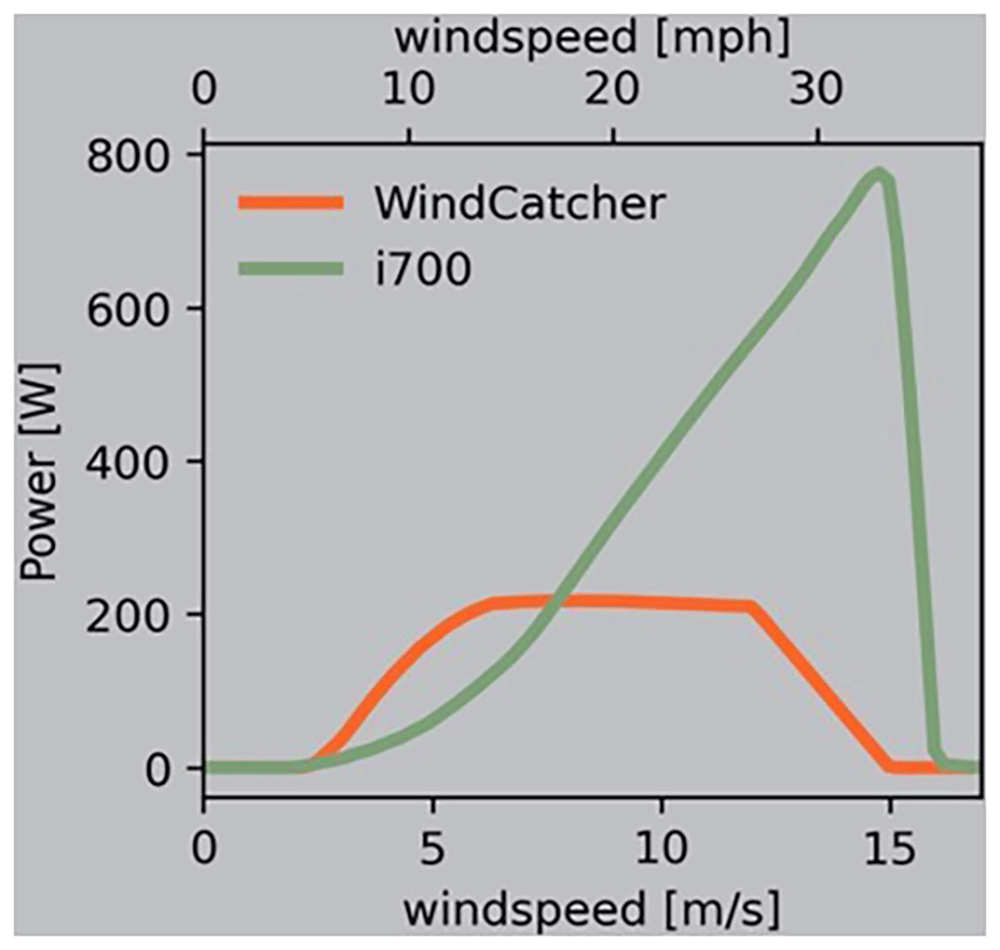
Figure 6. Power as a function of wind speed8.
The saved dataset with the generation data of the wind generator is filtered simultaneously with the procedure described for the PV generation data. The dataset for the operating period defined by the user input is then also compared with the methods described above and with the number of comparison periods (see Figure 5), which depends on the length of the operating period. Considering any deviations in the maximum percentage performance data for the wind generator for short periods of use, the dataset from the compared periods with the lowest values is used to optimize the new energy system.
The battery storage system shown in Table 1 was added as a store in PyPSA and connected to the node of the network of the new energy system by means of a link (see Figure 4). To determine the optimum capacity of the store, it was specified as expandable. In addition, the capacity of the store can be expanded in steps of 30 kWh, in accordance with the capacity shown in Table 1, and the maximum capacity is limited to 150 kWh. To include the maximum discharge and charging capacities of the battery storage system listed in Table 1, the store in PyPSA is connected to the electrical node by means of a link. The link is used to set the maximum percentage of energy flow between the electrical node and the store in both directions (charging and discharging). The maximum discharge power was set to 100%, based on the values listed in Table 1, for a continuous power of 30 kW. To take into account the discharge power of 16.67 kW (see Table 1), the maximum percentage discharge power of 56% was set.
The modular expandability, maximum capacity, and charging and discharging power of the battery storage can be adjusted, as required in lines 46–49 of the program code.
In parallel to the procedure for considering the transport emissions of the diesel generator in the actual system, the transport emissions for the technologies implemented in the new system were also considered. Specific CO2 factors (CO2 emissions/installed capacity) for the PV generator, wind generator, and battery storage (CO2 emissions/installed capacity) were also stored in PyPSA for this purpose. As described above, the specific CO2 factors were determined from the sum of the specific CO2 factors of the four different means of transportation. These are made up of the respective emission intensity values from Table 2 multiplied by the transport kilometers entered and the specific weights of the respective technologies (Equation 1).
For the actual system, the new system was optimized using the HiGHS solver described above. A load flow calculation was also performed for each defined time step, in which the described energy system was optimized with regard to the optimal performance of the diesel, wind, and PV generators, as well as the optimal capacity of the battery storage. As framework conditions, the solver minimizes the total CO2 emissions (transport and operation) of all components of the new energy system and covers the load in each snapshot. In addition, the maximum percentage values available for the output of the PV generator and the wind generator at each snapshot were considered (line 847 of the program code).
Results / output
The optimization results of the two energy systems were outputted via the graphical user interface of the optimization tool. The output field of the graphical user interface of the developed optimization tool is shown in (Figure 7).
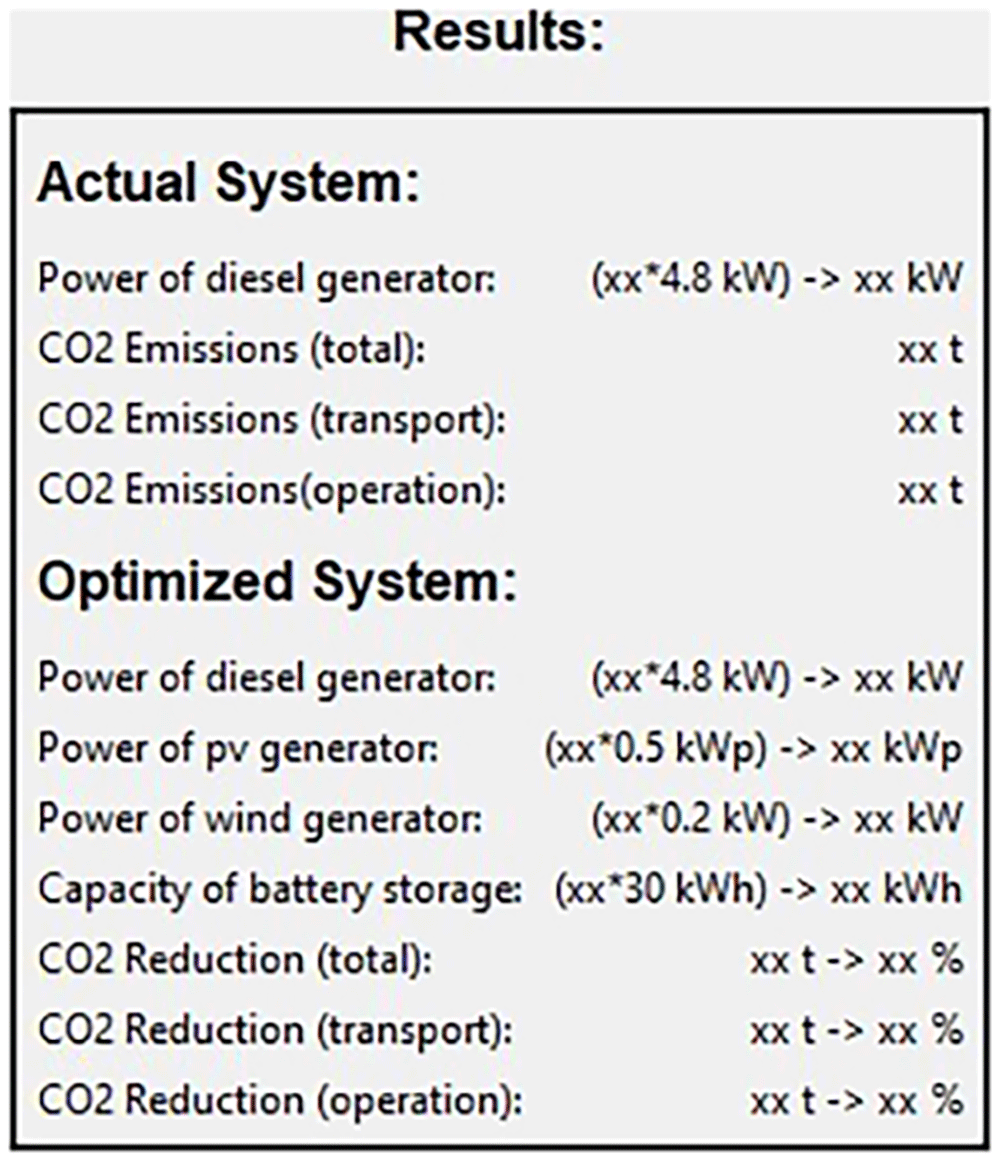
Figure 7. Result output of the optimization tool.
First, the optimization results for the energy system of the actual system are listed. The number of diesel generator units used with the electrical output stored in the code and the total electrical output in kilowatts were first determined and specified. The total CO2 emissions of the actual state were then output in tons. The total CO2 emissions can be divided into emissions during the transport and operation of the optimized energy system. Both values, including the total emissions, are given as outputs.
The optimization results for the new energy system are as follows: The optimum outputs in kilowatts of the diesel, PV, and wind generators calculated by the software, as well as the optimum capacity of the battery storage system in kilowatt hours, are specified. In addition, the number of technologies stored in the code corresponding to the optimum output is determined and listed. Based on the modified system with renewable energies, the reduction in total CO2 emissions in tons and as a percentage of the new energy system compared with the actual energy system is shown. This information on the reduction in total CO2 emissions can be devided into the reduction in emissions during transportation and the reduction in emissions during operation and is also stated accordingly. The results are presented in lines 854–883 of the program code. After determining the results listed above, the labels of the GUI shown in Figure 7 are updated with the results and overwritten. The updating of the results was implemented in lines 886–896 of the program code.
Operation
The following section lists the minimum system requirements for the developed optimization tool and describes the workflow for setting up the tool.
Python version 3.8 or higher, was required to use the tool. You must also ensure that the following libraries are installed in addition to the Python standard library17:
- PyPSA14
- tkcalender18
- pandas19
- numPy20
- request21
- HiGHS22
Furthermore, to use the tool, it is necessary to set up an API to query the data records from the renewables.ninja platform. To create the required API token, the user profile must be created. This procedure is explained at renewables.ninja23. The generated API token must then be inserted into Line 551 of the program code. Owing to the API request, a working Internet connection is required during the execution of the optimization tool.
Once the required libraries have been installed and the API is set up, an optimization tool can be used. The tool initially contained technical data for the technologies listed in Table 1. However, these can be manually adjusted using program code. Note that the floating-point numbers are separated by dots.
Diesel generator: In lines 23–25 of the program code, the active power in kW (kw_dieselgenerator), weight in kg (kg_diesel_generator), and CO2 emissions in g/kWh (co2_emissions_diesel_generator) can be adjusted for the diesel generator unit used.
PV generator: The technical parameters of the PV module can be adjusted in lines 28–31 of the program code. The peak power in kWp (kWp_pv_generator), weight in kg (kg_pv_generator), maximum power limit, and modular power limit in kWp can be configured. If no maximum power limit is to be set, the text “float(‘inf’)” can be used for the variable “maximum_power_pv_generator”. If no further modular power limit is configured, the peak power of the PV module in kWp can be used for the variable “modular_power_pv_generator”. Therefore, the tool optimizes the power of the PV generator.
Wind generator: The wind turbine used can be configured in lines 34–41. The nominal power of the wind turbine in kW (kW_wind_generator) and weight of the wind turbine in kg (kg_wind_generator) can be configured. The maximum total power of the wind generator in kW can be set via the variable “maximum_power_wind_generator” and can be canceled by entering “float(‘inf’)”. The modular power limitation in kilowatts is configured using the variable “modular_power_wind_generator”. If no modular power limitation is to be implemented for the wind generator, the nominal power of the wind turbine used can be used for this variable to optimize the wind generator in the power steps of the configured wind turbine. In addition, the hub height of the wind turbine model used must be specified in meters (hub_height_wind_generator) to correctly determine the yield of the wind generator. The roughness factor can also be configured manually (roughness_factor). This is set to a value of 0.25 and can be adjusted if necessary. The roughness factors for different surfaces are listed in Table 3. The variable “offset_boundary_layer” describes the offset of the boundary layer owing to obstacles in meters. This is set to zero; if the distance between the wind turbines and obstacles is small, the value to be entered can be set to 70% of the obstacle height.
Table 3. Roughness length Z0 for different terrain classes16, p. 300.
| Terrain class according to Davenport | Roughness length Z0 in m | Surface description |
|---|
| 1 – sea | 0.0002 | Open Sea |
| 2 – smooth | 0.005 | Wadden areas |
| 3 – open | 0.03 | Open flat terrain, pasture landscapes |
| 4 – open to rough | 0.1 | Agricultural land with low stock levels |
| 5 – rough | 0.25 | Agricultural land with high stock levels |
| 6 – very rough | 0.5 | Park landscapes with bushes and tree |
| 7 – closed | 1 | Regularly covered with obstacles (forests, villages, suburbs) |
| 8 – city centres | 2 | Centers of large cities with high and low buildings |
When configuring a wind turbine model that deviates from Table 1, the corresponding yield curve must also be stored as a function of the wind speed for the wind turbine model used. The corresponding yield curve as a function of wind speed can often be found in the manufacturer's specifications for wind turbines. To store this correctly in the optimization tool, lines 631–652 of the program code must be adapted according to the yield curve of the wind turbine model. Note that the percentage values (yield/nominal power) must be used as the yield.
Battery storage: The battery storage system can be configured in lines 44–49 of the program code. The capacity in kWh (kwh_battery), weight in kg (kg_battery), charging power (charge_power_battery), and discharging power in kW (discharge_power_battery) of the battery storage model must be specified. In addition, the maximum capacity limit for battery storage can be configured during optimization by using the variable “maximum_capacity_battery”. The maximum capacity limit is removed by using "float(‘inf’)". A modular capacity limit is configured using the variable “modular_capacity_battery”. To optimize the capacity of the battery storage in steps of the capacity of the battery storage system used, the capacity of the battery storage system used must be stored for this variable.
CO2 factors: For the calculation of transportation emissions described above, the emission intensity values listed in Table 2 were used for the four means of transportation truck, plane, ship, and train. If necessary, they can be adjusted in lines 52–55 of the program code. Note that the emission intensity values are given in units of g CO2e/tkm. Further emission intensity values can be found in the literature, for example in the “Global Logistics Emissions Council Framework for Logistics Emissions” of the Smart Freight Center12.
Use cases
In the following, the use of the optimization tool is demonstrated using two scenarios. The data were entered into the GUI of the optimization tool, and the output results are shown. Scenarios 1 and 3 were considered for the use of the base of operations defined in “Deliverable 2.1 – Scenario Definition” of the research project POWERBASE13. These can also be selected as pre-saved entries in Scenarios 1 and 3 on the GUI of the optimization tool. When applying these scenarios, it is assumed that the THW will execute the operation from Frankfurt am Main in Germany.
Scenario 1
Figure 8 shows the application of Scenario 1 using the optimization tool. The pre-saved entries were filled in by selecting the “Scenario 1” checkbutton. By pressing the “Start Calculation” button, the optimization was carried out and the results were displayed in the output area. Scenario 1, defined in POWERBASE, describes a forest fire in Asco Valley on the French island of Corsica. Therefore, location coordinates with a latitude of 42.42423130107311 and a longitude of 8.964693028300228 were assumed for the input in the optimization tool. Forest fires occur in the middle of the summer season, and a BoO is set up for 55 firefighters over a period of to 4-6 weeks. The start date was therefore set to June 3 and the end date to July 8. This corresponds to a deployment period of 5 weeks. The technical equipment is transported by ships from the mainland. Accordingly, a total transport distance of 1760 km by truck, 500 km by ship, 0 km by train, and 0 km by plane was assumed for the outward and return transport of the components. For the deployment scenario, the daily energy consumption of various consumers was defined as part of the research project. As no time resolution of the daily energy consumption was defined in the context of POWERBASE, a load profile with hourly resolution was developed for the input on this basis. The data entered for Scenario 1 are shown in Figure 8 in the input area (middle left)13.
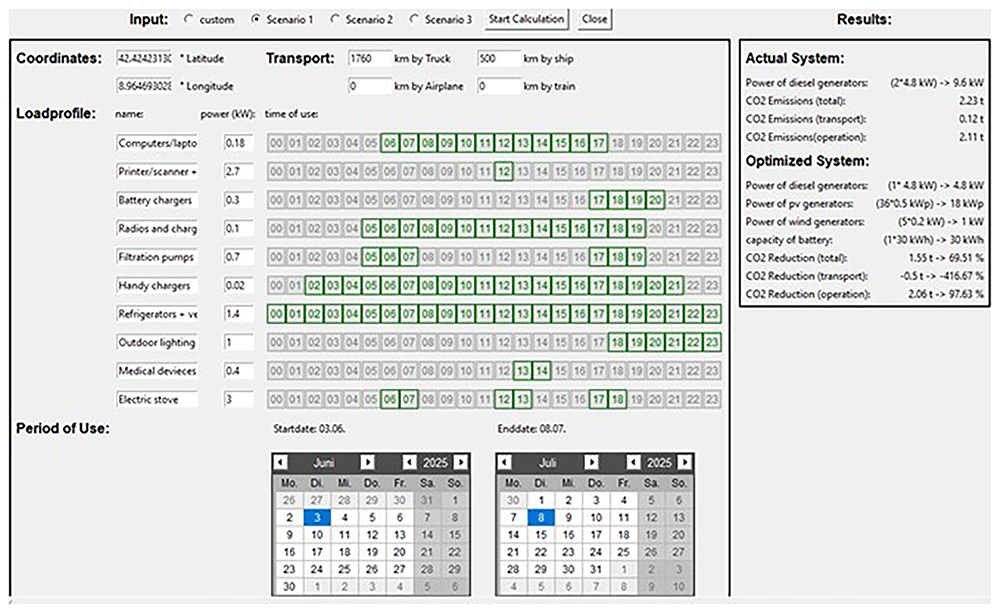
Figure 8. Application of scenario 1 using the optimization tool.
The optimization results for Scenario 1 are displayed in the output window of the GUI of the optimization tool (see Figure 8, right). CO2 emissions of 2.23 tons were calculated for the actual system. Of this, 0.12 tons are caused by the transport of the diesel generator units and 2.11 tons by their operation. In total, the optimum number of two diesel generator units was determined for the current system. For the new system, an optimum number of one diesel generator unit, 36 PV modules, 0 wind turbines, and one battery storage system were determined. The total CO2 emissions of the new system amount to 0.56 tons. This corresponds to a reduction in CO2 emissions of the new system by approximately 69.51% compared to the actual system. The total CO2 emissions of the new system are divided into 0.62 tons for transporting the components and 0.05 tons for operating them. The CO2 emissions for transportation thus increased by approximately 416.67% and the CO2 emissions for operation showed a reduction of approximately 97.63%.
Scenario 3
The application of Scenario 3 defined within the framework of POWERBASE using the optimization tool is shown in Figure 9. The input mask is filled with the pre-saved scenario entries by selecting the “Scenario 3” checkbutton. The optimization was then carried out using the “Start Calculation” button and the results were displayed in the output area.
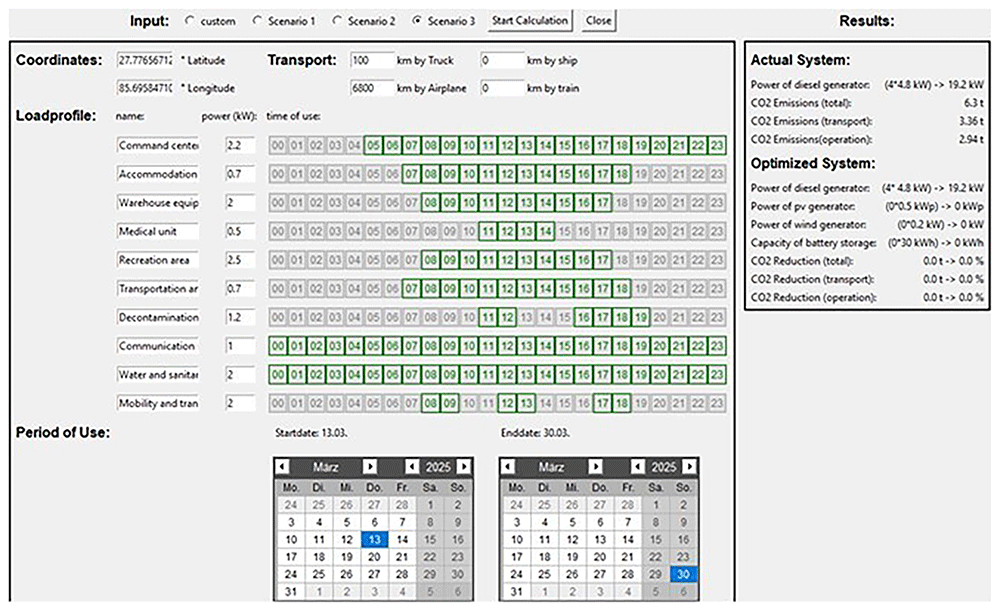
Figure 9. Application of scenario 3 using the optimization tool.
Scenario 3 describes an earthquake that occurred in Naples. The deployment of a Base of Operations for a 60-person team is planned in Chautara, Sindhupalchowk district. The location coordinates for the input are therefore assumed to be a latitude of 27.77656712430752 and a longitude of 85.69584710831923. The earthquake occurred in mid-March, and deployment is expected to last for a total of 17 days. Therefore, the start date of the operation was set to March 13, and the end date of the operation to March 30. In addition, the kilometers covered for the transport of the components for Scenario 3 were defined for the input. The return transportation of the components is not considered, as it is assumed that the transported equipment will be handed over to the local authorities for further use after deployment. A total transport distance of 100 km was assumed by truck, 0 km by ship, 0 km by boat, and 6800 km by plane. As no time resolution for daily energy consumption is defined in POWERBASE, a load profile with an hourly resolution is assumed for the input. The data entered for the load profile for Scenario 3 are shown in Figure 9 in the input area (middle left), and are based on Scenario 3 defined in POWERBASE13.
The results are shown on the right-hand side of Figure 9 in the output area of the GUI of the optimization tool. The CO2 emissions for the actual system were 8.51 tons. Transporting the optimum number of four diesel generator units causes 5.58 tons of CO2. For the operation over the period of use, CO2 emissions of 2.94 tons are calculated. The optimization of the new system shows that the implementation of the PV generator, wind generator, and battery storage system does not result in a reduction in emissions compared to the current system. Therefore, the optimum number of PV modules, wind turbines, and battery storage systems is set to zero. The optimal number of diesel generator units in the new system corresponds to the optimal number of diesel generator units in the current system.
Conclusion/Discussion
This study presents a tool developed to support energy logistics in disaster relief operations. This enables practitioners to optimize the combination of energy generators and identify the most efficient sources for field deployment. By leveraging this tool, users can determine generator configurations that minimize CO2 emissions while satisfying operational energy demands. The tool was published under GNU General Public Licence Version 3 (GPLv3), allowing it to be freely adapted to specific organizational needs. The performance and efficiency parameters can be customized to reflect the characteristics of the available generators. Additionally, users can modify load profiles directly via the user interface, whereas preconfigured scenarios can be tailored through the underlying code.
The analyzed scenarios demonstrate that the supply of base-of-operations (BoO) camps with renewable energy sources can already be integrated to significantly reduce CO2 emissions by utilizing wind turbines and photovoltaic generators currently available. Scenario 1 shows that a reduction of 69.51% in CO2 emissions is already achievable with existing solutions. However, a comparison with Scenario 3 highlights that the optimal solution strongly depends on specific circumstances. In Scenario 3, the tool calculates that diesel generator units alone are the most viable option. In general, it can be stated that distance is a crucial factor, as in disaster relief, the fastest possible response is essential, even if it involves climate-damaging means of transport such as airplanes.
Similar to all the simulation tools, this model represents a simplified version of reality. All data used, such as weather data, technical specifications of transportation means, and generator, are freely available. The system is easy to deploy and the results presented in this paper are reproducible. To meet the goals of accessibility, user friendliness, and reproducibility, certain compromises are necessary. For example, the temporal resolution of the load profiles is limited to hourly steps. This introduces a degree of inaccuracy, particularly when real-world load changes occur within subhour intervals or do not align precisely with the start and end of full hours. Consequently, short-duration peak loads or shifting demand phases may be underrepresented in the simulation, which can affect the sizing and selection of generators. In addition, historical weather data were considered, with the worst-case scenario selected around the planned deployment period. This conservative approach ensures a high reliability and supply security under uncertain conditions. However, this may lead to overestimation of the required resources. With more precise or real-time data, it is possible to further optimize resource allocation and reduce emissions. The manner in which the model is published, including open-source code on GitHub and configurable settings, is designed to enable easy adaptation and integration of more refined data if available.
Transportation emissions were calculated according to the “Global Logistics Emissions Council Framework” of the Smart Freight Centre16. These default values may vary in real-world scenarios depending on the specific type of vehicle used, such as the differences between vans and larger trucks, and are particularly subject to change with the adoption of alternative propulsion technologies such as electric or hydrogen-powered vehicles. While determining precise and scenario-specific values would improve accuracy, it would also increase complexity and time requirements, which are often not feasible in disaster relief contexts. Therefore, for a more accurate assessment, it is recommended that the underlying emission intensity values be adjusted to reflect the specifics of the given scenario. Another limitation is that the model only accounts for emissions during the operation phase of generators. However, in long-distance deployments, generators are frequently transferred to local authorities after operation and continue to be used within the country, which can positively affect their overall lifecycle efficiency. In the long term, moving away from fossil fuels is essential, not only to fulfill the Paris Climate Agreement but also to reduce dependency and preserve fuel for other critical applications in disaster zones, such as the transport of injured persons or the delivery of relief goods. The model is adjustable; generator selections can be tailored to specific needs, and the codebase is open to modification. This flexibility enables immediate practical deployment and continuous improvement, aligned with future technological development.
The model represents a deliberate compromise between optimal performance and the use of accessible data, user friendliness, and low technical barriers. Conservative assumptions prioritize reliability and supply security. Although this may result in slightly higher emissions, there is room for further CO2 reduction through data refinement and scenario-specific customization.
Ethics and consent
Ethical approval and consent were not required