1. Introduction
This document compiles a detailed description of all the functionalities included in the “selfX” R package developed within the “self-X Artificial Intelligence for European Process Industry digital transformation (s-X-AIPI)” project1. This R package is implemented as open-source software (OOS) and offered to the R community for use and improvement.
s-X-AIPI project is driven by autonomic computing, which is inspired by the human body's autonomic nervous system, which enables systems to self-manage and adapt with minimal human intervention. This concept underpins the self-X abilities in the "selfX” R package, facilitating automated creation of data-based AI applications. As part of the s-X-AIPI project, various AI applications have been developed for industrial scenarios, such as the manufacturing of asphalt mixes. These AI applications are also driven by the autonomic computing principles, and exhibit self-x principles, leading to the creation of several AI procedures and tools, like those documented here.
When a data scientist is faced with the task of developing a data-based AI application, there are a set of fundamental tasks that need to be addressed, including Feature Selection as major task in Data Exploration and/or Algorithm Selection and Anomaly Detection in Model Training (Figure 1). In addition, other tasks such as Data Cleaning, Statistical Tests or Outliers Treatment are also necessary to prepare the data.
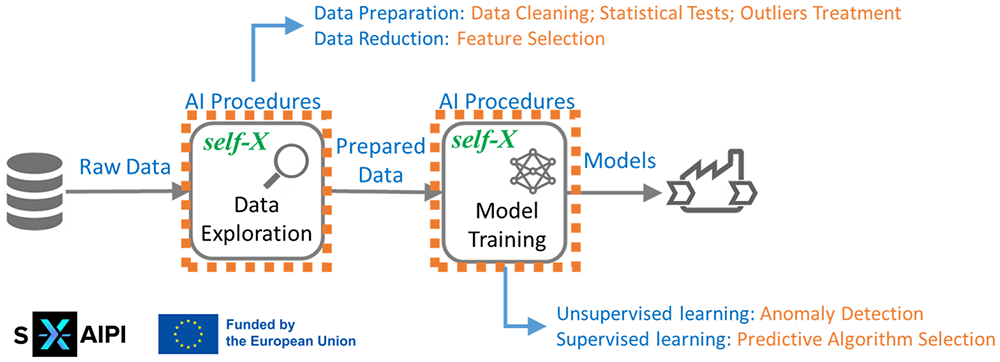
Figure 1. AI procedures included in the “selfX” R package.
Ensuring that these tasks can be carried out in the most autonomic way possible is the final objective of the functions included in this R package, whose end user profile is twofold:
1. Former, data scientists who will allow to perform more autonomous maintenance of AI applications, so that the re-training of the AI systems faced with new data be as autonomic as possible.
2. Latter, non-expert AI developers who will allow to perform typical activities of an AI pipeline in an autonomic way.
Following fundamental aspects to be covered within any data mining project are covered within this R package:
self-X autonomic data preparation: “selfX” R package includes the implementation of several functions to perform data preparation activities in a more autonomic way (Section Data Preparation):
Data Cleaning, focus on (1) search and remove of variables with constant values and (2) search and remove of examples with missing values.
Statistical Test, both normality and correlation hypothesis tests.
Outliers and Missing Values Treatment based on ad-hoc expert rules.
self-X autonomic supervised and unsupervised feature selection: “selfX” R package includes the implementation of several functions to perform feature selection (application of various methodologies and combination of results for decision making) within data exploration activities in a more autonomic way (Sections self-X autonomic unsupervised and supervised feature selection, Decision-making process and Feature Selection).
self-X autonomic unsupervised anomaly detection: “selfX” R package includes the implementation of an ad-hoc procedure based on outlier analysis and CUSUM RLS filter to detect anomalies in the data in a more autonomic way (Sections self-X autonomic unsupervised anomaly detection, Decision-making process and Unsupervised Anomaly Detection).
self-X autonomic predictive algorithm selection: “selfX” R package includes the implementation of several functions to perform predictive algorithm selection (application of various algorithms and selection of the most promising one) within model training activities in a more autonomic way (Sections self-X autonomic predictive algorithm selection, Decision-making process and Predictive Algorithm Selection).
Section self-X autonomic procedures: theoretical background summarizes the theoretical part of the models and methods used within autonomic feature and algorithm selection, specifically well-known techniques as Principal Components Analysis (PCA), Factor Analysis (FA), RELIEF, Outliers Analysis, Cumulative Sum (CUSUM) Recursive Least Squares (RLS) filter, Regression, Neural Networks, Support Vector Machines (SVM), Random Forest and Fuzzy Rule-Based Systems. Moreover, the decision-making process based on OWA operator and used in all the selection functions is presented. Section self-X methodology & implementation introduces the methodology and present the implementations of all functions included in the package, along with usage examples. Finally, section Conclusions to summarize the main findings and contributions.
2. self-X autonomic procedures: theoretical background
There are several methodologies proposed for the development of AI applications, and all of them include a “Data Exploration” phase in which the cleaning of the data, the treatment of outlier data, the analysis of correlations and feature selection (among others) are carried out. Furthermore, algorithm selection in “Model Training” is also crucial to obtain accurate predictions and valuable insights to perform informed decision-making.
In this section theoretical principles related with main models and methods used within “Feature Selection”, “Anomaly Detection” and “Algorithm Selection” tasks are explained, as well as decision-making process proposed that guides the final selection and that is applied in multiple steps of the proposed methodologies. The rest of the functions included in this package, related to data cleaning, statistical tests or outliers treatment, are presented directly in the following section.
2.1. self-X autonomic unsupervised and supervised feature selection
Feature Selection in Data Mining is a complementary technique that also helps to reduce the dimensionality of the data on which to subsequently apply the modelling algorithms, i.e., to enhance the quality and efficiency of clustering and/or predictive models, enabling them to focus on the most relevant and significant features for the given problem. In this way, the quality of the results is improved, their visualization and interpretation is facilitated, and the problems associated with high-dimensional data sets are alleviated.
With the aim of making feature selection more autonomic, an ad-hoc procedure was defined as part of the Asphalt Use Case within the s-X-AIPI project and subsequently adapted for general use (Figure 2). The approach can be summarized as follows:
1. Initially, well-known techniques (PCA/FA for unsupervised and RELIEF for supervised approaches) are used to select the most important features under different criteria.
2. Subsequently, an OWA operator is applied for decision making to select the three most relevant features.
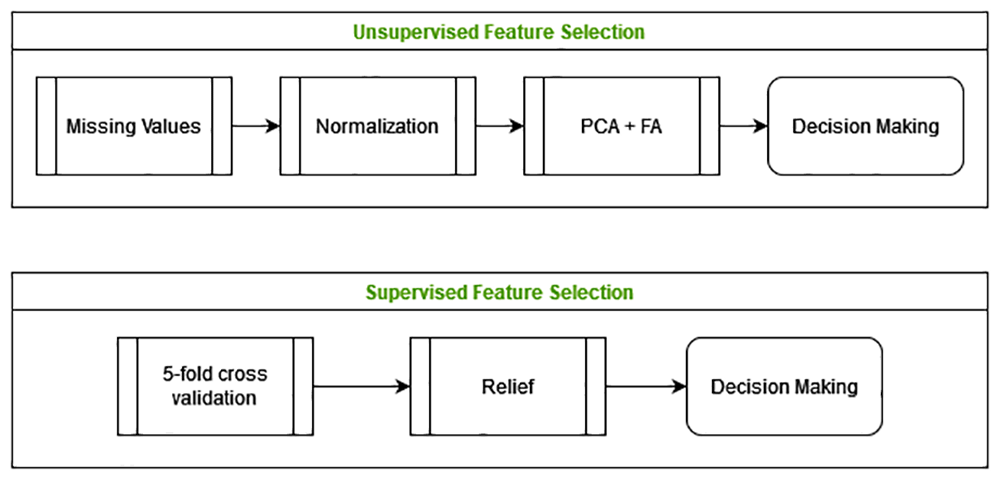
Figure 2. Feature selection: general methodology.
The main theoretical foundations of PCA, FA and RELIEF are explained below, as well as how to evaluate the importance of the variables based on the results obtained with these methods.
2.1.1. PCA: Principal Component Analysis
PCA is a feature extraction method that can be used for feature selection1,2. PCA is a statistical feature extraction technique frequently used for dimensionality reduction in unsupervised classification problems1. It is capable of generating a new space of reduced dimensions with extracted features, and which therefore usually lacks physical meaning. The transformation performed by PCA is linear, although there are versions of the method that implement non-linear transformations, as is the case with Kernel PCA. The PCA extractor bases its behaviour on obtaining the principal components from the covariance matrix, so that these components correspond to the eigenvalues of the covariance matrix, ordered from highest to lowest eigenvalue. The first principal component obtained will correspond to the predominant direction of distribution of the data. The second principal component will correspond to the second most predominant direction of the data, and so on. According to all this, the behaviour of the PCA is based on two general ideas:
In the end, principal components obtained are a linear combination of the original features of the problem. By applying the matrix of principal components to the original matrix, the new matrix of reduced features is obtained to work with.
From the data obtained in the feature extraction it is possible to propose a selection of them. The principal components are linear combinations of all available features. However, these features do not have to be of the same importance for the formation of the components. Some of these features will be critical and will be assigned greater weight in the combination. Other features will be redundant, irrelevant, or insignificant, and will be assigned a lower evaluation in the combination1. In addition, the most important features will be associated with the first principal components obtained, while the least important will be associated with the last principal components. And all this thanks to the ability of PCA to discriminate directions with the greatest variance in a given data set2.
Among all the main components obtained, it is necessary to determine the appropriate number of extracted features to work with. According to 1, a rule that is usually applied to determine the dimension of the new space obtained is to consider those eigenvalues that provide at least 90% of explained variance or whose value is higher than the average of eigenvalues.
2.1.2. FA: Factor Analysis
FA is a multivariate method that aims to express a set of initial observable variables n as a linear combination of new hypothetical or latent variables, called factors, plus an error expression3. FA is similar to PCA4, although they are not identical. The main difference is that FA uses regression modelling techniques while PCA is a descriptive statistical technique.
FA is a feature extraction method that can be used for dimensionality reduction or feature selection. Intuitively, the idea is based on transforming an n-dimensional space into another with a lower dimension in which the loss of information is as small as possible. To do this, the eigenvectors that define the new base with dimension p less than n must be selected. Each of these eigenvectors represents a feature, which could be contained in the initial feature space or be a combination thereof.
In order to use FA to perform feature selection, an exploratory analysis will be used in which the following parameters must be defined:
The number of latent factors. For this there are a series of techniques among which Kaiser Rule, Horn’s Parallel Analysis (PA) or the Minimum Partial Average (Velicer MAP) can be highlighted5.
The type of factorization. There are three fundamental methods: Principal Component Analysis (PCA), Principal Factor Analysis (PAF), or Maximum Neighborhood (ML)6.
The factorial rotation method. The methods to use can be divided into orthogonal rotations such as Varimax or Quartimax or oblique rotations such as Oblimin or Promax7.
At the end of the process, a matrix of loadings is obtained on which to work to determine which of the initial features are most important. An initial interpretation of the results can be derived from the weights of the loadings in the factorial matrix. A high loading value for a variable within a factor suggests that the variable accounts for a significant portion of the variance explained by that factor. Following this idea, one way to determine the importance of the features is to operate on the loads to obtain the communality value of them. Based on this value of communality, an importance value of the feature can be established.
2.1.3. RELIEF
RELIEF is a feature selection technique used in preparing data for machine learning tasks8,9. Its main goal is to identify the features that are most distinctive between instances of different classes, so it is particularly useful for classification tasks.
Its operation is based on evaluating the importance of features according to how well they differentiate between instances that are close to each other. For each instance, the algorithm finds its nearest neighbour of the same class (the “near neighbour”) and its nearest neighbour of a different class (the “far neighbour”). RELIEF then adjusts the importance score of each feature based on how much that feature differs between the current instance, its “near neighbour”, and its “far neighbour”.
The method is designed to handle different types of data, including binary, nominal, and continuous. One of the big advantages of RELIEF is that it not only considers features individually, but also takes into account interactions between features. This makes it very effective for problems where features have dependencies on each other.
2.1.4. Evaluation of the importance of variables
The methods applied to assign an importance value to the variables and thus establish a ranking between them are explained below:
Evaluation from PCA: The first step is to apply PCA on the covariance matrix and once the eigenvalues are obtained, evaluate the importance of the initial features based on the principal components considered. In this specific approach the following number of main components to carry out the evaluation have been considered:
1. the first principal component.
2. all those principal components that are above the mean eigenvalues.
3. all principal components that contain 90% of the explained variance.
The result is a list of the initial features, an evaluation of their importance and the ranking assigned to each of them.
Evaluation from FA: Once FA is applied, a loading matrix is obtained from which the communality can be calculated and the importance of the features can be evaluated. As with PCA, the result is a list of the initial features, an evaluation of their importance and the assigned ranking considering all factors. The result is a list of the initial features and their assigned weights.
Evaluation from RELIEF: RELIEF is applied following a 5-fold cross-validation strategy to assign an individual evaluation measure to each feature. Then, different direct search algorithms (cut-off method) are applied to select which are the features with the greatest evaluations. Specifically, the following methods are applied, which allow different aspects of the features to be highlighted, such as their ability to differentiate between classes or their robustness against noise and outliers:
1. Select K best: selects the k = 3 features with the greatest evaluations.
2. Select percentile: selects percentage = 80% of the total number of available features.
3. Select threshold: selects the features whose evaluation is over and under threshold = 0.1.
4. Select threshold range: selects the features whose evaluation is over a threshold = (((min – max) ∗ p.threshold) + max), p.threshold = 0.8
5. Select difference: selects features (in descending order from the best evaluation measure to the lowest) until evaluation difference is over d.threshold = 0.2.
6. Select slope: selects features (in descending order from the best evaluation measure to the lowest) until the slope to the next feature is over s.threshold = 1.5.
Finally, the importance value of each feature is assigned based on the number of times it has been selected.
2.2. self-X autonomic unsupervised anomaly detection
Anomaly Detection in an unsupervised way is an important task because it helps improve process efficiency, prevent errors, and optimize the performance of data-driven applications.
With the aim of making unsupervised anomaly detection more autonomic, an ad-hoc procedure was defined as part of the Asphalt Use Case within the s-X-AIPI project and subsequently adapted for general use (Figure 3). The approach can be summarized as follows:
1. Several well-known techniques (outliers analysis and CUSUM RLS filter) are applied to detect outliers and abrupt changes (so, anomalies) in the dataset.
2. OWA operator is applied for decision making to validate anomalies.
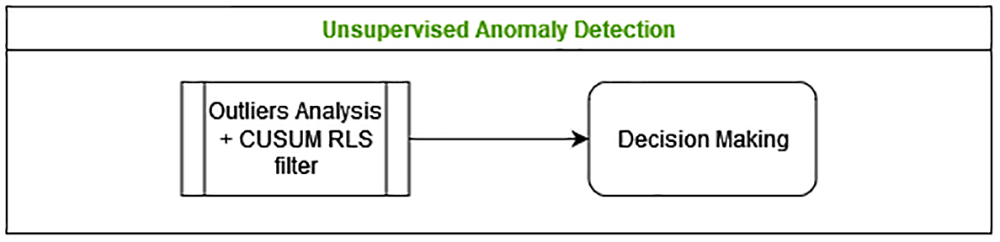
Figure 3. Anomaly Detection: general methodology
The main theoretical foundations of outlier analysis and CUSUM RLS filter are explained below.
2.2.1. Outlier analysis
This analysis is based on statistical principles that identifies as outliers those values such that: value < Q1 – threshold ∗ (Q3 – Q1) or value > Q3 + threshold ∗ (Q3 – Q1), where Q1, Q3 are the first and third quartiles respectively, and threshold could be 3 to detect extreme outliers or 1.5 to detect slight ones10. Outliers are those values that must be detected and analyzed to determine whether or not they are anomalies.
2.2.2. CUSUM RLS filter: Cumulative Sum Recursive Least Squares filter
CUSUM RLS filter11 is a change detector method based on Cumulative Sum (CUSUM) test and Recursive Least Squares (RLS) estimation. This filter assumes that the values of the variables change slowly over time, but that sometimes more abrupt changes occur. The latter are the ones that must be detected and analysed whether or not they are anomalies.
As shown in the formulation of the CUSUM RLS filter (Table 1), the procedure is based on:
1. Calculate the estimated value of a variable for the next step (t) using RLS method (based on a moving average of forgetting factor λ) and the error between the estimated value on the previous step (t – 1) and the real value (t).
2. Apply the CUSUM test to the error to determine whether an abrupt change is detected.
Table 1. CUSUM RLS filter.
| | = | λ ∗ + (1 – λ) ∗ yt |
| 𝜖t | = | yt – |
| | = | 𝜖t |
| | = | –𝜖t |
| | = | max( + – v, 0) |
| | = | max( + – v, 0) |
| “Alarm” if > h or > h |
| After an “Alarm”, reset = 0, = 0, and = yt |
In summary, the method learns normal behaviour and when abrupt changes are detected the “Alarm” is activated.
Setting Parameters: There are three design parameters that must be adjusted:
Additional improvement: Besides the previous procedure, and with the aim of improving the reliability in the generation of the “Alarms”, it can establish a consecutive repetition of abrupt changes before declaring its occurrence. To implement it, the formulation must keep track of the number of consecutive abrupt changes on each variable and triggers an “Alarm” only if the maximum number of consecutive changes is exceeded. This value (MaxChanges) must also be adjusted individually.
2.2.3. Detection of anomalies
The previous methods can be used to establish if the values of a set of variables at a given instant of time are or not an anomaly:
Anomalies detection from outlier analysis: this analysis can be applied in a multivariate analysis so that:
1. The outlier analysis is applied to each variable individually.
2. Each variable requires its own Q1, Q3, but threshold must be the same for all of them.
3. A set of values is considered anomalous if any of them are outliers individually.
The result is a logical value TRUE/FALSE indicating if there is or not an outlier, so an anomaly is detected.
Anomalies detection from CUSUM RLS filter: Also the filter can be used to analyse the values that multiple variables take at the same instant of time. In that cases:
1. The previous procedures are applied to each of the values of each variable.
2. Since each variable require its own parameter set (N, ν, h, MaxChanges), it is necessary to adjust these values to the behaviour of each variable individually.
3. A set of values generates an “Alarm” if any of them generates one and then an anomaly is detected.
Besides, in order to apply an unsupervised self-X version of the filter, it is necessary to make a prior adjustment of the parameters. This parameterization has been established based on expert knowledge and is:
The number of previous samples to take into account to make estimations N is set to 10 by default, since manufacturing systems are usually slow systems. In general, low values of N are established for fast systems, and high values for slow systems. The aim is to achieve an estimation that does not generate an alarm when no outlier occurs.
As drift must be one half of the expected change its default value can be adjusted from the actual data as: , being Q1 and Q3 the first and third quartiles respectively, and threshold = 3 to detect extreme changes or threshold = 1.5 to detect slight ones.
Following previous ideas, the procedure to calculate default value for h, based on accumulated errors of the filter without reset, is:
Calculate g1 and g2 for all t applying CUSUM RLS filter without reset.
Calculate Q1 and Q3 for both g1 and g2 ignoring zeros.
Establish limits h1 = threshold ∗ (Q3(g1) – Q1(g1)) and h2 = threshold ∗ (Q3(g2) – Q1(g2)). As previosuly, threshold = 3 for extreme changes and threshold = 1.5 for slight ones.
Select h = min(h1, h2)
The result is a logical value TRUE/FALSE that indicates whether an “Alarm” is triggered by the variables, so an anomaly is detected.
2.3. self-X autonomic predictive algorithm selection
Algorithm Selection during Model Training phase of predictive models is crucial to achieve accurate, efficient, interpretable and generalizable results.
With the aim of making predictive algorithm selection more autonomic, an ad-hoc procedure was defined as part of the Asphalt Use Case within the s-X-AIPI project and subsequently adapted for general use (Figure 4). The approach can be summarized as follows:
1. Well-known algorithms (LM, NN, SVM, RF, FRBS approaches) are used to obtain predictive models under different configurations.
2. Several accurate metrics (MSE, RSE, RMSE, MAPE, MAE and R2) are selected to evaluate the performance of each model.
3. OWA operators are applied successively for decision making to select the most relevant predictive model.
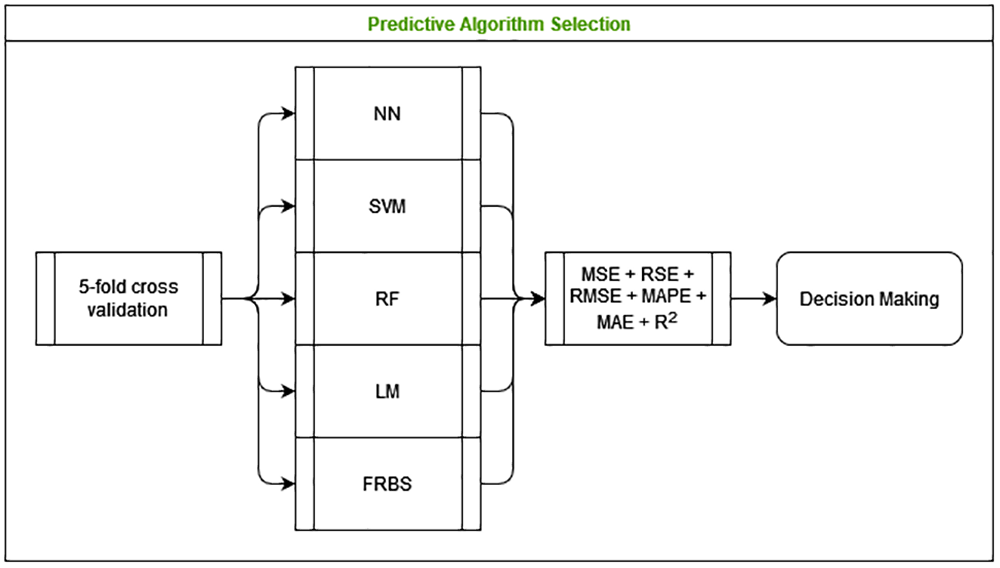
Figure 4. Algorithm selection: general methodology.
The main theoretical foundations of linear models (LM), neural networks (NN), support vector machines (SVM), random forest (RF) and fuzzy rule-based systems (FRBS) are explained below, as well as how to select the best models based on the performance obtained.
2.3.1. LM: Linear Models
A linear regression model is a statistical technique used to predict the value of a dependent variable (output) based on the value of one or more independent variables (inputs). This model assumes a linear relationship between the variables, represented by the equation y = β0 + β1x1 + β2x2 + ⋯ + βnxn + 𝜖, where y is the output, x1,x2,...,xn are the inputs, β0 is the intercept or constant term, β1,β2,..., βn are the coefficients representing the change in y per unit change in each x, and 𝜖 is the error term that captures deviations not explained by the model.
Linear regression is widely used across various disciplines to model and understand relationships between variables and to make predictions based on observed data.
2.3.2. NN: Neural Networks
A NN is computational model inspired by the structure and function of the human brain13. It consists of interconnected nodes, called neurons, organized in layers: an input layer, one or more hidden layers, and an output layer. Each connection between neurons has an associated weight that adjusts as learning proceeds, which helps the network learn from data.
NNs are widely used for tasks such as classification, regression, and pattern recognition, and are particularly powerful for handling complex, non-linear relationships. They are the foundation of deep learning, a subset of machine learning that involves large neural networks with many layers, known as deep neural networks.
2.3.3. SVM: Support Vector Machines
SVM are a set of supervised learning algorithms developed by Vladimir Vapnik and his team at AT&T Bell Labs14, that are commonly used for classification and regression tasks. Its objective is to find the optimal hyperplane that best separates data into different classes in a multidimensional space. The goal is to maximize the margin between the closest points of the classes, known as support vectors. SVMs can handle linear and non-linear data by using appropriate kernel functions to transform the input features into higher dimensions, making it easier to find a separating hyperplane.
SVMs are known for their effectiveness in high-dimensional spaces and their ability to be versatile with different kernel functions, making them powerful tools for various pattern recognition and classification problems.
2.3.4. RF: Random Forest
RF is an ensemble learning method used for classification, regression, and other tasks that operates by constructing a multitude of decision trees during training15. For classification tasks, the output of the RF is the mode of the classes predicted by individual trees; for regression tasks, it is the mean prediction of the individual trees. This method improves predictive accuracy and controls overfitting by averaging multiple decision trees, which reduces variance. Each tree is trained on a different subset of the data (using a technique called bootstrap sampling) and a random subset of features, ensuring diversity among the trees.
Random Forests are known for their robustness, ability to handle large datasets with higher dimensionality, and effective performance without extensive hyper-parameter tuning.
2.3.5. FRBS: Fuzzy Rule-Based Systems
FRBS are systems that use fuzzy logic to reason about data, so that conditions and conclusions can handle degrees of truth rather than being strictly true or false16. Technically these systems can be seen as a Knowledge Base that includes a Rule Base with information described by “if-then” fuzzy rules and a Data Base with the correspondence of the fuzzy values. Besides, a Fuzzification System that converts crisp inputs into fuzzy sets using predefined membership functions, an Inference Engine that uses the fuzzy rules to process the fuzzy input sets and generate fuzzy outputs, and a Defuzzification Interface that converts the fuzzy outputs back into crisp values to provide actionable decisions or predictions17.
FRBS are able to model complex, uncertain, or imprecise information more naturally, making them well-suited for applications where human reasoning and decision-making are involved.
2.3.6. Evaluation of the accuracy of the models
A system is more precise the closer its behaviour is to the real system it models. The most used measure to evaluate the precision of a regression model is estimation error. Some of the most used formulas are those shown in Table 218, where N is the number of examples, Yi the actual output and Y′i the estimated output. To improve the accuracy of a model it is necessary to minimize MSE, RSE, RMSE, MAPE or MAE and to maximize R2.
Table 2. Accuracy metrics in regression problems.
| Metrics | Formulas |
|---|
| Mean Squared Error | |
| Relative Squared Error | |
| Root Mean Squared Error | |
Mean Absolute Percentage
Error | |
| Mean Absolute Error | |
| R Square | |
2.4. Decision-making process
In various stages of the self-X methods, a decision-making process must be applied to determine at each moment which is the best option out of several possible ones. Specifically within this package, decision-making is based on OWA operators and RIM quantifiers.
2.4.1. OWA operator
The OWA (Ordered Weighted Averaging) operator is an aggregation operator defined by 19 that is used to obtain a single representative value from a set of data according to predetermined optimism/pessimism parameters. That is, it allows partial solutions to be added to obtain a global solution according to a pre-established degree of optimism or pessimism.
Mathematically, an OWA operator of dimension n is a function F: Rn → R that has an associated vector of n weights
such that wi ∈ [0,1], 1 ≤ i ≤ n and , and it is defined to aggregate list of values a1,..., an according to the expresion
being bi being the ith largest value in the set a1,..., an.
A fundamental aspect of OWA operators is the reordering step. An element aj is not associated with a particular weight wi, but rather a weight is associated with a particular ordered position i of the elements. Moreover, the final value of the aggregation is different depending on the values assigned to the weight vector W.
Besides, associated with the weight vector, the measures of orness (optimism) and andness (pessimism) are defined analogously to operators or and and in classical theory, so that:
2.4.2. RIM quantifier
In 20 several approaches to obtain the OWA operator weights (W) through fuzzy linguistic RIM (Regular Increasing Monotone) quantifiers Q are presented. The quantifier Q determines the construction strategy of the weight vector, allowing the importance of the different aggregation components to be increased or decreased according to the semantics associated with the operator. Moreover, for a given value x ∈ [0,1], Q(x) is the degree to which x satisfies the fuzzy concept represented by the quantifier Q.
Mathematically, a RIM quantifier is defined as a function Q:[0,1] → [0,1] where Q(0) = 0, Q(1) = 1 and Q(x) ≥ Q(y) if x > y and obtaining the weights (W) is done through:
In 21 different RIM quantifiers have been summarized. Specifically within the self-X methods presented previously, the RIM quantifier family with power function have been considered in decision making processes, being Qα(r) = rα, α ∈ (0,1) and . For this family of quantifiers, the smaller α the more ‘orlike’ quantifier22.
3. self-X methods & implementation
This section presents the main procedures associated to the creation of a self-X AI application, which are the preparation of the data, the feature selection, the detection of anomalies and how to select the appropriate predictive algorithm. The section also includes the instructions about how to install and use the “selfX” R software package.
3.1. Data preparation
3.1.1. Data cleaning
Performing correct data cleaning is essential when carrying out activities related to the extraction of knowledge from data. Specifically, it is necessary to eliminate variables with zero or little variability applied following procedure (Algorithm 1):
1. Find and remove samples (rows) where all values are missing values.
2. Find and remove variables (columns) where all values are missing values.
3. Find and remove NUMERIC, CATEGORICAL or LOGICAL variables (columns) with only one value (without taking into account missing values)
4. A dataset containing clean data (no constant values) for data mining activities is obtained and returned.
Algorithm 1. self-X initial data cleaning
Require: dataset containing numerical, categorical or logical variables for data mining activities
for each sample s do
if all values are missing values then
remove row s
end if
end for
for each variable v do
if all values are missing values then
remove variable v
else if only one value (without taking into account missing values) then
remove variable v
end if
end for
dataset containing clean data (no constant values) for data mining activities
3.1.2. Statistical test
As a complementary task to the previous one, it is necessary to perform statistical tests on the variables to know whether or not they follow a normal distribution and/or if there are correlated variables that cannot be taken into account in the following activities. Specifically:
The Shapiro-Wilk test is performed to test the normality of numerical variables, only if there are at least 3 and at most 5000 non-missing samples (Algorithm 2). If the p – value obtained is equal to or greater than 0.05 then it is considered that the distribution of the variable is not significantly different from normal distribution and normality can be assumed; otherwise, variable does not follow a normal distribution.
Algorithm 2. self-X statistical test: normality of the variables
Require: dataset containing numerical variables with a minimum of 3 and a maximum of 5000 non-missing samples
for each NUMERICAL variable v do
perform Shapiro-Wilk Normality test on v
if p – value ≥ 0.05 then
normality can be assumed for variable v
else
variable v does not follow a normal distribution
end if
end for
list containing “normal” and “non-normal” variables
The Kendall rank correlation coefficient is computed to measure the correlation between 2 numerical variables, only if there are at least 3 samples in each one. (Algorithm 3). If the Kendall rank correlation coefficient is greater than 0.8 or less than –0.8, and p-value obtained is equal to or greater than 0.05 then a significant correlation between the variables have been detected; otherwise, if the correlation coefficient is greater than 0.8 or less than –0.8 but p-value obtained is less than 0.05 then correlation is non-significant. In any other case, no correlation is detected.
Algorithm 3. self-X statistical test: correlation between variables
Require: dataset containing numerical variables with a minimum of 3 samples
for each NUMERICAL variable v1 do
for each NUMERICAL variable v2 ! = v1 do
obtain Kendall’s τ coefficient between v1 and v2
if|correlation(v2,v1)| > 0.8 then
v1 and v2 are correlated variables
if p – value ≥ 0.05 then
significant correlation detected between v1 and v2
else
non-significant correlation between v1 and v2
end if
end if
end for
end for
list containing SIGNIFICANT correlations between numerical variables
Besides, different graphs can be generated to normality and correlations in a more graphic way.
3.1.3. Outlier and missing values treatment
Additionally, locating and treating outliers and missing values is an essential task when data is pre-processed. An univariate procedure for numerical variables based on ad-hoc expert rules could be (Algorithm 4):
Algorithm 4. self-X outliers and missing values treatment
Require: dataset containing at least one numerical variable
Require: threshold to detect outlier: 3 (by default) to detect extreme outliers or 1.5 to detect slight outliers
for each NUMERICAL variable v do
detect outliers such that outlier < Q1 – threshold * (Q3 – Q1) or outlier >Q3 + threshold * (Q3 – Q1)
end for
for each sample s do
if all values are outliers or missing values then
remove row s
end if
end for
for each NUMERICAL variable v do
if all values are outliers or missing values then
remove variable v
else if only one value (without taking into account outliers and missing values) then
remove variable v
else if Percentage Of Outliers > 50% then
remove variable v
else
outliers = mean(v)
end if
end for
dataset containing clean data (no outliers, no constant values) for data mining activities
3.2. Feature selection
The methodology used in the “Feature selection” activities is presented below. In all the cases the selection of the features is based on weights obtained as explain in section self-X autonomic unsupervised and supervised feature selection.
3.2.1. Unsupervised feature selection
The unsupervised feature selection process applied to the data is as follows (Algorithm 5):
Algorithm 5. self-X autonomic unsupervised feature selection
Require: dataset containing clean data (no outliers, no missing values, no constant values) for data mining activities. ONLY numerical input variables allowed (that it can be normalized or not)
Z-score standardization
for FeatureSelectionAlgorithm =PCA:FA do
if PCA then
lij =Perform PCA over covariances matrix
for each variable v do
weight1(v): Only first PC is considered
weight2(v): PCs whose eigenvalue is over mean(eigenvalue) are considered
weight3(v): PCs whose ∑ (ExplainedVariance(Pj)) ≥ 90% are considered
end for
else if FA then
cij Apply FA(number of factors according to Horn’s Parallel Analysis, “maximum
likelihood” estimation and “varimax” rotation)
for each variable v do
weight4(v): All factors are considered
end for
end if
Set rank(features) based on standarized weight
end for
apply OWA on rank(features)
select variables with highest OWA(rank(features))
3.2.2. Supervised feature selection
The supervised feature selection process applied to the data is as follows (Algorithm 6):
Algorithm 6. self-X autonomic unsupervised feature selection
Require: dataset containing clean data (no outliers, no missing values, no constant values) for data mining activities.
ONLY numerical input variables allowed (that it can be normalized or not)
Require: vector with the names of the input variables
Require: vector with the name of the output variable. Only one output variable is allowed
generate randomly 5-fold cross-validation
for FeatureSelectionAlgorithm =RELIEF do
if RELIEF then
for RELIEFoption_i = K.best:percentile:threshold:threshold.range:difference:slope do
for CrossValidation CV1:CV5 do
perform RELIEF(RELIEFoptioni,CVj)
select BestFeaturesij
end for
calculate RELIEFselectioni = ∑jBestFeaturesij
end for
set rank(features) based on RELIEFselection
end if
end for
apply OWA on rank(features)
select input variables with highest OWA(rank(features))
3.3. Unsupervised anomaly detection
Based on the approaches presented in Section self-X autonomic unsupervised anomaly detection, following procedure to detect anomalies in an unsupervised way is defined.
Specifically, the unsupervised anomaly detection process applied to the data is as follows (Algorithm 7):
1. Different unsupervised anomaly detection methods are applied to the data to establish when an anomaly occurs. Specifically, 2 methods (Section Detection of anomalies):
a. Evaluation with Outliers Analysis. In this case, the values that all the numerical variables take at the same time are analysed to determine if any of them is an outlier. If yes, the sample is labelled as TRUE, otherwise FALSE.
b. Evaluation with CUSUM RLS filter. As previously, the values of all the numerical variables are analysed at the same time to determine whether any of them present or not an abrupt change. Logical values TRUE or FALSE are then assigned to the sample depending on whether or not an abrupt change is detected.
2. Based on the evaluation obtained, a multi-criteria decision-making process is carried out based on:
3. Samples are validated or not as anomalies
Algorithm 7. self-X autonomic unsupervised anomalies detection
Require: dataset containing time-ordered data numerical variables
Require: threshold to detect anomalies: 3 to detect extreme anomalies or 1.5 (by default) to detect slight anomalies
for AnomalyDetectionMethod = OutlierAnalysis:CUSUMRLSfilter do
if OutlierAnalysis then
for each NUMERICAL variable v do
calculate Q3 and Q1
for each value sample vs do
if vsi is an outlier then
OutlierAnomaly (vsi) = TRUE
end if
end for
OutlierAnomaly (vs) = any(OutlierAnomaly (vsi))
end for
end if
if CUSUMRLSfilter then
for each NUMERICAL variable v do
for each value sample vs do
if vsi represent an abrupt change then
AbruptChangeAnomaly (vsi) = TRUE
end if
end for
AbruptChangeAnomaly (vs) = any(AbruptChangeAnomaly (vsi))
end for
end if
apply OWA on rank(OutlierAnomaly (vs),AbruptChangeAnomaly (vs)) to validate the anomaly
end for
dataset containing analysed data and a final column per sample indicating whether (TRUE) or not (FALSE) an anomaly has been detected
3.4. Predictive algorithm selection
Finally, following principles presented in Section self-X autonomic predictive algorithm selection, a procedure has been defined to select the predictive algorithm that best fits the data.
In that case the predictive algorithm selection process applied to the data is as follows (Algorithm 8):
Algorithm 8. self-X autonomic predictive algorithm selection
Require: dataset containing clean data (no outliers, no missing values, no constant values) for data mining activities.
ONLY numerical input variables allowed (that it can be normalized or not)
Require: list with different sets of inputs for modelling
Require: vector with the name of the output variable. Only one output variable is allowed
Require: list with execution options
generate randomly 5-fold cross-validation
for each sample s do
if all values are missing values then
remove row s
end if
end for
for FeatureSelection do
for PredictiveAlgorithm=LM:NN:SVM:RF:FRB do
for NormalizationOption = Z-score:min-max:non-normalized do
normalize the data
for CrossValidation CV1:CV5 do
for ModelingOption do
train PredictiveAlgorithm(FeatureSelection, CVi, NormalizationOption, ModelingOption)
calculate AccuracyMetricstra and AccuracyMetricstst
end for
end for
end for
end for
calculate AccuracyMetrics = mean(AccuracyMetricstst)
end for
set rank(ModelingOption) based on AccuracyMetrics
apply OWA on rank(ModelingOption)
select PredictiveAlgorithm with best OWA(rank(ModelingOption)))
set rank(NormalizationOption) based on AccuracyMetrics of the selected model
apply OWA on rank(NormalizationOption)
select NormalizationOption based on OWA(rank(NormalizationOption))
set rank(FeatureSelection) based on AccuracyMetrics of the selected model and normalization option
apply OWA on rank(FeatureSelection)
select FeatureSelection based on OWA(rank(FeatureSelection))
set rank(CrossValidation) based on AccuracyMetrics of the selected model and normalization option and feature selection
apply OWA on rank(CrossValidation)
select CrossValidation based on OWA(rank(CrossValidation))
select most relevant predictive model
1. Each set of input variables is considered separately, so modelling is performed first with the first set, then with the second, and so on. In this way it will be used, for example:
a. A set with the names of variables selected in the supervised or unsupervised feature selection process,
b. Other set with the names of the variables selected by a domain expert,
c. Another set with the names of all possible input variables,
d. Any other set of variables.
2. Different normalization options are applied:
a. min-max normalization: transforms a variable defined in the interval [min, max] to the normalized interval [newmin, newmax]. In this aproach: newmin = 0 and newmax = 1:
b. Z-score normalization: transforms one set of data into another, with mean zero and standard deviation one.
c. In addition, non-normalized data is also considered.
3. The available data sets are randomly divided into 5 training and test datasets to have a 5-fold cross-validation process.
4. Different predictive algorithms are applied to the data using different options (Table 3). In all cases, the accuracy of the models is evaluated based on different error metrics: MSE, RSE, RMSE, MAPE, MAE, R2 (Section Evaluation of the accuracy of the models).
5. Based on the evaluation obtained, a multi-criteria decision-making process is carried out based on:
a. OWA operator: applying the RIM quantifier Qα(r) = rα, r ≥ 0, with orness = 0.4, with on the accuracy of each model to select the most relevant (most accuracy, less test error) model, normalization, input dataset and fold-cross validation. The steps defined in this selection process are:
i. Select the most relevant model (most accurate) after ranking them according to mean errors. Remove those models whose accuracy is worse than the average and random values
ii. Select the most relevant normalization (most accurate) of the previously selected model based on the scores given according to the mean errors.
iii. Select the most relevant input dataset (most accurate) of the previously selected model and normalization, based again on the scores given according to the mean errors.
iv. Select one of the models generated in the cross-validation strategy is selected based on error.
6. The most relevant predictive algorithm is selected.
Table 3. Predictive model generation parameters.
| PredictiveAlgorithm | ModelingOption | Usage |
|---|
| Linear Models (LM) | generalized | stats::glm(y ∼ x, data) |
| non-generalized | stats::lm(y ∼ x, data) |
| Neural Networks (NN)2 | backpropagation | neuralnet::neuralnet(y ∼ x, data) |
| single-hidden-layer, default options | nnet::nnet(x, y, size=10) |
| single-hidden-layer, tuning | nnet::nnet(x, y, size=30, linout = TRUE, maxit = 5000) |
| multilayer perceptron for regression | RSNNS::mlp(x, y, size=5, learnFuncParams=c(0.1), maxit=350, inputsTest, targetsTest) |
| Support Vector Machines (SVM)3 | default options | e1071::svm(y ∼ x, data) |
| tuning | e1071::svm(y ∼ x, data, cost=10, gamma=0.01) |
| Random Forest (RF)4 | default options | mRF <- randomForest::randomForest (x, y) |
| n.ar < – which.min(mRF$mse) |
| randomForest::randomForest (x, y, ntree=n.ar) |
| tuning | mRF < - randomForest::randomForest (x, y, importance=TRUE, proximity= TRUE) |
| n.ar < - which.min(mRF$mse) |
| randomForest::randomForest (x, y, ntree=n.ar, importance=TRUE, proximity= TRUE) |
| for regression | randomForest::randomForest (y ~ x, data,importance= TRUE, proximity=TRUE) |
| Fuzzy Rule-Based Systems (FRBS)5 | Wang and Mendel | frbs::frbs.learn(data.train, range.data, method.type = “WM”, num.labels = 5, type.mf = “TRIANGLE”, type.tnorm = “MIN”, type.snorm = “MAX”, type.defuz = “WAM”, type.implication.func = “ZADEH”) |
| ANFIS | frbs::frbs.learn(data.train, range.data, method.type = “ANFIS”, num.labels = 5, max.iter = 10, step.size = 0.01, type.tnorm = “MIN”, type.snorm = “MAX”, type.implication.func = “ZADEH”) |
| DENFIS | frbs::frbs.learn(data.train, range.data, method.type = “DENFIS”, Dthr = 0.1, max.iter = 10, step.size = 0.01, d = 2,name = “Sim-0”) |
3.5. Implementation: How to use
This section shows how to use the functionalities included in the "selfX" package and explained before. In all the cases the codes to use the procedure is showed as well as the outputs obtained by console. Moreover, mtcars6 is used as dataset to demonstrate the functionality of the R package. This dataset is a built-in dataset in R. Its data is related to automobiles design and performance, and contains 11 features for 32 samples.
| Data Preparation: Data Cleaning |
R > library(selfX)
# load dataset
R > data(mtcars) |
# run initial.cleandata method
R > cleanDF <- initial.cleandata(mtcars) |
| R > View(cleanDF) # see Figure 5 for details
|
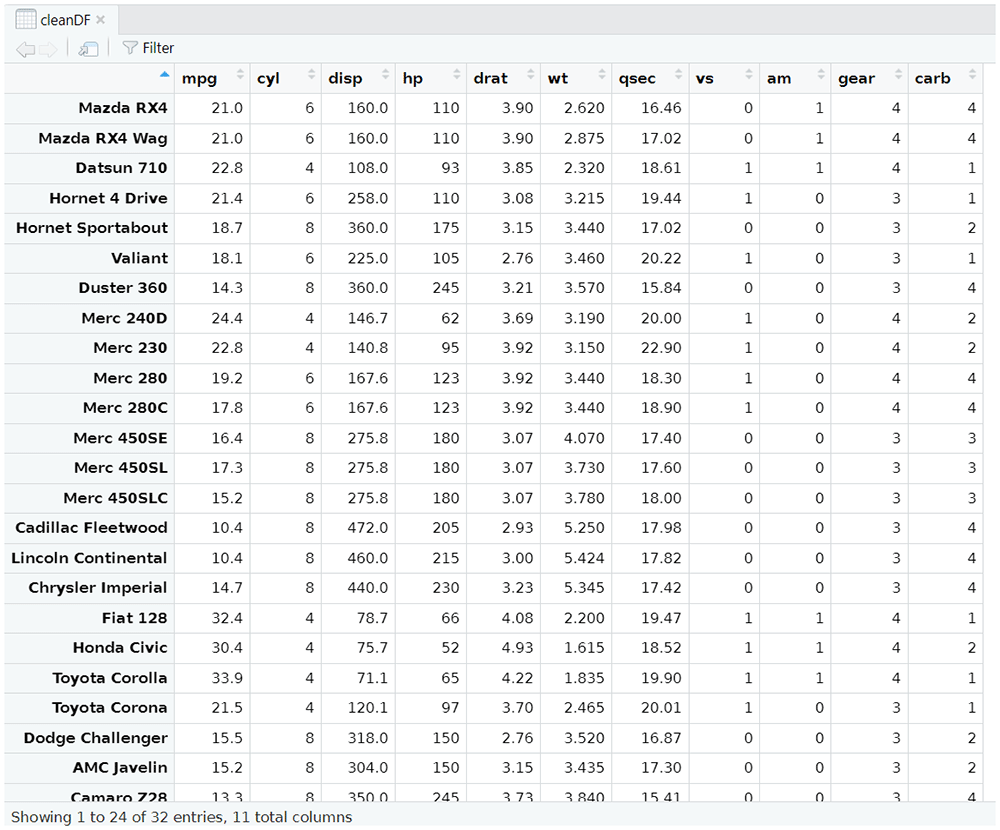
Figure 5. Data Preparation: Data Cleaning Output.
| Data Preparation: Statistical Test |
R > library(selfX)
# load dataset
R > data(mtcars) |
# run test.normality method
R > NormalTest <- test.normality(mtcars) |
| R > View(NormalTest) # see Figure 6 for details |
# run test.correlation method
R > CorrelationTest <- test.correlation(mtcars) |
| R > View(CorrelationTest) # see Figure 7 for details |
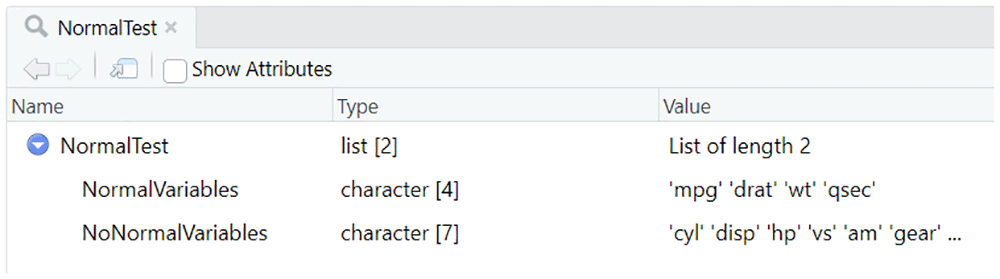
Figure 6. Data Preparation: Normality Statistical Test Output.
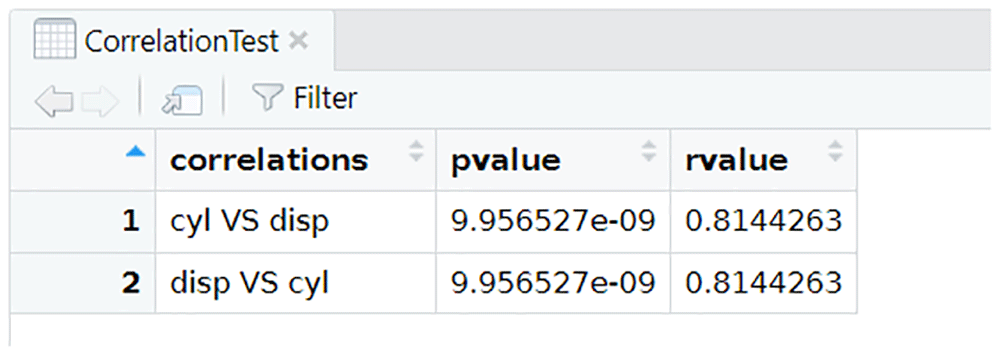
Figure 7. Data Preparation: Correlation Statistical Test Output.
| Data Preparation: Outlier and Missing Values Treatment |
R > library(selfX)
# load datase
R > data(mtcars) |
# run outliers.treatment method
R > cleanDF.NoOutliers.NoMissing <- outliers.missing.treatment(mtcars) |
| R > View(cleanDF.NoOutliers.NoMissing) # see Figure 8 for details |
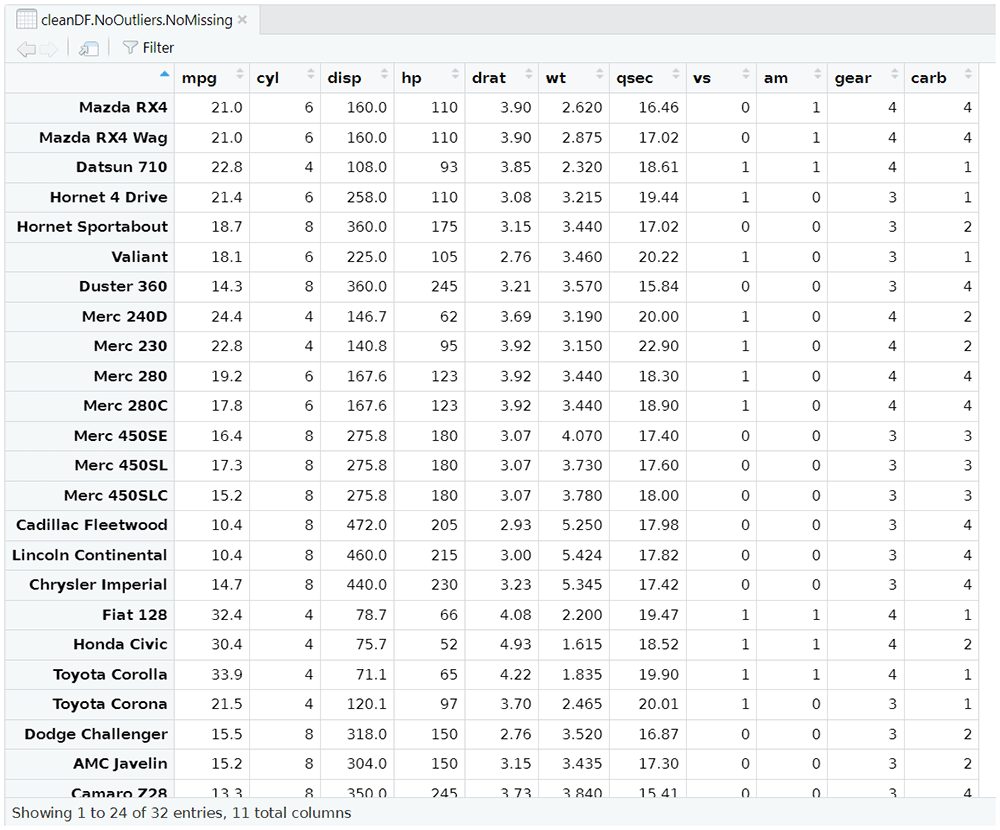
Figure 8. Data preparation: Outlier and missing values treatment output.
| Unsupervised Feature Selection |
R > library(selfX)
# load dataset
R > data(mtcars) |
# run pca.fa.owa method
R > FS_unsupervised <- pca.fa.owa(mtcars) |
| R > View(FS_unsupervised) # see Figure 9 for details |
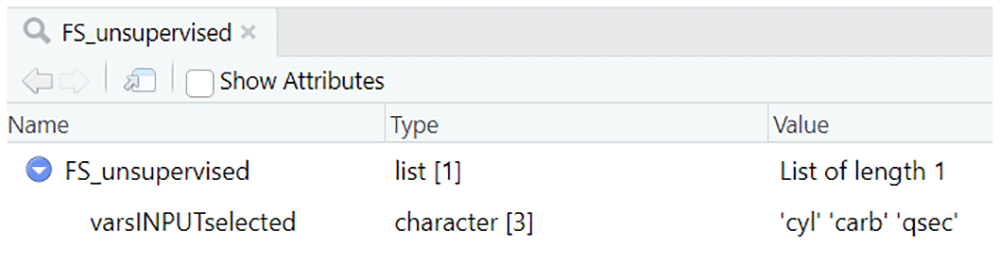
Figure 9. Unsupervised feature selection output.
| Supervised Feature Selection |
| R > library(selfX) |
| R > library(foreach) |
# load dataset
R > data(mtcars)
# establish inputs and output
R > varsINPUT <- c(“cyl”,”disp”,”hp”,”drat”,”wt”,”qsec”,”vs”,”am”,”gear”,”carb”)
R > varsOUTPUT <- c(“mpg”) |
# run relief.owa method
R > FS_supervised <- relief.owa(mtcars,varsINPUT,varsOUTPUT) |
| R > View(FS_supervised) # see Figure 10 for details |
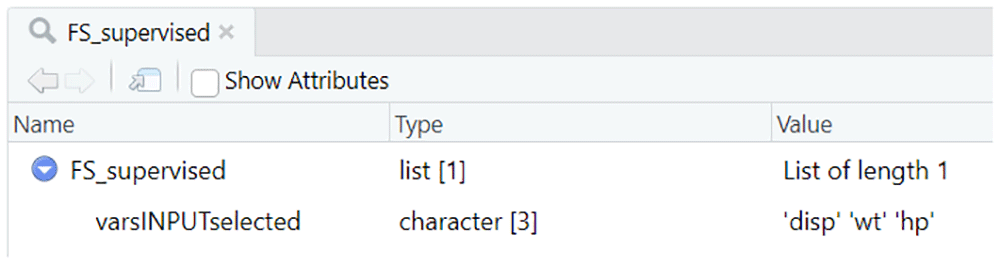
Figure 10. Supervised feature selection output.
| Unsupervised Anomaly Detection |
R > library(selfX)
# load dataset
R > data(mtcars)
# establish inputs and output
R > varsINPUT <- c(“mpg”,”disp”,”hp”,”drat”,”wt”,”gear”) |
# run unsupervised.anomalies.detection.owa method
R > anomaliesDF <- unsupervised.anomalies.detection.owa(mtcars, varsINPUT) |
| R > View(anomaliesDF) # see Figure 11 for details |
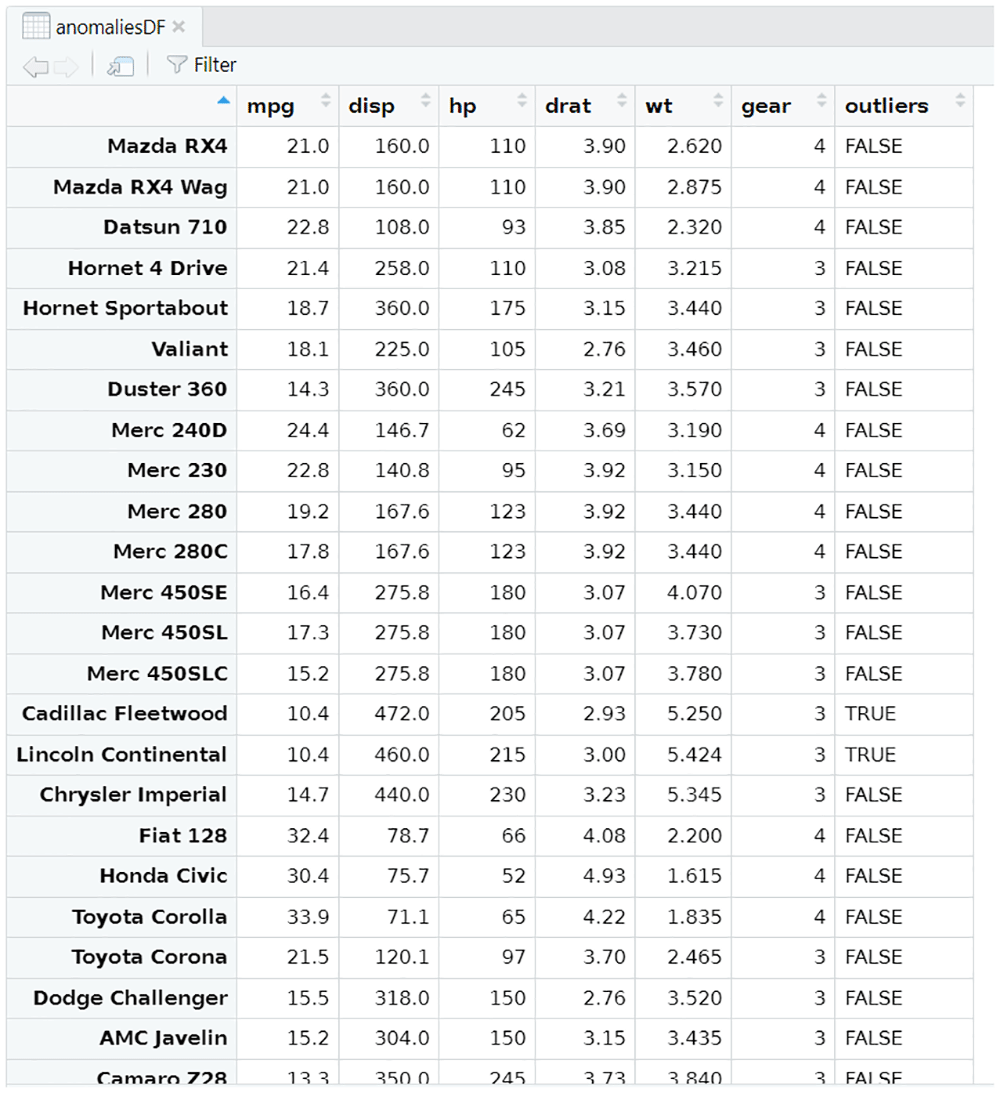
Figure 11. Unsupervised anomaly detection output.
| Predictive Algorithm Selection |
R > library(selfX)
R > library(foreach)
# load dataset and define inputs/output
R > data(mtcars)
R > varsINPUTopc1 <- c(“cyl”,”disp”,”wt”)
R > varsINPUTopc2 <- c(“cyl”,”disp”,”hp”,”drat”,”wt”,”qsec”,”vs”,”am”,”gear”,”carb”)
R > varsINPUTlist <- list(varsINPUTopc1,varsINPUTopc2)
R > varsOUTPUT <- c(“mpg”) |
# run modeling.owa method in selfX way (default options)
R > SelectedModel_1 <- modeling.owa(mtcars, varsINPUTlist, varsOUTPUT)
... self-X modelling ... cyl disp wt
... the execution may take a few minutes to complete depending on the number of data ...
... self-X modelling ... cyl disp hp drat wt qsec vs am gear carb
... the execution may take a few minutes to complete depending on the number of data ...
FINAL SELECTION
Self-X feature selection: cyl disp hp drat wt qsec vs am gear carb
Self-X selected algorithm: Random Forest
Self-X selected normalization: Z-Score
Self-X selected FCV: 3
... completed successfully ... |
| R > View(SelectedModel_1) # see Figure 12 for details |
# run modeling.owa method in selfX way, only SVM and Randon Forest
R > runOPC <- list(runLM = FALSE, runNN = FALSE, runSVM = TRUE, runRF = TRUE, runFRBS = FALSE)
R > SelectedModel_2 <- modeling.owa(mtcars, varsINPUTlist, varsOUTPUT, runOPC)
... self-X modelling ... cyl disp wt
... the execution may take a few minutes to complete depending on the number of data ...
... self-X modelling ... cyl disp hp drat wt qsec vs am gear carb
... the execution may take a few minutes to complete depending on the number of data ...
FINAL SELECTION
Self-X feature selection: cyl disp wt
Self-X selected algorithm: Random Forest
Self-X selected normalization: min-max (between 0-1)
Self-X selected FCV: 1
... completed successfully ... |
| R > View(SelectedModel_2) # see Figure 13 for details |
# run modeling.owa method in debugger mode, only NN and FRBS
R > runOPC <- list(runLM = FALSE, runNN = TRUE, runSVM = FALSE, runRF = FALSE, runFRBS = TRUE)
R > SelectedModel_3 <- modeling.owa(mtcars,varsINPUTlist,varsOUTPUT,runOPC,selfX = FALSE)
... 5 FCV creating ...
... 5 FCV created ...
... self-X modelling ... cyl disp wt
... the execution may take a few minutes to complete depending on the number of data ...
... running OWA ...
DEBUGGING MODE
... Self-X selected algorithm (options): NNet4_N_TST (NNet4_N_TST)
... accurate metrics (MSE_nor1, RMSE_nor1, RSE_nor1, MAPE_nor1, MAE_nor1, R2_nor1, MSE_nor2, RMSE_nor2, RSE_nor2, MAPE_nor2, MAE_nor2, R2_nor2): 7.29, 2.65, 0.25, 11.5, 2.21, -Inf, 7.5, 2.69, 0.26, 11.7, 2.18, -Inf
... running OWA ...
... Self-X selected normalization (options): Z-Score (Z-Score)
... self-X modelling ... cyl disp hp drat wt qsec vs am gear carb
... the execution may take a few minutes to complete depending on the number of data ...
... running OWA ...
DEBUGGING MODE
... Self-X selected algorithm (options): NNet4_N_TST (NNet4_N_TST)
... accurate metrics (MSE_nor1, RMSE_nor1, RSE_nor1, MAPE_nor1, MAE_nor1, R2_nor1, MSE_nor2, RMSE_nor2, RSE_nor2, MAPE_nor2, MAE_nor2, R2_nor2): 16.43, 3.78, 0.6, 16.48, 3.13, -Inf, 16.77, 3.66, 0.61, 15.84, 3.04, -Inf
... running OWA ...
... Self-X selected normalization (options): min-max (between 0-1) (min-max (between 0-1))
... running OWA ...
... Self-X selected features (options): SC1_nnet2_default_N_TST (SC1_nnet2_default_N_TST)
... running OWA ...
... Self-X selected fold cross-validation (options): FCV3 (FCV3)
FINAL SELECTION
Self-X feature selection: cyl disp wt
Self-X selected algorithm: Neural Networks
Self-X selected normalization: Z-Score
Self-X selected FCV: 3
... completed successfully ... |
| R > View(SelectedModel_3) # see Figure 14 for details |
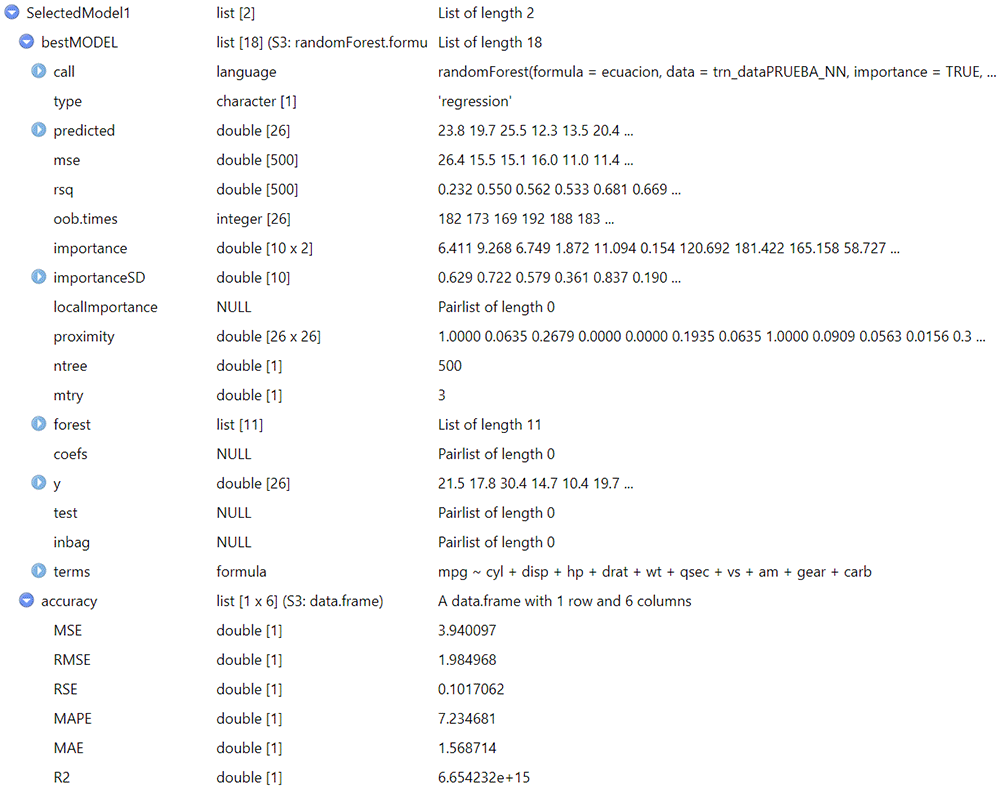
Figure 12. Predictive algorithm selection output (1/3).
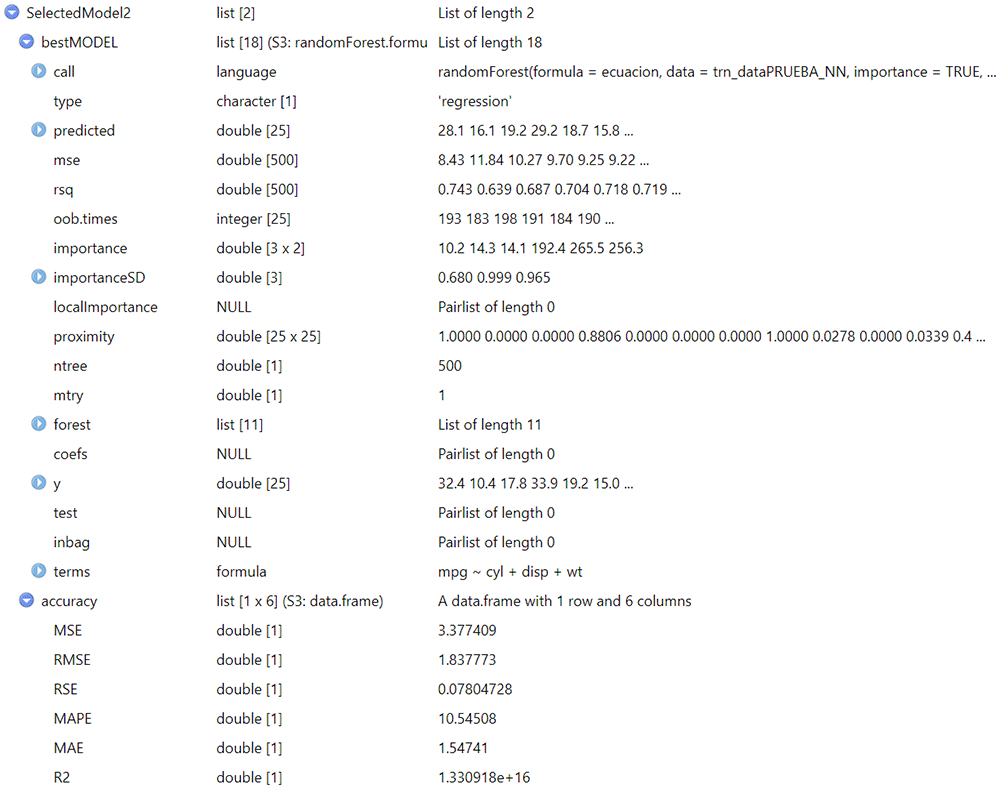
Figure 13. Predictive algorithm selection output (2/3).
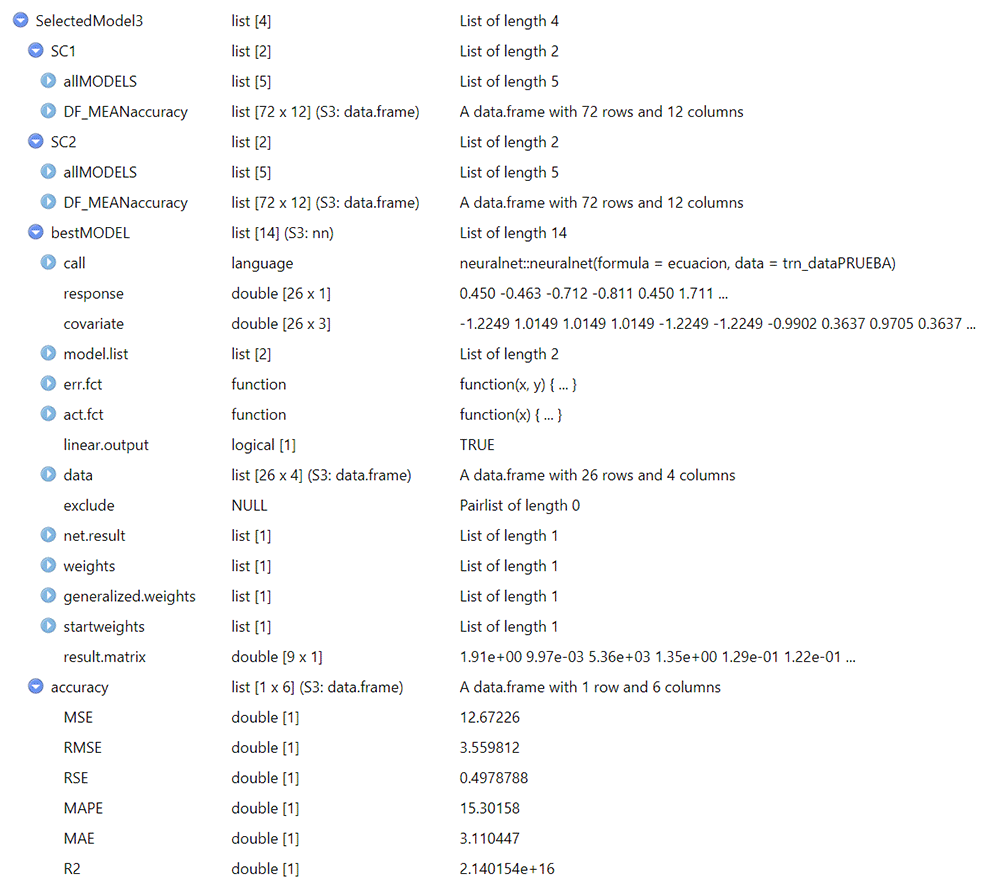
Figure 14. Predictive algorithm selection output (3/3).
3.6. Operation: How to install
This section include the instructions to install "selfX" package in RStudio, an integrated development environment (IDE) for R programming language. The only requirement to be able to use this package is to have the R installed in version 4.0 or higher. Then, to start working with the packages in R, it must be installed as indicated below. Remember that, after installation, the package must be loaded in order to be able to use the functions.
R version 4.3.2 (2023-10-31 ucrt) -- "Eye Holes"
Copyright (C) 2023 The R Foundation for Statistical Computing
Platform: x86_64-w64-mingw32/x64 (64-bit)
R es un software libre y viene sin GARANTIA ALGUNA.
Usted puede redistribuirlo bajo ciertas circunstancias.
Escriba 'license()' o 'licence()' para detalles de distribucion.
R es un proyecto colaborativo con muchos contribuyentes.
Escriba 'contributors()' para obtener más información y
'citation()' para saber cómo citar R o paquetes de R en publicaciones.
Escriba 'demo()' para demostraciones, 'help()' para el sistema on-line de ayuda,
o 'help.start()' para abrir el sistema de ayuda HTML con su navegador.
Escriba 'q()' para salir de R.
[Workspace loaded from ~/.RData]
R >
R> install.packages(devtools)
Loading required package: foreach
Installing package into ‘C:/../AppData/Local/R/win-library/4.3’ (as ‘lib’ is unspecified)
also installing the dependencies ‘credentials’, ‘gitcreds’, …………, ‘rversions’, ‘urlchecker’
probando la URL 'https://cran.rstudio.com/bin/windows/contrib/4.3/credentials_2.0.1.zip'
Content type 'application/zip' length 221665 bytes (216 KB)
downloaded 216 KB
probando la URL 'https://cran.rstudio.com/bin/windows/contrib/4.3/gitcreds_0.1.2.zip'
Content type 'application/zip' length 99460 bytes (97 KB)
downloaded 97 KB
……………………………
probando la URL 'https://cran.rstudio.com/bin/windows/contrib/4.3/urlchecker_1.0.1.zip'
Content type 'application/zip' length 36322 bytes (35 KB)
downloaded 35 KB
probando la URL 'https://cran.rstudio.com/bin/windows/contrib/4.3/devtools_2.4.5.zip'
Content type 'application/zip' length 435953 bytes (425 KB)
downloaded 425 KB
package ‘credentials’ successfully unpacked and MD5 sums checked
package ‘gitcreds’ successfully unpacked and MD5 sums checked
…………….
package ‘urlchecker’ successfully unpacked and MD5 sums checked
package ‘devtools’ successfully unpacked and MD5 sums checked
The downloaded binary packages are in
C:/../AppData/Local/Temp/.../downloaded_packages
R >
Download the file selfX_1.0.0.tar.gz with the source code of the package.
Use install_local function to install “selfX” R package from the file (.tar.gz) downloaded in the previous step. Remember to correctly specify the local path of the file.
R >; devtools::install_local("selfX_1.0.0.tar.gz")
These packages have more recent versions available.
It is recommended to update all of them.
Which would you like to update?
1: All
2: CRAN packages only
3: None
4: parallelly (1.36.0 -> 1.37.0 ) [CRAN]
5: RcppArmad... (0.12.6.6.1 -> 0.12.8.0.0) [CRAN]
6: recipes (1.0.9 -> 1.0.10 ) [CRAN]
Enter one or more numbers, or an empty line to skip updates:
— R CMD build —
✔ checking for file 'C:/../AppData/Local/Temp/.../selfX/DESCRIPTION' (543ms)
– preparing 'selfX':
✔ checking DESCRIPTION meta-information
– checking for LF line-endings in source and make files and shell scripts
– checking for empty or unneeded directories
– building 'selfX_1.0.0.tar.gz'
Installing package into ‘C:/../AppData/Local/R/win-library/4.3’ (as ‘lib’ is unspecified)
* installing *source* package 'selfX' ...
** using staged installation
** R
** byte-compile and prepare package for lazy loading
** help
*** installing help indices
** building package indices
** testing if installed package can be loaded from temporary location
** testing if installed package can be loaded from final location
** testing if installed package keeps a record of temporary installation path
* DONE (selfX)
R >
R > library(selfX)
Loading required package: foreach
R >
4. Conclusions
A detailed description of all the functionalities included in the “selfX” R package has been included in this contribution.
At the moment, the version 1.0.0 of this package includes the implementation of several self-X methods for dealing with (1) supervised and unsupervised feature selection, (2) unsupervised anomaly detection, (3) predictive algorithm selection, and (4) cleaning data, statistical tests or outliers treatment activities in a more autonomic way.
Subsequent versions of the package will include, among others, the following improvements:
allow the end user to provide their own data sets to apply the 5-fold cross-validation technique.
increase the types of statistical tests, including normality tests for more than 5000 samples and/or other correlation tests.
define additional “self-X autonomic clustering algorithm selection” and “self-X autonomic normalization methods” procedures and include them in the package
This package has been developed within the s-x-AIPI project, which has received funding from the European Union‘s Horizon Europe research and innovation programme under grant agreement № 101058715 (https://s-x-aipi-project.eu/). Moreover, this R package is implemented as open-source software and offered to the R community for use and improvement through the AI on-demand (AIoD) platform7 (Table 4).