Architectural overview
XR-CareerAssist employs a layered architecture designed for modularity, scalability, and maintainability. The system comprises five primary layers: User Interface Layer, Application Layer, Integration Layer, AI Models and Services Layer, and Data Layer.
Figure 1 illustrates the comprehensive system architecture showing the relationship between these layers and the flow of data through the various AI components. The architecture diagram presents the layered system design including: User Interface (UI) Layer with VR/AR devices accessing the XR Environment; Application Layer containing the Career Guidance Application with User Interaction Module and Model Training and Adaptation components; Integration Layer featuring the Data Integration Framework (APIs) and VOXReality Model Extensions; AI Models and Services Layer hosting the ASR, NMT, Vision-Language (VL) Model, and Conversational Agent (CA); and the Data Layer comprising the CVs Database and User Data Repository connected to VOXReality Repositories. The diagram shows data flows between the various technical components.
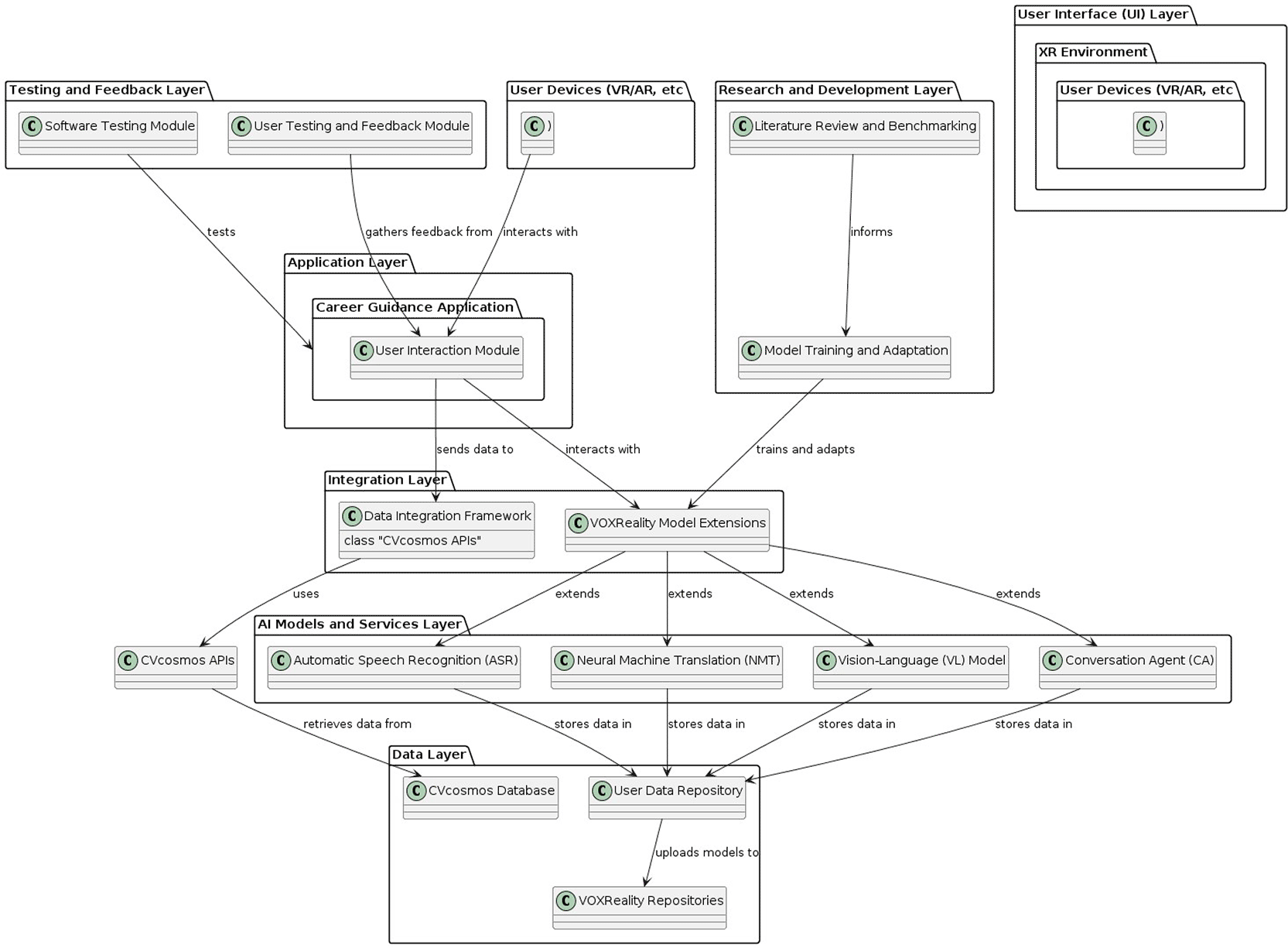
Figure 1. XR-CareerAssist architecture diagram and component.
The User Interface Layer encompasses the immersive XR environment accessed through VR headsets, specifically the Meta Quest 3 platform. This layer handles user input through voice commands, gesture controls, and gaze-based selection, while rendering the 3D environment, career visualisations, and avatar interactions.
The Application Layer manages the core career guidance logic, including questionnaire management, user session handling, and coordination of AI model inference. This layer translates user inputs into appropriate API calls and orchestrates the response flow from multiple AI components.
The Integration Layer provides abstraction between the application and external services, implementing adapters for the CVs database and AI models. This layer handles authentication, rate limiting, error handling, and data transformation, ensuring reliable communication with backend services.
The AI Models and Services Layer contains the core AI capabilities: ASR for speech-to-text conversion, NMT for translation, the Conversational Agent for dialogue management, VL models for visual interpretation, and TTS for speech synthesis. Each component is independently deployable and scalable.
The Data Layer manages persistent storage including user profiles, session data, and cached career information. The layer interfaces with the CVs database for career trajectory data while maintaining user privacy through appropriate data handling practices.
System component implementation and validation
Automatic Speech Recognition (ASR): The ASR component provides the primary voice input channel for XR-CareerAssist. The system accepts voice input directly from the XR environment, processes spoken queries through the ASR model supporting English, Greek, and French, and returns transcribed text with confidence scores. The model achieves recognition accuracy exceeding 95% in controlled environments, with response latency under 2 seconds for typical queries.
Figure 3 illustrates the ASR pipeline showing the complete flow from English voice input to text transcription, along with the subsequent NMT translation to Italian. The ASR pipeline demonstration shows the complete speech-to-text and translation flow. The top section displays the audio input waveform from an English voice recording. The middle section shows the ASR transcription output with the recognised text in English. The bottom section demonstrates the NMT module translating the English text into Italian, showing the complete text-to-text mapping from source to target language. The interface displays timing metrics, confidence scores, and language detection indicators, demonstrating the real-time processing capability of the integrated ASR and NMT components.
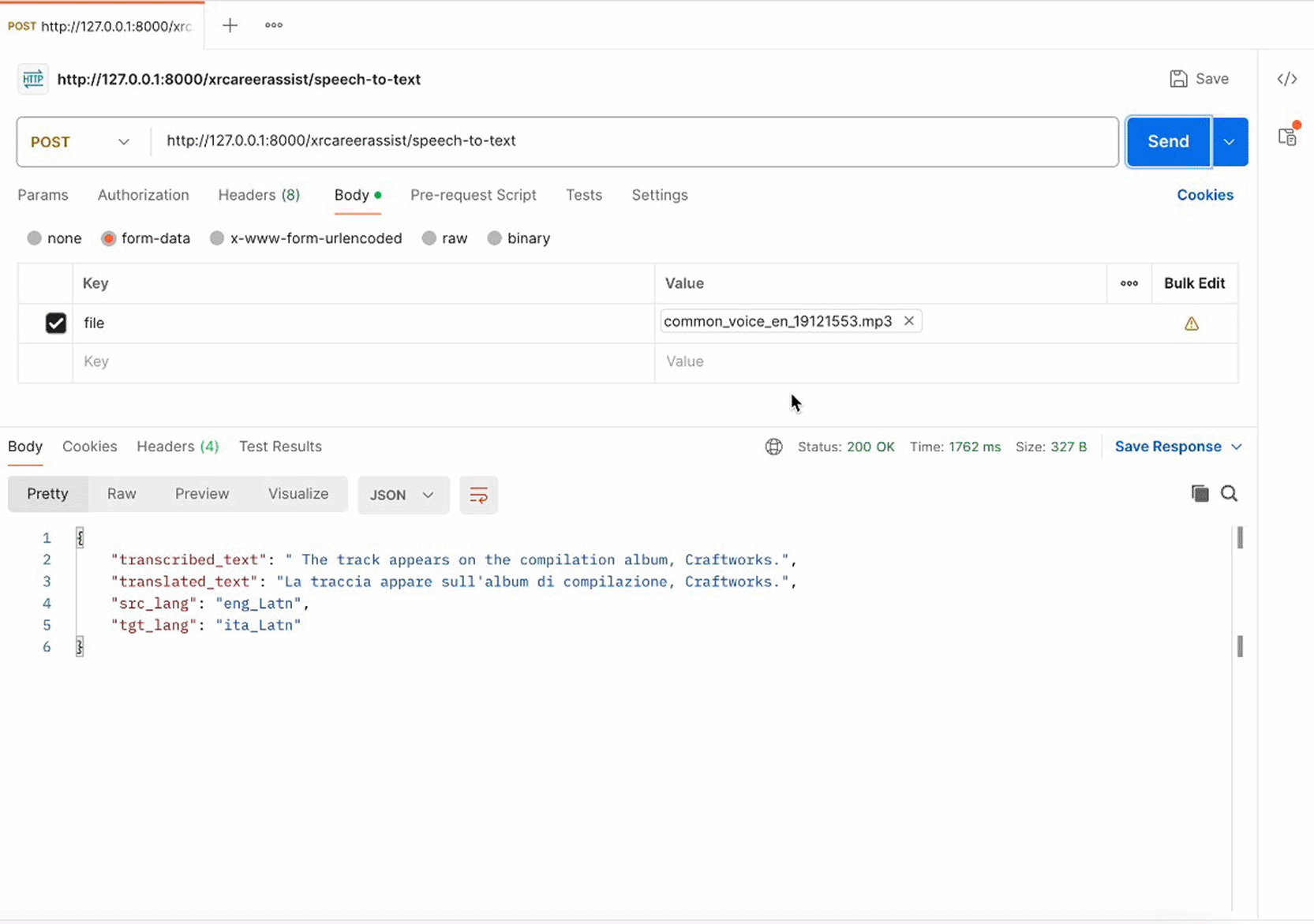
Figure 3. XR ASR pipeline: English voice input to text transcription and NMT translation.
Neural Machine Translation (NMT): The NMT component enables multilingual accessibility by translating text between supported language pairs. The system provides translation capabilities for English, Greek, French, and Italian, with bidirectional translation support and response latency under 2 seconds per translation request. Integration with ASR enables seamless translation of voice input, while integration with TTS ensures translated responses can be spoken in the user's preferred language.
Vision-Language Model (VL): To enable natural language interpretation of career visualisations, the team fine-tuned a BLIP-based Vision-Language model. The fine-tuning process utilised k-means clustering to select 20 representative Sankey diagram images from the career data corpus, followed by training for 50 epochs. The resulting model can respond to user queries about Sankey diagrams, explaining career transitions and patterns shown in the visualisations.
Figure 4 demonstrates the VL model's performance on sample Sankey diagram queries. The VL model performance demonstration shows two examples of the fine-tuned BLIP model responding to questions about Sankey diagrams. Each example displays a Sankey diagram image alongside the user's natural language question and the model's generated response. The first example shows a question about career transition patterns, with the model correctly identifying the major pathways shown in the diagram. The second example demonstrates the model's ability to explain the relative frequencies of different career moves based on the width of the flows in the visualisation. The results demonstrate that the fine-tuning approach successfully adapted the general-purpose BLIP model for domain-specific career diagram interpretation.
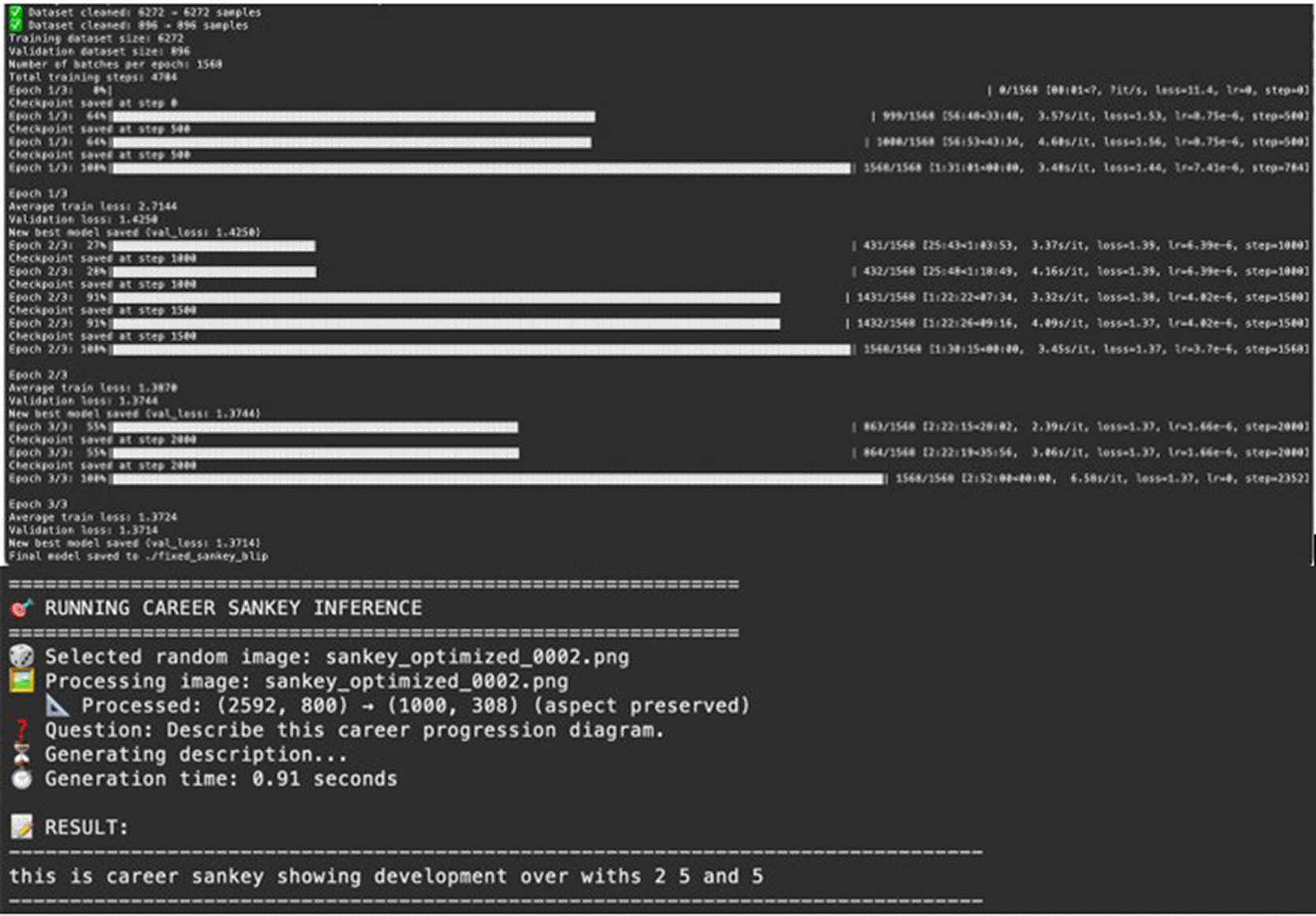
Figure 4. VL model extended through finetuning to respond to sankey diagrams.
Conversational Agent (Training Assistant): The Conversational Agent (Training Assistant), provides contextual dialogue capabilities within the XR environment. The agent is built on the Langchain framework and is able to maintain conversation context, integrate with career data APIs for personalised responses, and escalate complex queries to external resources when necessary. It serves as the primary interface through which users interact with career guidance features, with its responses delivered through the 3D avatar via TTS.
Figure 5 shows the dialogue system training manual that guides users in their interactions. The Dialogue System Training Manual provides structured guidance for users interacting with the XR-CareerAssist platform. The manual includes step-by-step instructions for engaging with the Training Assistant, best practices for formulating career-related questions, guidance on interpreting system outputs, tips for navigating various platform features, and troubleshooting information for common issues. The manual is designed to ensure a seamless user experience and maximise the value users derive from their interactions with the conversational agent.
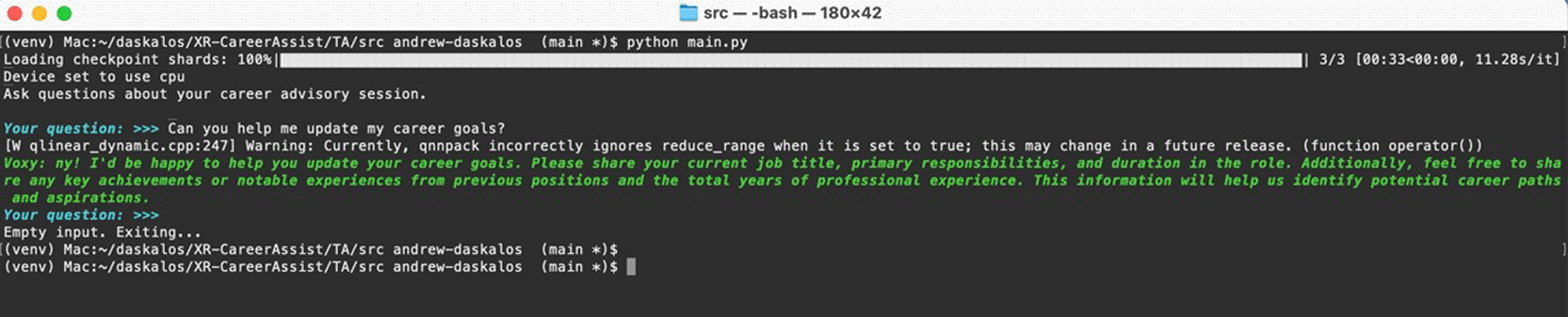
Figure 5. Dialogue system training manual for XR-CareerAssist.
Text-to-Speech (TTS): To enhance the immersive and accessible nature of XR-CareerAssist, a Text-to-Speech (TTS) feature was implemented to convert generated textual outputs into lifelike audio responses for users interacting within the XR environment. Initially, the team evaluated the open-source PIPER TTS engine, which was successfully installed, configured, and tested locally as shown in
Figure 6. However, PIPER revealed significant technical limitations including reliance on unmaintained Python dependencies and incompatibility with Python 3.12 used across the XR-CareerAssist backend. As an alternative, the team deployed AWS Polly, a robust and secure cloud-based TTS service, ensuring high reliability, compliance with security best practices, and consistent performance. Multiple Polly voices were evaluated and selected to ensure natural-sounding speech aligned with the XR user experience goals.
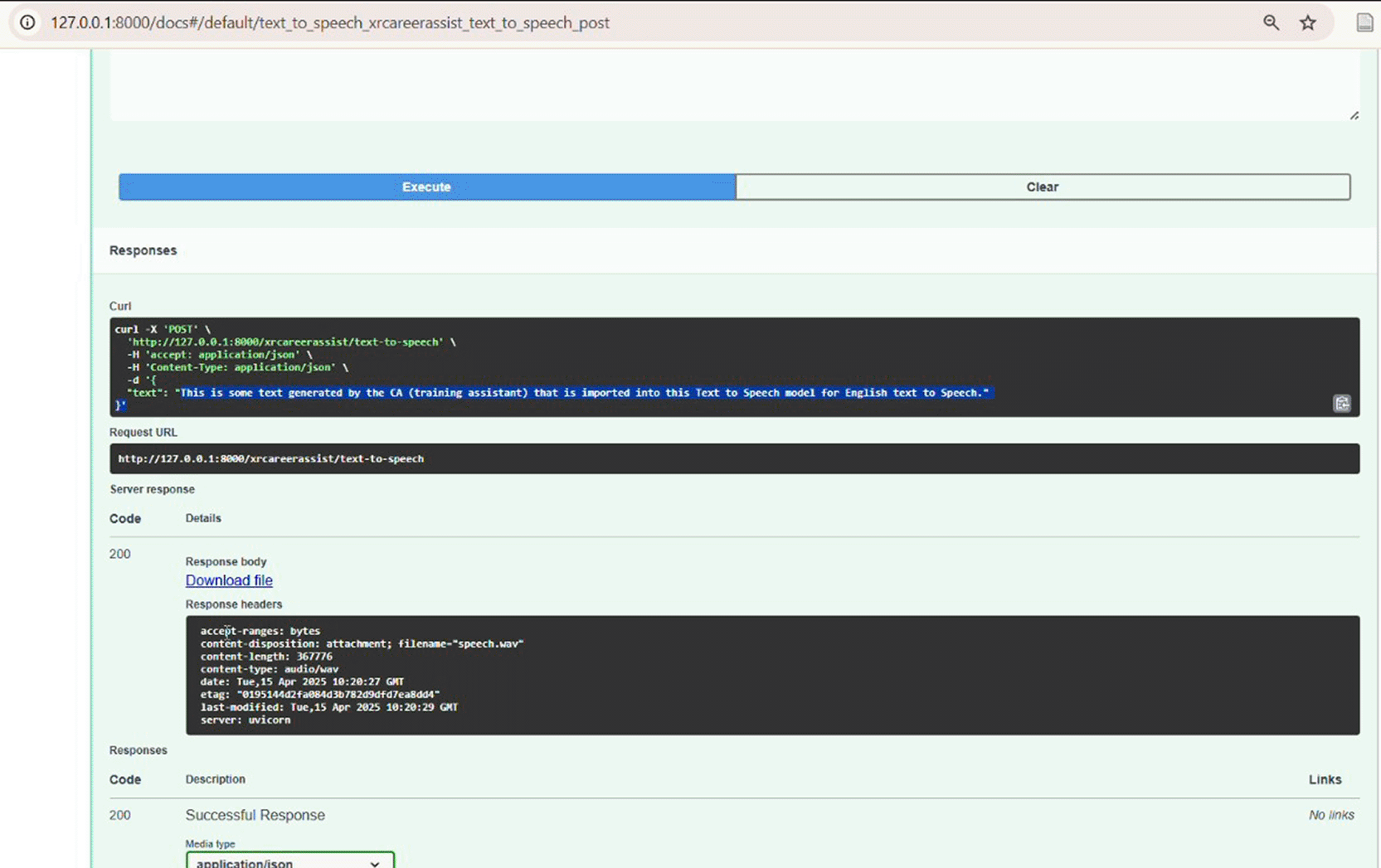
Figure 6. Local testing of PIPER TTS with XR-CareerAssist backend.
Career Data Integration and Visualisation: A major technical achievement involved the successful integration of the CVs database with the XR-CareerAssist backend infrastructure. The project team utilised DuckDB for efficient in-memory analytics, and a dedicated API service was implemented in Python to expose high-performance endpoints for querying the anonymised profiles dataset. The API endpoint (/profile/sankey POST) accepts questionnaire-style inputs and returns a PNG image of a generated Sankey diagram.
Figure 7 shows a sample Sankey diagram generated from CVC data. This visualisation displays career transitions for a user profile with 25 years of experience showing all role possibilities. It shows flowing paths from current roles on the left through intermediate career stages in the middle to potential future roles on the right, spanning a 10-year projection period. Different colour bands represent various career trajectories including transitions to senior roles, lateral moves within industries, and cross-industry shifts. The width of each flow indicates the relative frequency of that career transition among similar professionals in the database, providing data-driven insights into likely career progressions.
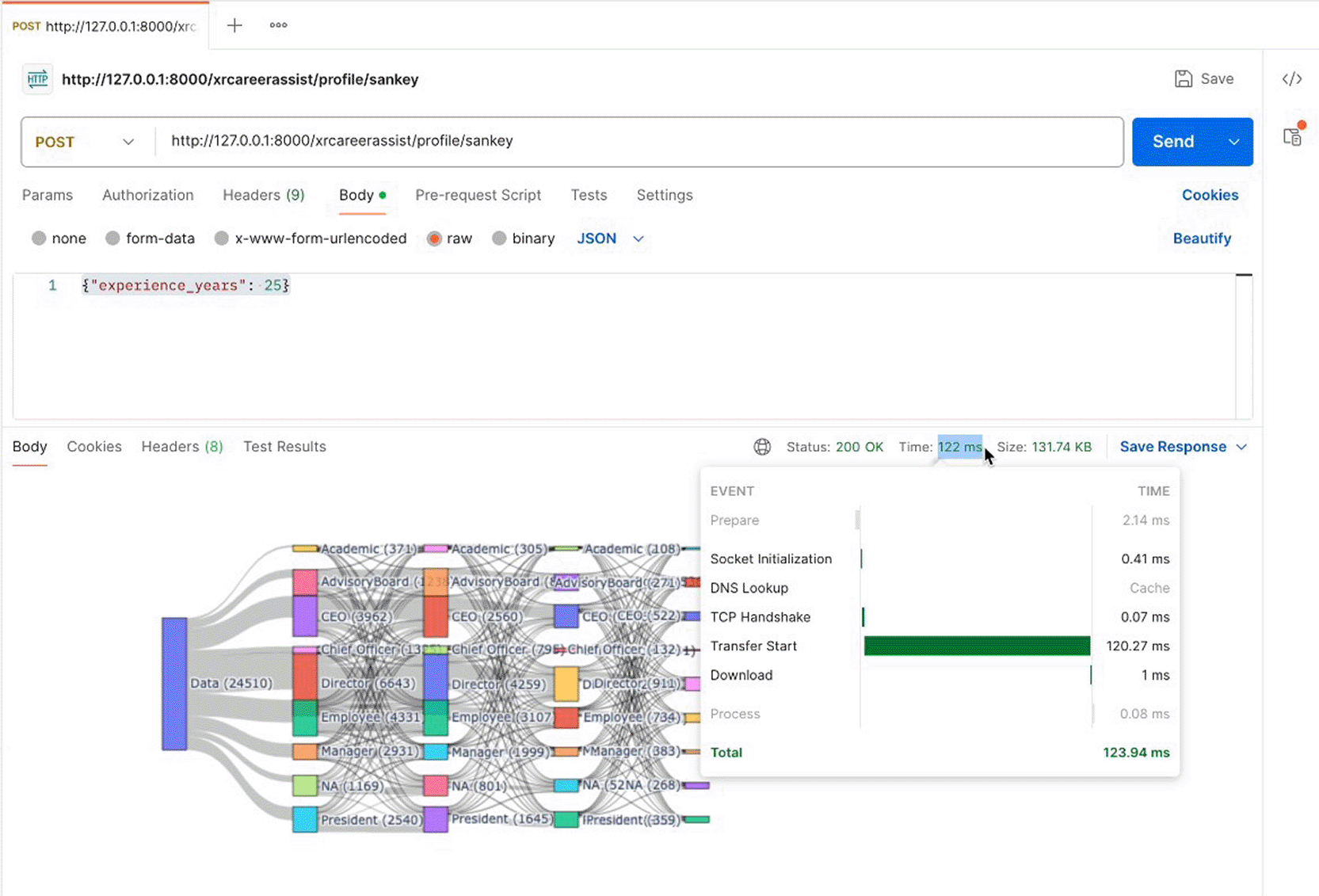
Figure 7. Sample sankey diagram generated from CVC data for a user profile input.
The career map concept demonstrates how users can visualise their potential career progression over time, tracking professional journeys including role progressions and industry shifts.
Figure 8 shows the Career Map concept note with detailed metrics.
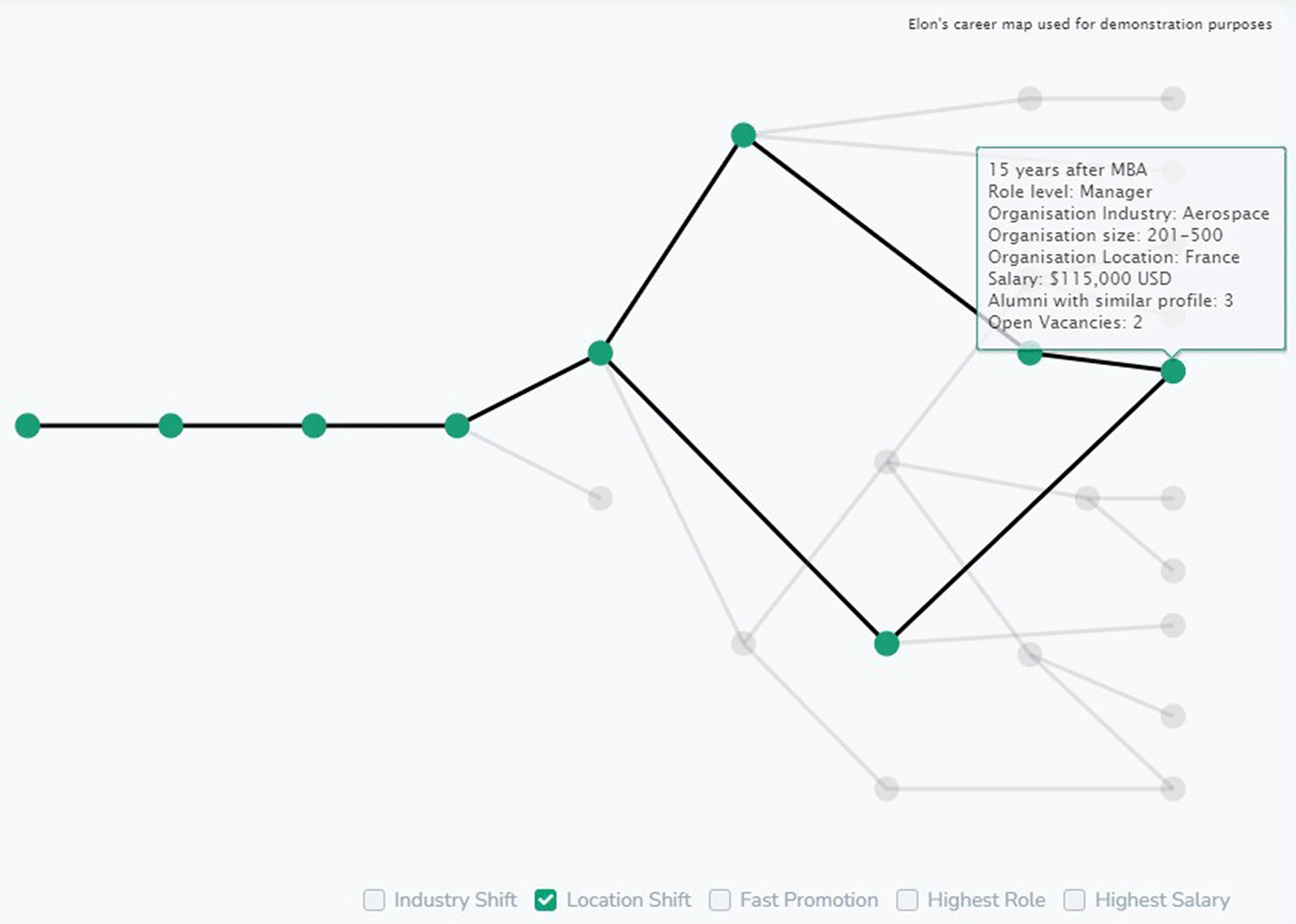
Figure 8. Career map concept note for location shift target.
The platform provides users with dynamic career maps displaying potential role and industry transitions over different time periods (2, 5, and 10 years).
Figure 9 presents the Job Role Evolution Career Map and
Figure 10 shows the Industry Shift evolution diagram. The Role Job Career Path Sankey diagram provides a visualization of career progression based on user input for a 10-year projection. The left column shows starting roles (Employee, Manager, Director), the middle columns show intermediate career stages at 2 and 5 years, and the right column shows potential roles at 10 years (Chief Officer, Director, Manager). The flowing bands between columns show transition frequencies, with wider bands indicating more common career paths. The diagram helps users visualise potential transitions to higher-level positions with pathways showing possible detours or accelerations based on sector and industry variables. The Industry Shift Career Path Sankey diagram shows how professionals typically move between industries over a 10-year period. The left column lists source industries (Computer Manufacturing, Financial Services/Insurance, Investment Banking, IT Services/Consulting, Software Products), the middle columns show industry distributions at 2 and 5 years, and the right column shows the 10-year industry destinations. The flow widths indicate the relative frequency of each industry transition, revealing patterns such as common moves from IT Services to Software Products or the stability of professionals remaining within Financial Services.
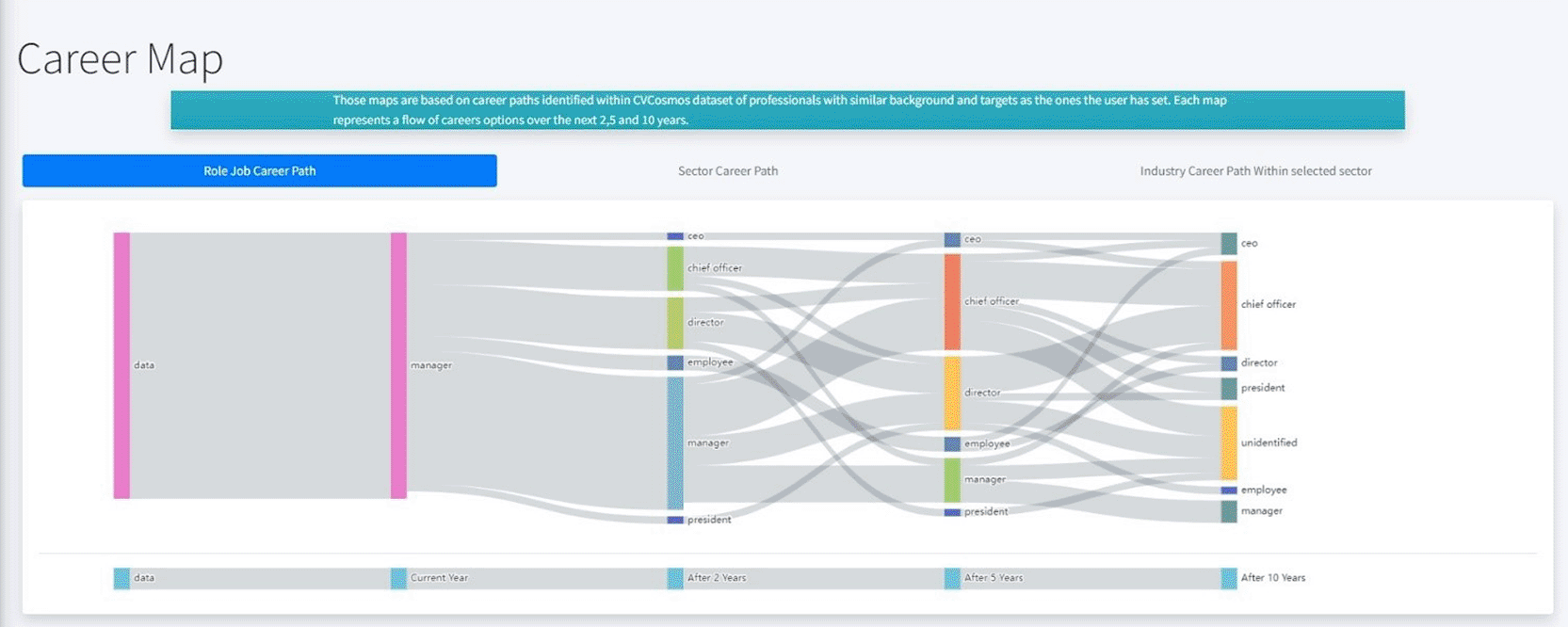
Figure 9. Job role evolution career map for specified user input for the next 10 years.
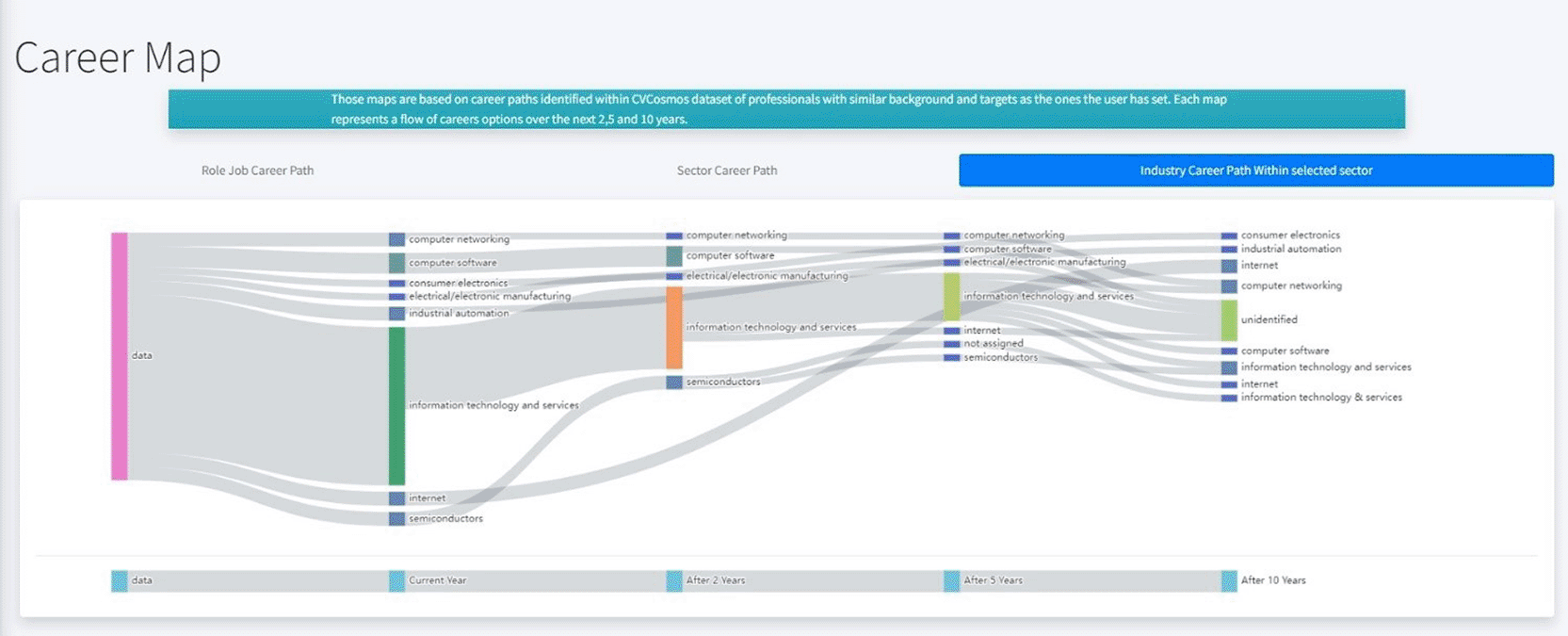
Figure 10. Industry shift evolution career map for specified user input for 10 years.
XR User Interface and Experience: The XR environment was developed using Unity 2022.3 LTS with Meta SDK 2.0, optimised for the Meta Quest 3 platform. The interface incorporates interactive 3D elements that guide users through career exploration activities, with user-friendly navigation ensuring accessibility for individuals with varying levels of XR familiarity.
Career questionnaires were created to collect user data on professional interests, skills, and career aspirations. The design ensures clarity and brevity to maintain user engagement, with questions tailored to elicit information essential for generating accurate career transition visualisations.
Figure 11 illustrates the questionnaire flow within the XR environment. The questionnaire interface presents two sequential input screens within the immersive VR environment. In the first panel (left), users are asked to insert their desired role with a dropdown menu offering career level options including Employee, Manager, Director, and Executive. In the second panel (right), users specify their work experience by providing the years of work experience they have. Both panels feature a clean, dark-themed design optimised for VR readability, with clearly visible text, intuitive dropdown selectors, and prominent “Next” buttons to progress through the questionnaire. The virtual office environment is visible in the background, maintaining spatial context within the immersive experience. Based on these user inputs, the system queries the CVCOSMOS database containing over 100,000 anonymised CVs from highly experienced professionals to identify matching career trajectories and potential career shifts. The algorithm analyses profiles with similar starting characteristics to generate personalised Sankey diagrams showing statistically-derived career progression pathways over 2, 5, and 10-year time horizons.
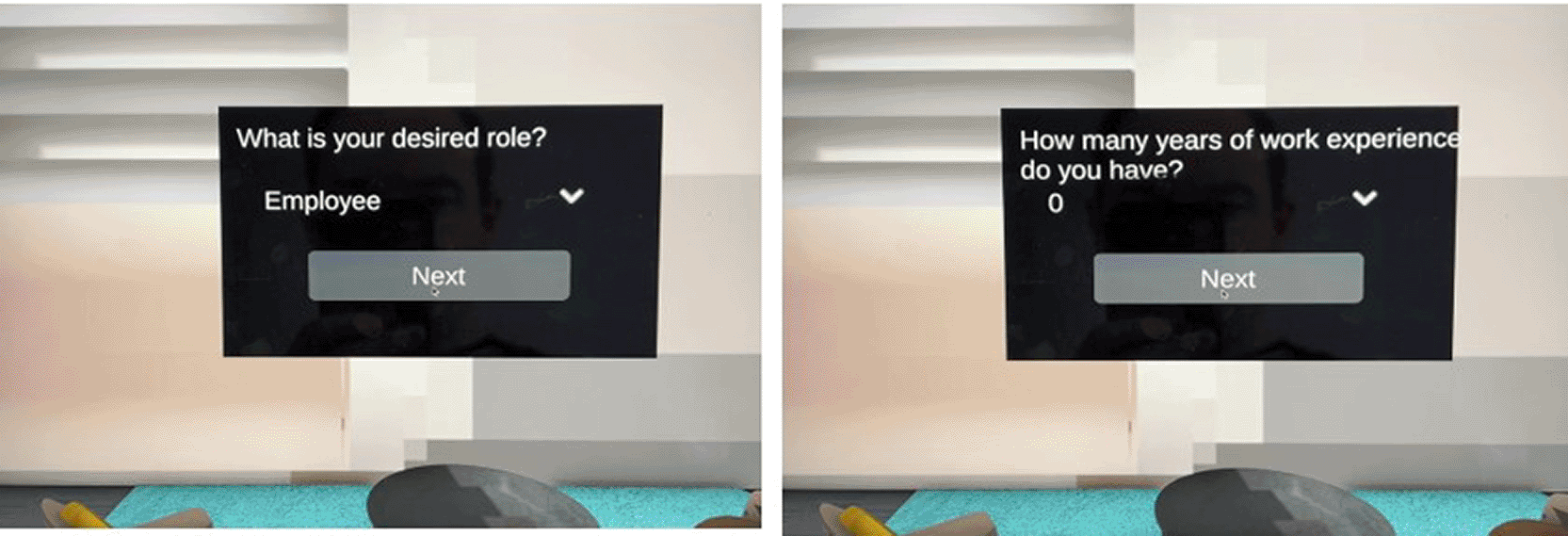
Figure 11. Questionnaire flow in XR to generate career sankey diagrams.
Figure 12 illustrates the main XR interface where users interact with the career guidance features. The VR scene illustrates the immersive environment as experienced on the Meta Quest 3 headset. The 3D avatar (Training Assistant) is positioned to the left of the view, facing the user with a welcoming posture. The main viewing area displays a Sankey diagram panel showing career transition flows. The virtual environment features a modern, professional aesthetic with ambient lighting and clean geometric design elements. The interface demonstrates the spatial arrangement of interactive elements in the actual VR experience, with the avatar positioned for natural conversation and the career visualisation prominently displayed for easy viewing and discussion.
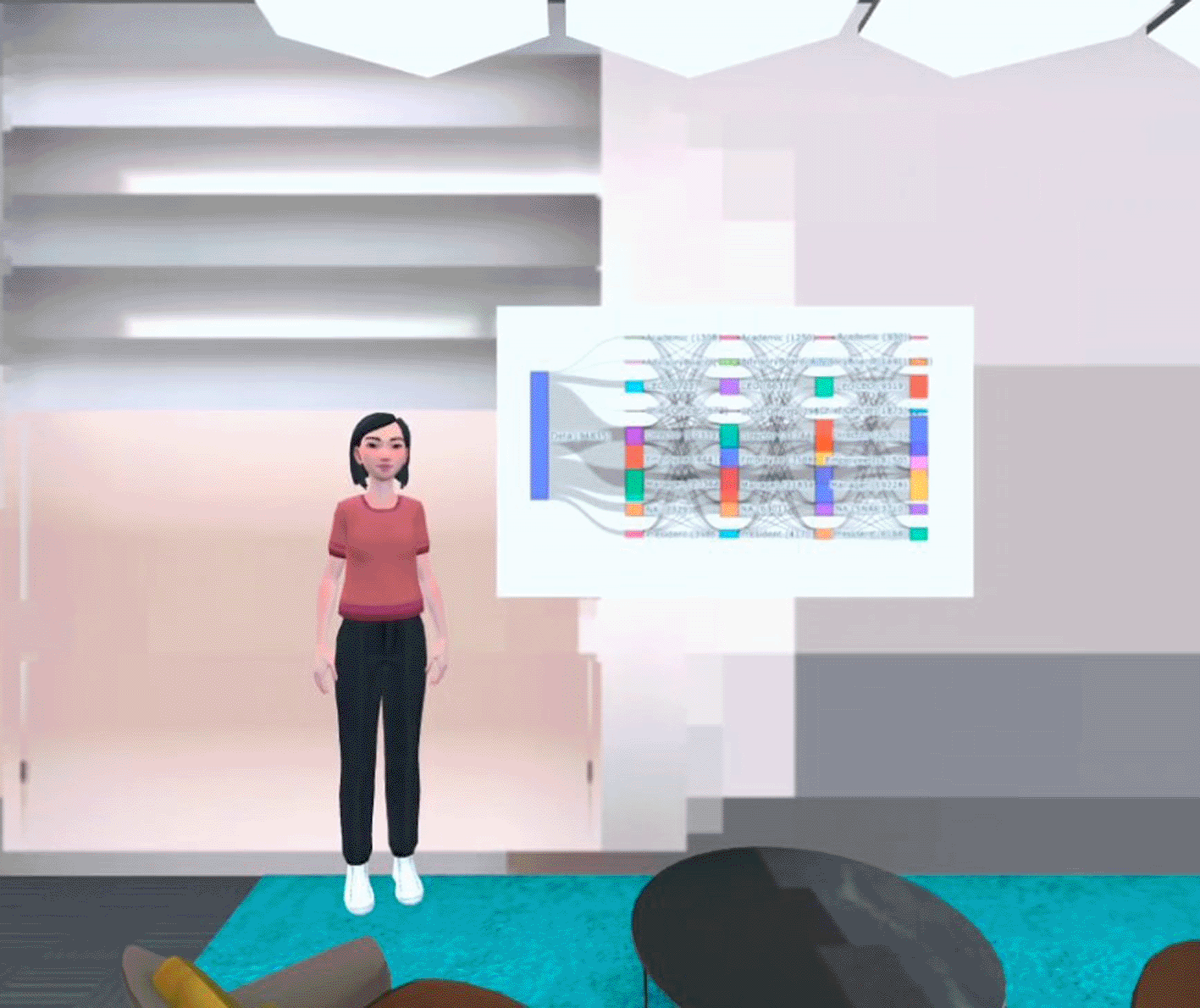
Figure 12. XR-careerassist user interface in XR environment.
Users can engage in natural voice-based dialogue to inquire about the displayed career visualisations. When a user poses a question about the Sankey diagram, such as asking about specific career transitions or the likelihood of progression to a particular role, the integrated microphone captures the spoken query. The Automatic Speech Recognition (ASR) module transcribes the audio input into text in real-time. If the transcribed text is in a language other than English (e.g., Italian or French), the Neural Machine Translation (NMT) module automatically translates it into English to ensure compatibility with downstream processing. The translated text is then passed to the Conversational Agent (Training Assistant), which is specifically trained to interpret career-related queries and generate contextually appropriate textual responses. Finally, the generated response text is converted into natural-sounding speech using Amazon Polly's Text-to-Speech (TTS) service, and the audio output is delivered through the 3D avatar, creating a seamless, immersive conversational experience that guides users through their personalised career exploration.
Performance Optimisation: The backend API, specifically the Sankey diagram generation endpoint, underwent substantial performance optimisation. Initial implementations required approximately 45 seconds to generate personalised career maps. Following optimisation through query restructuring, index optimisation, caching strategies, and algorithm improvements, response times were reduced to approximately 200 milliseconds, representing a 99.56% improvement.
To verify scalability requirements, comprehensive load testing was conducted for 10,000 concurrent simulated users.
Figure 13 presents the load testing results demonstrating the platform's performance under high load. In particular, the load testing dashboard shows performance metrics during the stress test with 10,000 concurrent simulated users. The top graph displays request rate over time, showing sustained throughput of 900-1,000 requests per second. The middle graph shows response time distribution, with median latency between 800-900 milliseconds and 95th percentile under 2 seconds. The bottom section displays the failure rate, which remains at zero throughout the test duration, demonstrating system stability under load. Summary statistics show total requests processed, average response time, and system resource utilisation confirming the platform can handle the target concurrent user load without degradation.
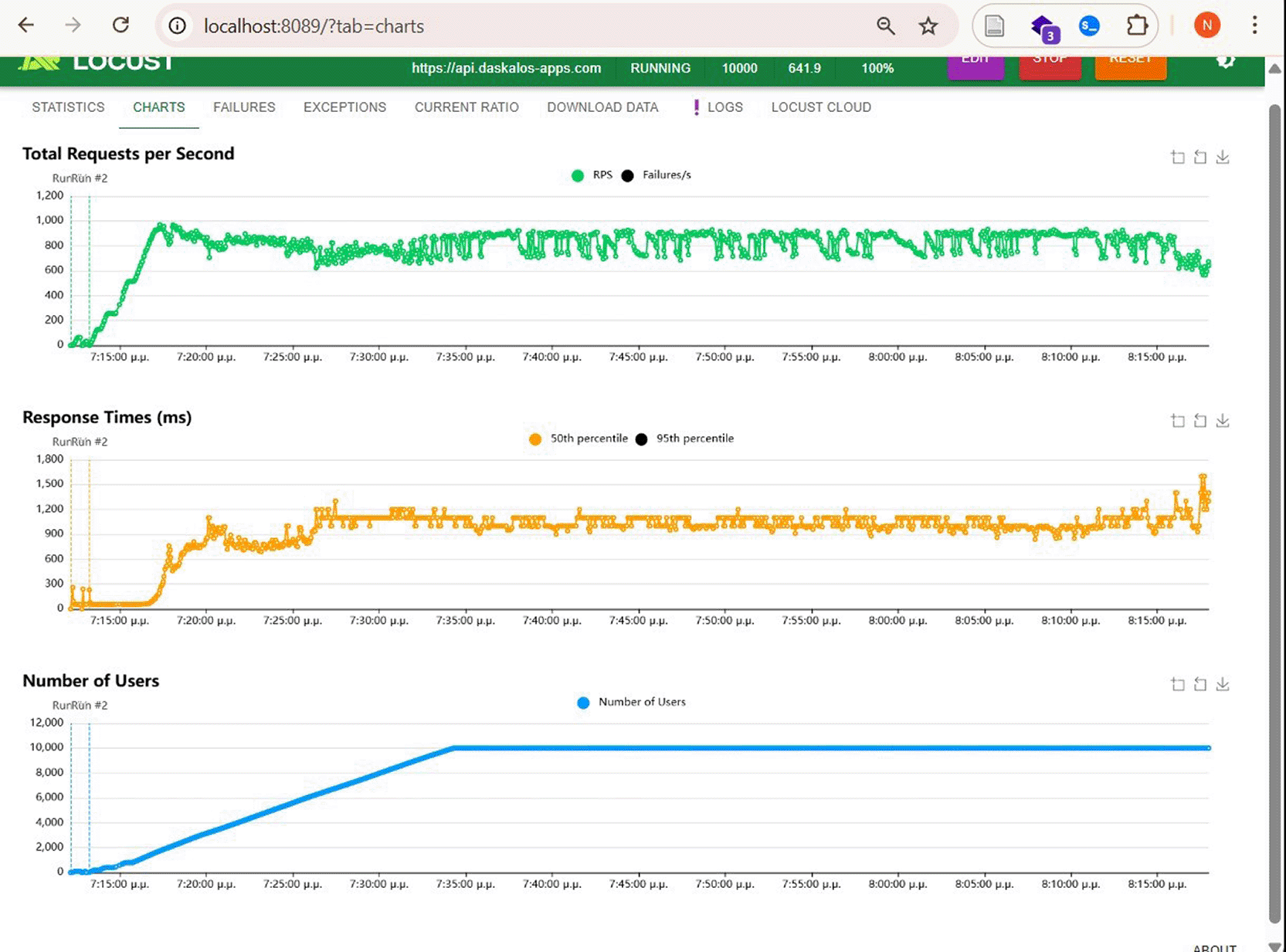
Figure 13. Load testing results for 10,000 concurrent users.