Introduction
The world’s population is ageing, and the pressure on healthcare is increasing. Digital health (eHealth) applications are investigated to not only support people with lifestyle changes following a health condition, but also as supporting tools for preventative lifestyle changes. These applications, however, face adherence challenges1,2, and people need to actively engage with them for the interventions to have an effect. To increase the engagement in eHealth applications, the inclusion of (embodied) conversational agents as a natural human–computer interaction paradigm is a promising field of investigation. These agents can take on the role of virtual health experts or coaches, and allow users to interact with the application in a natural manner, namely through conversations (dialogues). The agents can be one element in a broader application3, or they can be the application’s main component4,5.
Conversational agents have been widely researched and are employed in many domains. They are present in various commercial settings, such as customer service6,7 or the digital entertainment industry, such as non-player characters in video games8. In research, they are incorporated in applications to make those applications more accessible, engaging and effective; for example, as pedagogical agents for children9,10, providing various types of skills training11, and for a wide range of health related applications5,12,13.
Building conversational agents is an interdisciplinary process that requires domain experts, experts on agent technology, and agent designers to work together14,15, especially when building agents for contexts where presenting incorrect domain information might have serious adverse effects, such as the healthcare domain or other mission-critical domains. The tools that are used to author the dialogues and the software libraries used for dialogue management in these conversational agents are therefore an important factor in making the development process as efficient and user friendly as possible, both for technical and non-technical members of a development team14.
While tools and libraries are important in the process of developing conversational agents with high-quality content and many human–computer interaction labs have their own private development tools, we found that there was no open-source dialogue-authoring platform that supported this process, was user friendly and could be used for developing web and mobile applications on an operating system of choice. In this paper, we therefore present the WOOL Dialogue Platform16 for dialogue authoring and execution (see Figure 1), which has been developed over the past three years in the context of the EU Horizon 2020 project Council of Coaches (grant agreement #769553).
Figure 1. The WOOL Dialogue Platform logo.
The aim of the Council of Coaches project was to develop a health-coaching application in which multiple embodied conversational agents support a user with advice on leading a healthy lifestyle5. The WOOL Dialogue Platform was developed to fulfil a need for tools that support the division of tasks in the dialogue development process between domain experts and system developers, that allow novice authors (who were experts on the coaching domains) to write dialogues, and that support functional testing while also allowing for the developed content to be used for a state-of-the-art technical prototype.
The dialogue authoring process
One possible representation for dialogues are dialogue scripts. These scripts can serve multiple uses in agent development: they can be used directly, as design examples, or as training data for more complex dialogue systems. Often applied in applications with a user interface that follows a speech-bubble and reply-button paradigm, scripted dialogues have a simple learning curve and a low entry threshold for first-time authors; especially when supported by intuitive authoring tools. This ensures that domain experts can focus on the quality of the dialogues instead of struggling to write them. Furthermore, scripted dialogues have a set structure and order, which makes dialogues relatively predictable: an important feature if you develop an eHealth application that provides health coaching and you need to ensure that the resulting advice by the coach is always sound.
Authoring scripted dialogues can be an intensive process. A few phases can be distinguished in this process and each of them has its challenges. First, once the general idea for the application is clear (e.g., the coaching domain has been selected and the role of the agent defined), there is a phase in which system designer and domain experts determine the topics for which dialogues should be written. For example, for a physical activity coach this could involve determining the type of feedback that should be given or which health education sessions can be defined. Some of these topics can be repeated over coaching sessions (e.g., feedback on sensor data), while others are less likely to be repeated (e.g., a first introduction). Therefore, one major challenge in dialogue authoring is to make dialogue scripts reusable, as opposed to duplicating (parts of) dialogues. A possible solution could be to divide content into multiple dialogue scripts that refer to each other, instead of creating one large script.
In the second phase, a domain expert writes the dialogues. This requires them to keep an overview of the network of possible statements by the agent and replies by the user. In a dialogue script, each defined statement could have multiple reply options for a user, which in turn might all receive different responses by the agent, etc. This branching is another major challenge in dialogue authoring. Keeping an overview of the network (a directed dialogue graph) can be challenging for authors and could be assisted by dialogue visualisation17. Furthermore, authoring dialogues tends to be an iterative process and in this phase, it could be beneficial for the author to go back and forth between editing and interacting with the dialogue they are writing17.
In the authoring phase it is also important to include elements to tailor the dialogue to the user. Examples are using the user’s first name in a sentence or responding to a user’s personal data. This can be done during the authoring process by the expert or afterwards by a developer. Tailoring dialogues is a challenge that can be addressed by allowing authors to use variables (e.g., $userFirstName) and conditionals (e.g., if-then-else statements) in a dialogue script, that can then be filled in or executed with information stored for a specific user. Storing information following user replies or about which parts of a dialogue have been completed is therefore essential.
Once the domain expert has finished a dialogue, in the third phase, the dialogue is reviewed and tested by the system developers. They will add variables for dialogue management, and possibly other purposes, depending on the authoring experience of the domain expert, and they will embed the dialogue in the intended system. They will also test the dialogue in the actual system to ensure that the flow fits the agent and context. After the dialogue has been successfully integrated in the application, the domain expert is then asked to review it again.
Finally, completed dialogues can be translated to other languages. At the minimum, this involves management of multiple versions of a dialogue’s text (translation management), while keeping the structure the same. Translating sentences to another language, while avoiding, for example, anglicisms (the use of a word or construction from English in another language) is an art. However, localisation in dialogue can be more complicated than that, and sentence-by-sentence translation might not always suffice. For example, dialogue branches in which an agent recommends local events, or discusses a typical local recipe, may not be suitable to “translate”, but must be replaced with completely different localised dialogue branches. Furthermore, there are numerous other translation challenges, for example, formality can differ between languages (e.g., ‘your’ in English can already be translated to either ‘jouw’ or ‘uw’ in Dutch) and the gender of the speaker or addressee can influence the inflection of words (e.g., in Portuguese).
To summarise, major challenges in the authoring process that a dialogue platform should address are to develop reusable dialogues, keeping an overview of branching dialogues, tailoring of dialogues, and translation management.
Related work: dialogue authoring tools
There is a large body of research on the topic of dialogue, conversational agents, and chatbots. Various tools and software platforms have been developed in the past to enable their development. Different tools are suited for different types of applications, authors, and developers. In the following subsections, we briefly discuss platforms that specifically include tools for authoring the dialogues, since we see dialogue authoring by (possibly non-technical) domain experts as an important step in the conversational agent development process. In our overview, we have included commercial, scientific and open source tools (as distinguished by Green et al.18). We will discuss the tools by dividing them into three groups, based on the type of agent that they are intended for and discuss our conclusions for development of the WOOL Dialogue Platform.
Tools for building chatbots
One group of tools that can be distinguished are so-called "chatbot building services". Examples include commercial services such as Amazon’s Lex19, Microsoft’s Azure Bot Service20, Google’s Dialogue Flow21, IBM’s Watson22, (Facebook’s) Wit.ai23, Landbot I.O.24, Botsociety25 and Bot Builder26 or open source chatbot services (e.g., Rasa27 and DialogOS28); to name a few. These services are typically aimed at users who want to build agents that have short interactions with their users, often used in contexts like customer support, question answering or operating smart home appliances. Generally speaking, these services let developers define intents that the user of their application can have (e.g., book a flight), entities that are relevant to those intents (e.g., Amsterdam: as the intended city to travel to) and add actions that can be triggered by those intents (e.g., a search for available plane tickets or a dialogue that asks more questions about the date and time).
While these chatbot tools can be used to build conversational agent systems that respond to the user with short dialogues, these dialogues are typically limited to short dialogues, that are not really aimed to mimic a real human-human dialogue. Furthermore, they are usually not intended for designing interactions with agents that can carry over multiple sessions – an aspect that is essential in the health coaching domain.
Tools for building ECAs
A second group that can be distinguished are scientific platforms or tools aimed at building embodied conversational agents (ECAs) in research settings. These tools are prevalent in the educational domain, where they are used to build intelligent learning systems such as tutoring agents or (3D) simulations.
Tools such as ASPIRE29, CTAT30 and ASAT31, and GIFT authoring tools32 have been developed to generate the rules that form the domain model for knowledge-based intelligent tutoring systems following a domain expert’s input29, but these are not intended for ECA development. CO-AUTHOR14 is a tool which has a conversational interface aimed at building knowledge-based agents. The FAtiMA Authoring Tool33 is a tool that allows agent developers to define dialogue actions and cognitive rules for knowledge-based FAtiMA agents. It also provides a (text-based) simulator to test the resulting interactions and inspect changes in underlying variables. Tools such as NPCEditor34, and Virtual Human Toolkit35 are aimed at building the natural language processing components for agents that can respond to user utterances (question-answering agents), while tools like TuTalk36 are aimed at agents for tutoring conversations using natural language.
Then there are tools intended for authoring serious games, which include functionalities for, for example, building storylines, aspects of the ‘world’ that a user interacts with (e.g., 37) and even serious games with agents, such as virtual humans for tactical questioning38 or believable 3D agents in interactive training applications (e.g., 39,40), that are intended to be easy to use in the development of complex applications. The SceneMaker toolkit41 was designed for rapid prototyping of interactive agents by non-experts, but it was designed for a specific target application. Furthermore, Gaffney et al.17 review three tools (VISIOn, Experience Builder, Captivate 3) for authoring soft skill simulations.
While authoring tools for knowledge-based systems make it possible for domain experts to author content, the underlying representations for the resulting systems and often the dependencies on specific computationally-heavy agent applications make these tools difficult to use for the (rapid) development of prototypes.
Tools for building interactive stories and (narrative) games
A third group of tools, mostly from the open source domain, is used to build interactive stories and (narrative) games, which often feature conversational agents as characters. These tools typically include dialogue flow graph-based editors (e.g., Inklewriter42, Texture Writer43, and StorySpace 344) in which the statements by an agent are represented as a network of connected blocks, or natural language programming languages (Inform 745). TADS 346 and Villanelle (scientific)47 on the other hand are more similar to programming languages.
Articy is a commercial tool aimed at professional game developing teams48. Fungus49 is developed for scripting narrative games in Unity 3D. Other examples include Quest50, Ren’Py51, Genarrator52, Dialogue Designer53, Yarn54 and the Yarn editing tool Yarn Spinner55, and Squiffy56. Many tools within this category have been inspired by Twine57.
Scenejo58,59, Cyranus60, Story Canvas61 and Scribe62 are all scientific tools for building interactive stories with agents, which, as was the case for tutoring agents have knowledge-based representations. Furthermore, a state-of-the-art scientific tool in this group is Mimisbrunnur by Stefnisson et al.63, which uses natural language processing and mixed-initiative exploration (the system providing suggestions to the author) to help the author create an outline for their generative, interactive story. Finally, Novella is a recently published scientific tool that allows for graph-based editing64 of interactive narratives.
In the end, the best candidates for what we needed were found in this category of dialogue tools. These candidates were Yarn54 and the Yarn Spinner tool55, and Twine57, which thus form the basis and inspiration for the WOOL Dialogue Platform. Novella64 would also have been a candidate but was released after our initial search.
Requirements
In our search for suitable dialogue authoring and agent development tools, there were several platforms available in the commercial, scientific and open source communities that ticked many of the boxes on our wish-list. However, there was not one tool or platform that completely suited our needs. Based on our experience with the dialogue authoring process and its major challenges, and our exploration of available tools, we created a set of requirements for our dialogue platform that are listed below.
Non-functional
The authoring tools had to (a) have an intuitive user interface that made dialogue authoring very user-friendly and easy to learn; even for novice authors, (b) include a testing feature that would allow authors to test their dialogue while editing.
Functional
The dialogue language had to support (a) structuring scripted dialogues into several files, which would allow them to be easier to reuse, (b) conversations with multiple conversational agents, (c) a simple way to define basic dialogues, but also (d) powerful features when needed, such as the use of variables, conditionals, input fields, and special actions. The editor had to have a (e) graph-based dialogue flow editing interface, since that would provide a clearer overview of dialogues steps than form-based or text-based interfaces65.
Technical
The platform’s tools should support (a) inclusion of the developed content in all kinds of applications (ranging from mobile apps to tablet applications to desktop applications), (b) dialogue authoring on multiple operating systems, (c) dialogue authoring with an easy editor setup/installation, and similarly, (d) dialogue execution without major requirements for an operating system or installed software. Finally, the platform had to be (e) open source, so that it could benefit from community suggestions and contributions.
Methods
Implementation
Development of the WOOL Dialogue Platform started with a version of the Yarn54 narrative game language.
We made adjustments that suited our context with multiple conversational agents, and added functionality to support various data input fields, which in turn resulted in the development of custom execution libraries and addition of testing functionality to Yarn’s editing tool (Yarn Spinner55). In the end, this process resulted in a language and a set of tools that was significantly different from the original language and tools: The WOOL Dialogue Platform.
Figure 2 shows a typical setup of a WOOL application that has a client-server architecture. The Author uses the WOOL Editor to write a set of scripts that are stored in the WOOL Web Service. The WOOL Core libraries can be used inside the web service to parse (WOOL Parser) and execute (WOOL Executor) these scripts, triggered by a request from a client application. During execution, variables in the scripts are retrieved from and then stored in the WOOL Variable Store. The open source platform provides all these functionalities, and lets developers focus on the creation of the specifics of their next user interfaces (Agent UI).
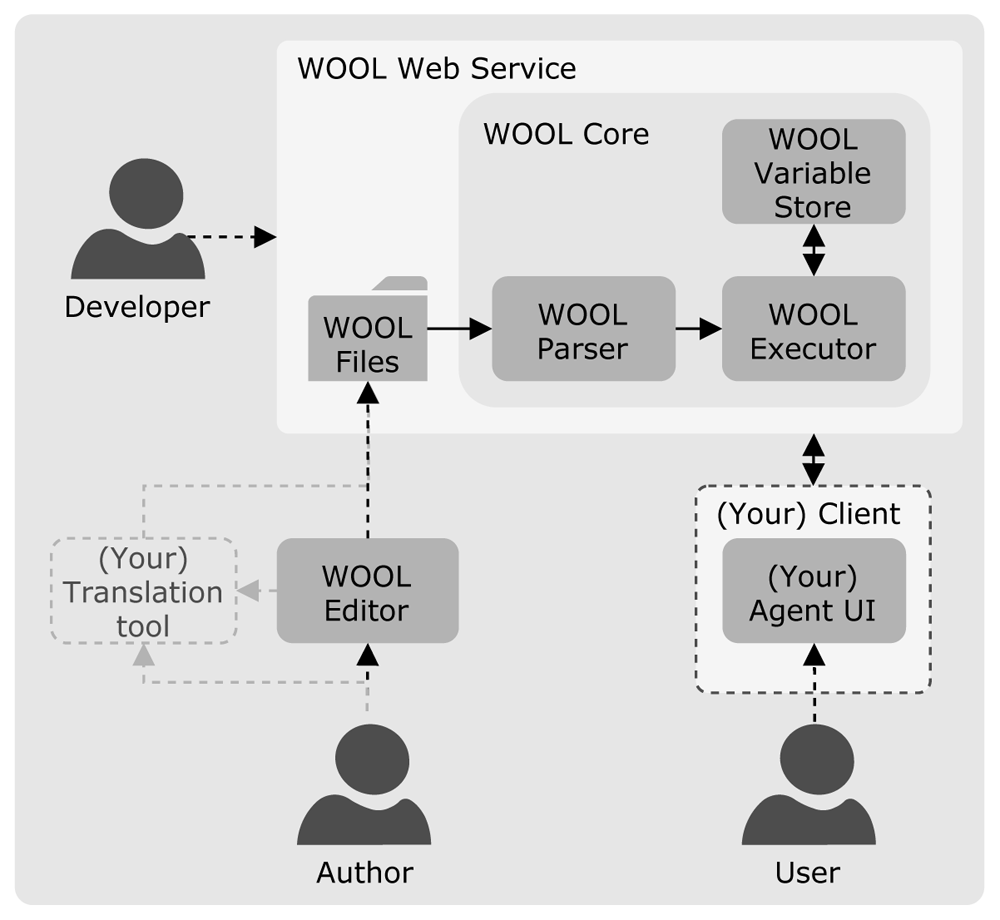
Figure 2. Typical setup of an application using the WOOL Dialogue Platform.
In the following three subsections, we will elaborate on the platform’s three main components: the language, the editor, and the core libraries and web service.
The WOOL dialogue definition language
While detailed language documentation is available on the platform’s website16, and may undergo changes as additional requirements emerge and functionalities are added, in this paper we will describe the basics of the WOOL language, and highlight features that support authors and developers by addressing dialogue authoring challenges and fulfilling our requirements.
The basics. The WOOL dialogue definition language defines, in essence, a series of dialogue steps or nodes. Each of these nodes has a header and a body. Consider, for example, the following example code for a single node:
title:  Start
speaker:  Robin
position:  -416, 112
color:  cyan
–-
Hello, my name is Robin!

[[Nice to meet you Robin!|NodeRobin1]]
[[Goodbye.|End]]
===
The header in this example contains a title and a speaker. The node’s title (‘Start’ in this case) can be used when referring to the next node from a reply, and the speaker indicates the name of the agent that makes the statement (‘Robin’ in this case). The position and color are technically optional, but are used for depiction of the node in the editor. It is also possible to include any number of optional tags in the header.
The body of the example node contains two other key elements for defining a WOOL dialogue, namely a statement and two replies. The statement (“Hello, my name is Robin!") is a basic example of what an agent can say. The replies contain the user’s response options (e.g., “Nice to meet you Robin!") and a reference (node pointer, e.g., ‘NodeRobin1’) to the next node when that reply is chosen.
By linking nodes such as the one in the example, an entire dialogue can be defined, which makes WOOL easy to learn and use for novice authors (especially when they use the editor). However, the language can also be very powerful if needed. Authors have the possibility to add variables, set-statements, input fields, conditionals, and actions, which give them more control of the dialogue flow, means to personalise content, and influence other user interface elements.
The setup of the language in this manner allows for a non-technical expert to write an entire dialogue using the language’s most basic features (perhaps including comments for the developers), and then a developer could add additional elements that make the dialogue more dynamic or tailored. More experienced authors, however, could immediately write more complicated dialogues.
Language features addressing authoring challenges. To support reusablity of dialogue scripts, the reference to a next dialogue step from a reply does not have to refer to a reference to a node in the same dialogue script, but it can also be a reference to a specific node in a different dialogue script. Through this feature and the obligatory use of a ‘Start’ node, authors can keep the size of dialogues they write limited and various dialogue scripts can be chained together as needed. Since this allows authors to limit a dialogue to one topic, they can also have a better overview of that specific dialogue, which helps with branching.
Tailoring within dialogues is supported in the WOOL language through the use of variables, conditionals, set-statements and input fields. Authors can include variables in sentences, which are filled in with stored information about the user on dialogue execution (e.g., Welcome back,$userFirstName!). These variables are also included in conditionals. For example, an agent could advise a user to set a goal of 10000 steps when they are younger than 65, and a goal of 7500 steps when they are older than 65. The text in the editor could then be the following:
«if $userAge >= 65»
A daily step goal of 7500 steps would be
enough!
«else»
How about a daily step goal of 10000 steps?
«endif»
To refer to the user’s personal goal in a future interaction, a set-statement could be included to store that goal (e.g., «set $dailyStepGoal = 7500»). These set-statements can be included in the statement-part of a node, but they can also be attached to specific replies (e.g., to store an answer to an ‘are you satisfied with your current physical activity?’ question).
Storing information can also be done through input fields. These can be included in a reply and allow users to input information. For example, My name is «input type="text" value="$userFirstName"»..
Finally, though not addressing an authoring challenge, actions can be included in dialogues. These can be links to other webpages, triggers to open a widget (e.g., the coach opens a recipe book or shows an activity graph), or any other functionality that the developers implement for the agent application.
The WOOL Editor
The editor is a web-based editor that allows users to write and test dialogues. It can be used in a browser or as a desktop application (using the open source Electron framework66). The desktop version also includes file management features. The editor has two main screens, namely a dialogue overview screen (see Figure 3) and a ‘run dialogue’ screen (see Figure 4).
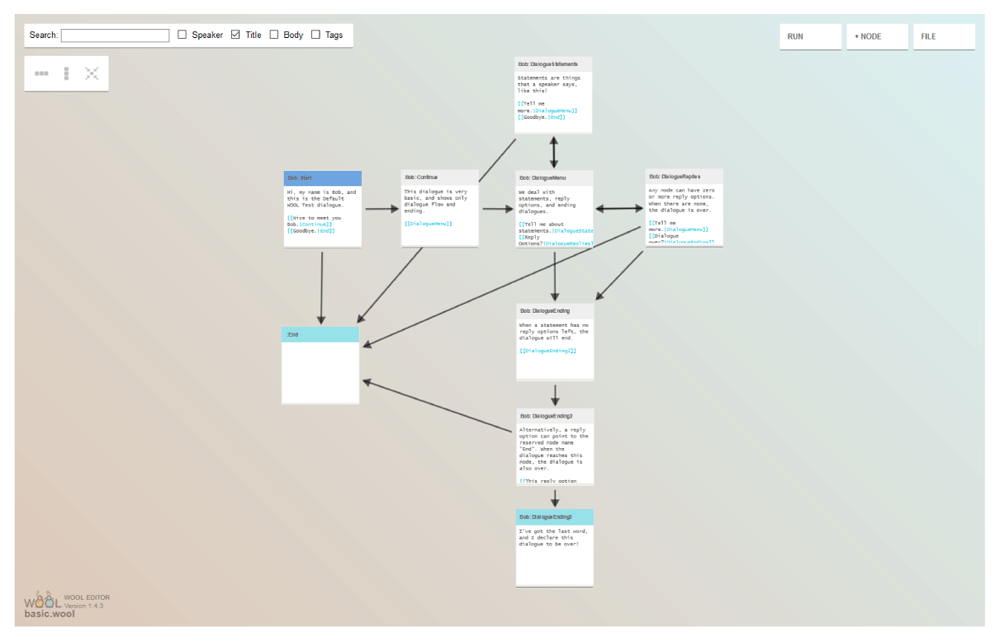
Figure 3. The overview screen in the WOOL Editor.
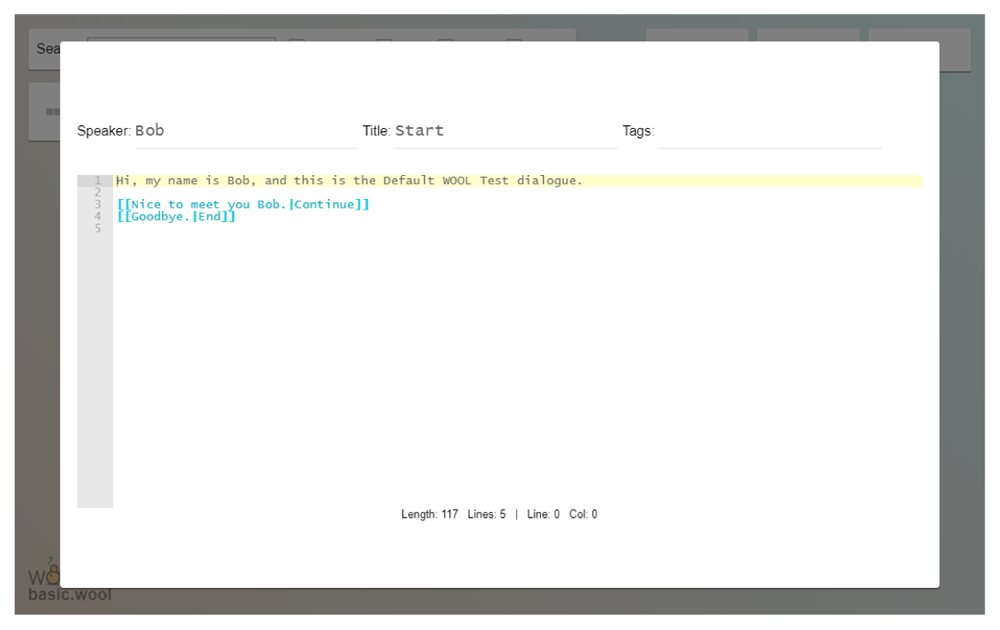
Figure 4. The node editing overlay in the WOOL Editor.
The dialogue overview screen allows users to create new nodes and edit their content. This part of the editor has its origins in the Yarn Spinner tool55. When a node refers to another node (through a node pointer in a reply), the two are connected by an arrow, thus creating a directional graph that provides users with an overview of the structure and the dependencies in their dialogue (which helps with the branching challenge). When a node in the editor is double clicked it opens the node editing overlay, which allows users to edit the node, for example, by adding or changing the agent name, node name, tags and node content in its body (statements, replies, actions, conditionals, etc.).
In the desktop version of the editor, we added file management, to support authors when they create multiple dialogues on multiple topics (to make dialogues reusable). We also added syntax checking, which is performed on the content of nodes. Notifications for syntax errors can be seen both in the node view and in front of the line with the error in the editing overlay.
The second main screen, the ‘run dialogue’ screen, features a randomly generated 2D agent and background (which can be customised) (see Figure 5). This screen allows users to interact with the dialogue to test its functionality (e.g., for node pointers and conditionals) and experience; that is, is the flow of the conversation as intended? If a dialogue contains multiple agents as speakers, these are shown sequentially; that is, each name is assigned a different agent image, which is shown when that agent participates in the dialogue. Authors can open an overview of the variables in their dialogue, to verify that these are updated correctly throughout the dialogue. They can also go to a current node in the editor screen to make a change and then continue testing where they left the dialogue. Additionally, the editor can export a dialogue as a shareable URL that can function as a prototype. The editor allows the user to save their created dialogues as .wool files. When dialogues need to be translated to other languages for multi-lingual applications, the editor also allows to export all the unique sections of text (“terms") that occur in a dialogue to a JSON file. These exported terms can subsequently be imported in popular tools for translation, such as POEditor67, which can be used to generate the translated terms files. The resulting translations can be imported in the editor. The execution libraries for the WOOL Dialogue Platform have built-in support for reading these translation files and combining them with the original source .wool script.
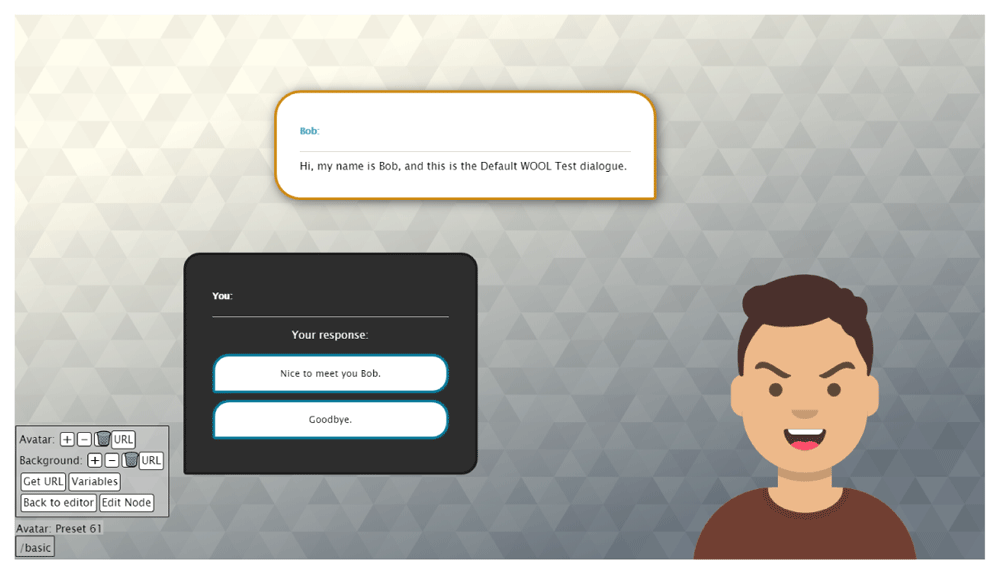
Figure 5. The run and test screen in the WOOL Editor.
The WOOL libraries and Web Service
The third key component of the WOOL Dialogue Platform is a set of Java libraries (the WOOL Core) that conversational agent developers can use to build their own conversational agents. These can be used in both web services and Android apps. The Java libraries provide classes to parse WOOL scripts, store variables and execute the dialogue definitions, for example, by providing methods for starting and progressing a dialogue based on selected replies.
The platform also includes the WOOL Web Service, which is a Java Spring Web Service built around the WOOL Core. It allows developers to build their own web service using a basic service with endpoints for starting and progressing dialogues and basic user management. It also supports the execution of dialogues in multiple languages (if translation files are added). The inclusion of basic authentication/authorisation means that a first version of an application has basic security features when deployed to a webserver. User information and data are stored in files, but developers can exchange this for their database of choice.
Operation
The desktop version of the WOOL Editor requires an installation of NodeJS (>=14). The WOOL Core libraries are intended to be used with developer’s own source code (Java, JDK >= 8). Running the WOOL Web Service requires Java (JDK >=8) and Tomcat (8.5). Setup instructions can be found in the ReadMe files included in the WOOL repository. Language documentation and tutorials can be found in the documentation section of the WOOL website.
Use cases
The main motivation for developing the WOOL Dialogue Platform was to facilitate the creation of conversational agents for both (novice) authors and developers. In this section we present and discuss two use cases for the platform. The first is its use in the EU Horizon 2020 project Council of Coaches (grant agreement #769553) that developed two applications for group conversations with multiple embodied conversational agents. The second is the use of the platform in a smartphone application featuring a single embodied conversational agent built for the EU Horizon 2020 project SmartWork (grant agreement #826343).
The Council of Coaches demonstrators
The Council of Coaches project5 aimed to develop a virtual group of coaches that can support users in their health behaviour change process. The embodied conversational agents each have their own expertise (e.g., physical activity or nutrition) and personality. Using the WOOL Dialogue Platform, a functional demonstrator was developed that allowed for user-testing of the concept and dialogue content, which then in turn could be incorporated in the project’s technical demonstrator (which is computationally heavier and was initially less suited for conceptual user-testing).
In the 2D functional demonstrator, participants see a living room with the agents in their personal council (see Figure 6). They can start the interaction with an agent by clicking on that agent and are then able to have a conversation with that agent following a speech-bubble and reply-buttons paradigm. Server-side, each agent is a separate software agent, with their own set of dialogues (and translation files; since testing was performed in the Netherlands, Scotland, and Denmark). Conversations are tailored to the user using the features of the dialogue scripts (input fields, variables, set-statements and conditionals) and the interface can be influenced by the actions in the scripts (e.g., to show a recipe book that the coach can refer to). Experts on various domains used the editor to write and test dialogues that were then integrated in the system by the system developers. In this case the experts were not programmers (e.g., a psychologist, a movement scientist), but were used to cooperating on technical projects. They were given a short explanation before using the editor and a link to the language documentation; which, in most cases, was sufficient information to let them write and test dialogues on their own. Multiple demonstrators were created (in English, Dutch and Danish), with different types of content, but the final demonstrator contained content for 8 different agents (6 coaches, a peer and an assistant). A total of 160 dialogues were written, which contained 1973 dialogue steps and 4116 unique phrases. All dialogues were available in two languages (English and Dutch)1.
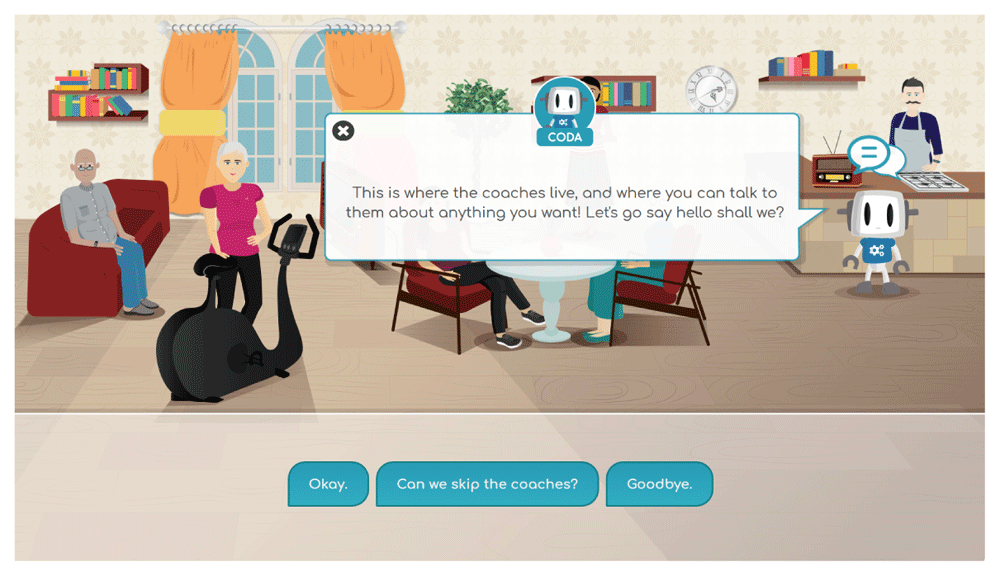
Figure 6. A screenshot of the Council of Coaches functional demonstrator.
The WOOL Dialogue Platform was also included in the technical demonstrator, which aimed to integrate state-of-the-art software such as Flipper68, ASAP69, GRETA70, and the Platform for Argument and Dialogue (which includes DGEP71 and the DUG72) in one multi-agent system2. The WOOL Dialogue Platform’s Web Service fulfils three functions in this system. The first function is that it is used to store and retrieve variables. Second, it provides the system with user management and authentication/authorisation. Its third function is in the use of scripted dialogues. One the one hand, the WOOL editor was used to write dialogues that served as a source for the design of dynamic dialogue games for use in DGEP. On the other hand the WOOL Web Service was used to execute scripted dialogues that are directly used for the statements by the agents and the replies that the user has available (although behaviour instructions for the agents are added onto the executed statements). In this manner, the platform was used as a method for providing both dynamic (indirectly) and static dialogues (directly).
The SmartWork HealthyMe app
In the EU Horizon 2020 research and innovation project Smart-Work, (grant agreement #826343), aimed at coaching office workers on various domains, the platform is used to embed an embodied conversational agent in a smartphone application for the health behaviour change service (HealthyMe, see Figure 7). The agent, that has the role of a lifestyle coach, provides advice on physical activity, sleep, nutrition and well-being. Through dialogues and a wearable activity sensor the agent gathers information about the user and adjusts its advice accordingly.
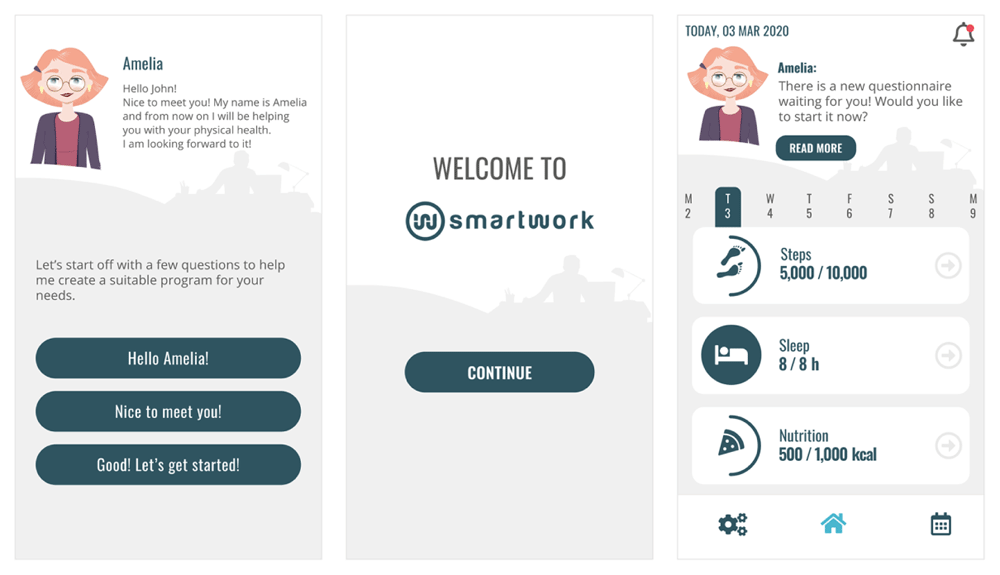
Figure 7. Three screenshots of the SmartWork HealthyMe smartphone application.
In the SmartWork project, the editor is used by several domain experts to write dialogues and test these before they are included in the application. The WOOL Core is integrated in the smart-phone application to allow users of the app to have conversations with the coach. Execution of dialogues takes place fully on the smartphone, which means that the application works without an internet connection.
Other use cases
In addition to the projects mentioned above, early versions of the platform have also been used for the assistive agent in the Android app for the Horizon 2020 project GOAL (aimed at older adults) and for the web-based frailty screening agent in the AAL project FRAIL (aimed at frail older adults).
Furthermore, the platform was used for development of the web application in the ZonMW Create Health project PACO (featuring two embodied conversational agents for dietary behaviour change in older adults; grant number 40-44300-98-110), is used in the AAL project LEAVES (featuring an embodied conversational agent for older adults with prolonged grief due to loss of a spouse; grant number AAL-2019-6-168-CP), and it is being included in the smartphone application for the EU Horizon 2020 project Bionic (grant agreement #826304) (which focuses on lifestyle coaching for blue collar workers).
Overall, the WOOL Dialogue Platform is used by an increasing number of domain experts, developers and agent designers, who are actively contributing to the platform’s usability and functionalities.
Conclusions
In this paper, we have presented the WOOL Dialogue Platform16. Originally developed to fulfil a need within a single project, it now provides the eHealth and conversational agent communities with an open source and easy to use set of tools that can be used in the development of conversational agent systems and the content for these agents. Whether the aim is to use scripted dialogues written by domain experts for the direct (or indirect) execution of dialogues or as a basis for a demonstrator or end product, the WOOL Dialogue Platform allows system experts and domain experts to work together, and allows for early stage user-testing applications to be developed.
With many ongoing projects building on the WOOL Dialogue Platform, the future for WOOL is looking bright. Future developments focus on improving the platform’s usability for nontechnical users, localisation support, and releasing additional application components as open-source assets for application developers.
Data availability
No data are associated with this article.
Software availability
Software and documentation available from: https://www.woolplatform.eu
Source code available from: https://github.com/woolplatform
Archived source code at time of publication: https://doi.org/10.5281/zenodo.5654838
License: MIT License.
Notes
1The Council of Coaches Demonstrator is available on: www.council-of-coaches.eu
2The resulting multi-agent platform has subsequently been released as the Agents United Platform73 through www.agents-united.org.